
CrowdSec reads your logs, recognises attacks (SSH brute force, web scans, exploit attempts) and bans the attacking IP. On its own that’s fail2ban with a nicer CLI. What makes it worth the effort is the central Local API: every server reports what it sees to one place, and every server enforces every ban. An IP that tries SSH passwords on your DNS server is blocked on your web server and your reverse proxy a few seconds later, before it ever reaches them. On top of that, the community blocklist blocks IPs that thousands of other CrowdSec users have already caught.
This guide builds that setup:
- A central Local API (LAPI) in Docker on the management node, with secrets in an
.envfile, metrics for Prometheus and ban notifications to ntfy - A Docker agent that reads Traefik’s access log and container logs through a read-only Docker socket proxy
- AppSec, CrowdSec’s web application firewall, with virtual patching for known CVEs, wired into Traefik’s bouncer plugin
- A Debian web server (nginx) and a Debian BIND server running CrowdSec as agent only, with the nftables firewall bouncer
- A blocklist mirror so the router can block the same IPs at the edge
- Central allowlists, escalating ban times for repeat offenders, monitoring and tests
Written for: CrowdSec v1.8.2 in Docker on the management node, CrowdSec 1.8 from CrowdSec’s Debian repository on Debian 13 “trixie”, Traefik v3.7 with the CrowdSec bouncer plugin. All commands run as root. The Traefik side is described in my Traefik management and remote node guide.
Table of contents
- How CrowdSec works
- Architecture
- Placeholders
- The central Local API in Docker
- Machines and bouncers
- The Traefik agent and the Docker socket proxy
- Traefik integration and AppSec
- Publishing the LAPI to other servers
- Debian web server
- Debian BIND server
- Allowlists
- Ban duration and notifications
- Blocklist mirror for the router
- The community blocklist and privacy
- Monitoring
- Testing
- Day-2 operations
- Troubleshooting
- Checklist
- Cheat sheet
1. How CrowdSec works
CrowdSec splits detection, decision and enforcement into separate parts, which is exactly what makes a central setup possible:
| Part | Job | Runs where |
|---|---|---|
| Agent (log processor) | Reads logs, parses them, runs scenarios, sends alerts | Every server whose logs you want to analyse |
| Local API (LAPI) | Receives alerts, turns them into decisions (bans), stores them, serves them | Once, centrally |
| Bouncer (remediation component) | Pulls decisions and enforces them: firewall drop, HTTP 403, captcha | Everywhere you want to block |
| Central API (CAPI) | CrowdSec’s service: receives your attack signals, sends the community blocklist | Internet, optional |
What the agent runs comes from the hub, as collections: bundles of parsers and scenarios for one piece of software. crowdsecurity/nginx parses nginx logs, crowdsecurity/linux covers sshd and syslog, crowdsecurity/base-http-scenarios detects web scans and brute force.
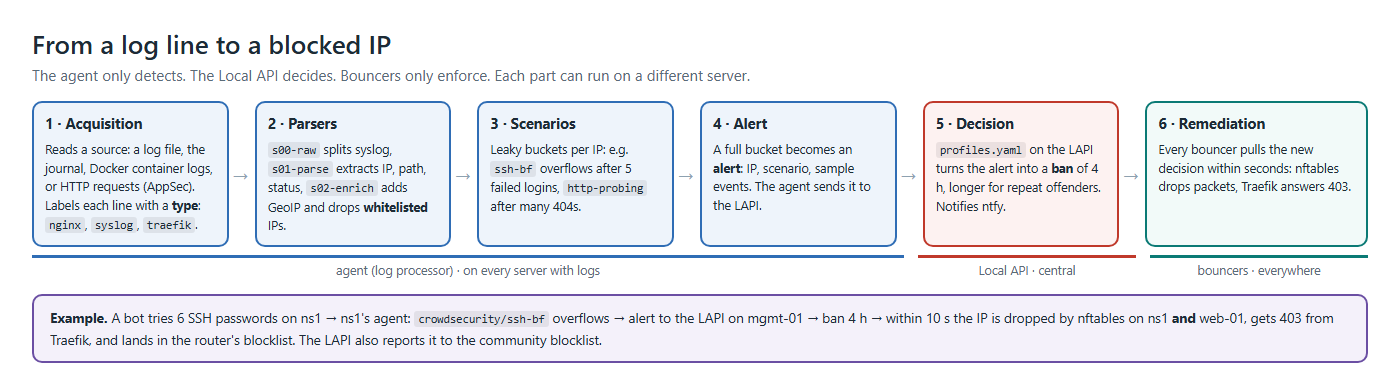
A scenario is a leaky bucket per IP. Each matching event adds to the bucket, which slowly leaks. When it overflows, for example after five failed SSH logins in a short time, the agent sends an alert. The LAPI’s profiles decide what that alert becomes: by default a 4-hour ban of the IP.
2. Architecture
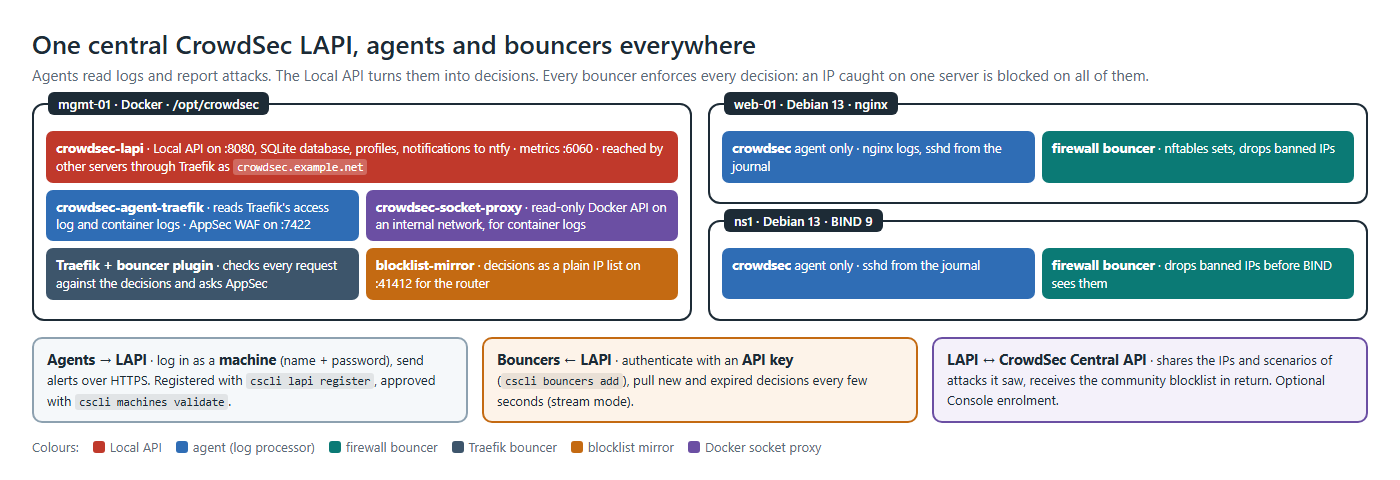
- mgmt-01 runs Docker with Traefik (see the Traefik guide) and the CrowdSec stack under
/opt/crowdsec: the LAPI, an agent for Traefik and container logs, a Docker socket proxy and the blocklist mirror. - web-01 is a Debian nginx server. It runs CrowdSec as an agent that sends its alerts to mgmt-01’s LAPI, and the nftables firewall bouncer.
- ns1 is an authoritative BIND server on the internet, with the same agent and bouncer.
- The router downloads the blocklist from the mirror and drops banned IPs before they reach any server.
The LAPI listens only on the Docker network. The Debian servers reach it through Traefik at https://crowdsec.example.net, with TLS from your internal CA and an IP allow list.
3. Placeholders
| Placeholder | Meaning |
|---|---|
mgmt-01, 192.0.2.10, 2001:db8:10::10 | Docker host with Traefik and the CrowdSec stack |
web-01, 192.0.2.21 | Debian nginx web server |
ns1, 203.0.113.53 | Debian BIND authoritative server, on the internet |
192.0.2.1 | Router that downloads the blocklist |
192.0.2.30 | Prometheus server |
192.0.2.0/24, 2001:db8:10::/64 | Your LAN, never banned |
198.51.100.0/24 | Example: your secondary DNS provider’s servers, never banned |
crowdsec.example.net | Name of the LAPI behind Traefik |
ntfy.example.net | Your ntfy server |
Europe/Amsterdam | Time zone |
4. The central Local API in Docker
4.1 Layout
/opt/crowdsec/
├── docker-compose.yml
├── .env                    # secrets, mode 0600
├── config/                 # LAPI configuration (/etc/crowdsec in the container)
├── data/                   # LAPI database (SQLite) and GeoIP data
├── agent/
│   ├── data/
│   ├── acquis.yaml         # Traefik access log
│   ├── appsec.yaml         # AppSec listener
│   ├── immich.yaml         # Docker container logs
│   └── my-whitelist.yaml   # never-ban list for this agent
└── mirror/
    └── cfg.yaml            # blocklist mirrorCode language: PHP (php)
install -d -m 0750 /opt/crowdsec /opt/crowdsec/config /opt/crowdsec/data
install -d -m 0750 /opt/crowdsec/agent /opt/crowdsec/agent/data /opt/crowdsec/mirror
install -m 0600 /dev/null /opt/crowdsec/.envCode language: JavaScript (javascript)4.2 Secrets
Secrets belong in .env, not in docker-compose.yml. Compose files end up in Git, in backups and in screenshots. Generate them:
cd /opt/crowdsec
cat > .env <<EOF
CS_LAPI_SECRET=$(openssl rand -hex 48)
AGENT_PASSWORD=$(openssl rand -base64 36 | tr -d '/+=')
BOUNCER_KEY_TRAEFIK=$(openssl rand -hex 32)
BOUNCER_KEY_MIRROR=$(openssl rand -hex 32)
EOF
chmod 0600 .envCode language: JavaScript (javascript)| Variable | Used for |
|---|---|
CS_LAPI_SECRET | Signs the tokens the LAPI hands out to agents. A fixed value keeps agents logged in across LAPI restarts. |
AGENT_PASSWORD | Password of the Docker agent’s machine account |
BOUNCER_KEY_TRAEFIK | API key of the Traefik bouncer plugin |
BOUNCER_KEY_MIRROR | API key of the blocklist mirror |
4.3 The Compose file
/opt/crowdsec/docker-compose.yml:
services:
  crowdsec:
    image: ghcr.io/crowdsecurity/crowdsec:v1.8.2
    container_name: crowdsec-lapi
    restart: unless-stopped
    environment:
      CS_LAPI_SECRET: ${CS_LAPI_SECRET}
      DISABLE_AGENT: "true"                            # LAPI only
      BOUNCER_KEY_traefik: ${BOUNCER_KEY_TRAEFIK}      # registers the bouncer at start-up
      BOUNCER_KEY_mirror: ${BOUNCER_KEY_MIRROR}
      TZ: Europe/Amsterdam
    volumes:
      - /opt/crowdsec/config:/etc/crowdsec
      - /opt/crowdsec/data:/var/lib/crowdsec/data
    ports:
      - "192.0.2.10:6060:6060"                         # metrics, LAN address only
      - "[2001:db8:10::10]:6060:6060"
    security_opt:
      - no-new-privileges:true
    networks:
      - traefik
    labels:
      - 'wud.tag.include=^v\d+\.\d+\.\d+$$'
      - 'wud.trigger.include=dockercompose.crowdsec'

  crowdsec-agent:
    image: ghcr.io/crowdsecurity/crowdsec:v1.8.2
    container_name: crowdsec-agent-traefik
    restart: unless-stopped
    environment:
      DISABLE_LOCAL_API: "true"                        # agent only, no LAPI
      LOCAL_API_URL: "http://crowdsec-lapi:8080"       # direct over the Docker network
      AGENT_USERNAME: "mgmt-01-traefik"
      AGENT_PASSWORD: ${AGENT_PASSWORD}
      COLLECTIONS: "crowdsecurity/linux crowdsecurity/traefik crowdsecurity/base-http-scenarios crowdsecurity/http-cve crowdsecurity/appsec-virtual-patching crowdsecurity/appsec-generic-rules gauth-fr/immich"
      TZ: Europe/Amsterdam
    volumes:
      - /opt/crowdsec/agent/data:/var/lib/crowdsec/data
      - /opt/crowdsec/agent/acquis.yaml:/etc/crowdsec/acquis.yaml:ro
      - /opt/crowdsec/agent/my-whitelist.yaml:/etc/crowdsec/parsers/s02-enrich/my-whitelist.yaml:ro
      - /opt/crowdsec/agent/appsec.yaml:/etc/crowdsec/acquis.d/appsec.yaml:ro
      - /opt/crowdsec/agent/immich.yaml:/etc/crowdsec/acquis.d/immich.yaml:ro
      - /opt/traefik/logs:/var/log/traefik:ro          # Traefik access log
    ports:
      - "192.0.2.10:60601:6060"                        # agent metrics
      - "[2001:db8:10::10]:60601:6060"
    security_opt:
      - no-new-privileges:true
    networks:
      - traefik
      - crowdsec-docker
    depends_on:
      - crowdsec
      - crowdsec-socket-proxy
    labels:
      - 'wud.tag.include=^v\d+\.\d+\.\d+$$'
      - 'wud.trigger.include=dockercompose.crowdsec'

  blocklist-mirror:
    image: crowdsecurity/blocklist-mirror:v0.0.6
    container_name: crowdsec-blocklist-mirror
    restart: unless-stopped
    volumes:
      - /opt/crowdsec/mirror/cfg.yaml:/etc/crowdsec/bouncers/crowdsec-blocklist-mirror.yaml:ro
    ports:
      - "192.0.2.10:41412:41412"
    security_opt:
      - no-new-privileges:true
    networks:
      - traefik
    depends_on:
      - crowdsec
    labels:
      - 'wud.tag.include=^v?\d+\.\d+\.\d+$$'
      - 'wud.trigger.include=dockercompose.crowdsec'

  crowdsec-socket-proxy:
    image: tecnativa/docker-socket-proxy:v0.5.0
    container_name: crowdsec-socket-proxy
    restart: unless-stopped
    environment:
      CONTAINERS: 1          # list/inspect containers + read container logs
      EVENTS: 1              # container start/stop events (docker acquisition follows these)
      INFO: 1                # 'docker info', called once at startup
      PING: 1
      VERSION: 1
      POST: 0                # read-only: no create/start/stop/pull
    volumes:
      - /var/run/docker.sock:/var/run/docker.sock:ro
    networks:
      - crowdsec-docker      # only the CrowdSec agent can reach it
    labels:
      - 'wud.tag.include=^v?\d+\.\d+\.\d+$$'
      - 'wud.trigger.include=dockercompose.crowdsec'

networks:
  traefik:
    external: true
  crowdsec-docker:
    internal: trueCode language: PHP (php)
The design decisions:
- LAPI and agent in separate containers. The LAPI is the central service for all servers; the agent is just one of its clients, the one that happens to run on this host. They can be restarted and upgraded separately, and the agent has no access to the LAPI’s database.
- Same image, two roles.
DISABLE_AGENTturns the first container into a pure LAPI,DISABLE_LOCAL_APIturns the second into a pure agent that logs in tocrowdsec-lapias machinemgmt-01-traefik. BOUNCER_KEY_<name>registers a bouncer with a fixed key every time the LAPI starts. Nocscli bouncers addneeded for the containers on this host, and the key survives a rebuild of the LAPI’s data.COLLECTIONSinstalls hub collections at start-up: Linux basics, Traefik, generic HTTP scenarios, HTTP CVE detection, the AppSec rule sets and a community collection for Immich.- The Docker socket proxy. The agent can read container logs (section 6), but it never touches the real Docker socket. The proxy allows only read requests (
POST: 0), only container listing, events and logs, and it sits on theinternalnetworkcrowdsec-docker, which has no route outside the host. The socket gives root on the host; the proxy reduces that to reading logs. - Ports. Only metrics (6060, 60601) and the mirror (41412) are published, and only on the LAN address. Docker publishes ports past the host firewall, so binding to one address is the protection. The LAPI’s own port 8080 isn’t published at all.
- What’s Up Docker.
wud.tag.includelimits updates to release tags;wud.trigger.include=dockercompose.crowdseclets WUD update the tags in this Compose file. Give both CrowdSec containers the trigger, so the LAPI and the agent are upgraded together.
4.4 LAPI settings
Settings that the image’s environment variables don’t cover go into /opt/crowdsec/config/config.yaml.local, which CrowdSec merges over config.yaml. The file survives image upgrades:
db_config:
  use_wal: true
prometheus:
  enabled: true
  level: full
  listen_addr: 0.0.0.0
  listen_port: 6060Code language: CSS (css)
use_wal switches SQLite to write-ahead logging. Without it, many agents and bouncers writing and reading at once cause database is locked errors, and the LAPI logs a warning about it at every start.
4.5 Start
cd /opt/crowdsec
docker compose config --quiet
docker compose up -d crowdsec
docker exec crowdsec-lapi cscli lapi status
docker exec crowdsec-lapi cscli bouncers list         # traefik and mirrorCode language: PHP (php)
The agent and the mirror follow after their configuration in sections 6 and 13.
5. Machines and bouncers
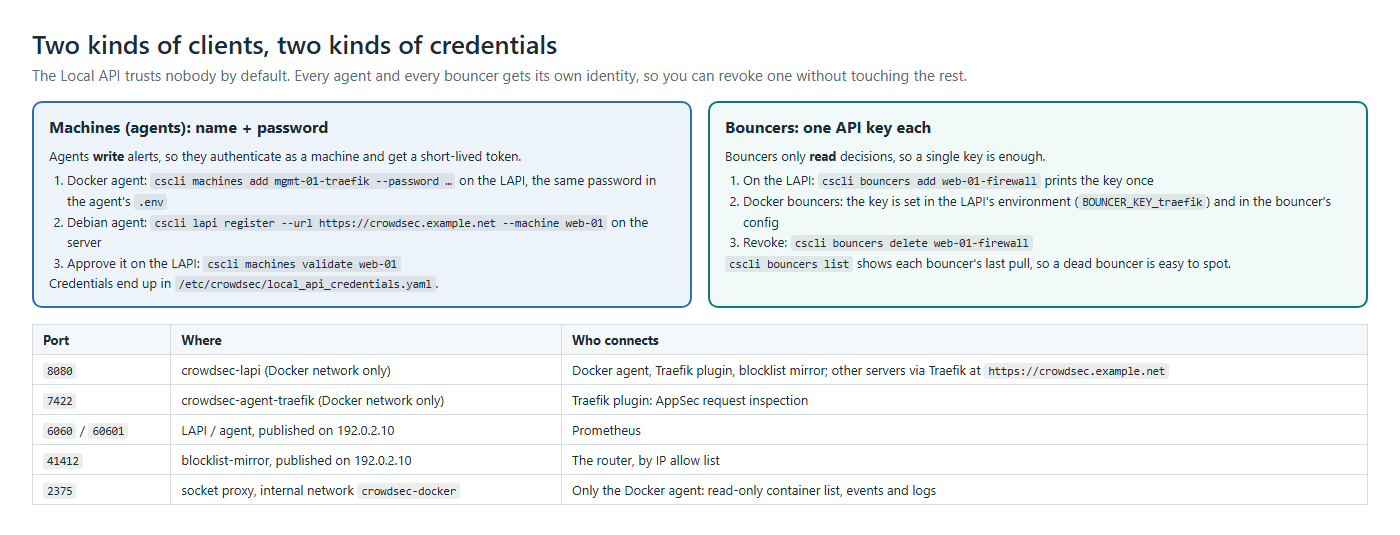
Machines are agents. They send alerts, so they log in with a name and password and receive a token. Bouncers only read decisions and use an API key. Every agent and every bouncer gets its own identity: cscli machines list and cscli bouncers list then show exactly who checked in when, and a compromised server is revoked with one command.
Create the Docker agent’s machine on the LAPI, with the password from .env:
cd /opt/crowdsec
set -a; . ./.env; set +a
docker exec crowdsec-lapi cscli machines add mgmt-01-traefik --password "$AGENT_PASSWORD" -f /dev/null
unset AGENT_PASSWORDCode language: PHP (php)
-f /dev/null stops cscli from writing a credentials file inside the LAPI container; the agent container gets the password from its environment.
6. The Traefik agent and the Docker socket proxy
6.1 Traefik’s access log
/opt/crowdsec/agent/acquis.yaml:
filenames:
  - /var/log/traefik/access.log
labels:
  type: traefikCode language: JavaScript (javascript)
Traefik must write its access log as JSON (see the Traefik guide), and the crowdsecurity/traefik collection parses it. Scenarios from base-http-scenarios and http-cve then catch scanners, path traversal, admin-page brute force and known exploit attempts against every app behind Traefik.
6.2 Container logs
Some apps log their own failed logins, which Traefik can’t see: it only sees HTTP status codes. The agent reads those container logs through the socket proxy. /opt/crowdsec/agent/immich.yaml:
source: docker
docker_host: tcp://crowdsec-socket-proxy:2375
container_name:
  - immich_server
labels:
  type: immichCode language: JavaScript (javascript)
The gauth-fr/immich collection parses Immich’s log and bans IPs after repeated failed logins. Add a file like this for every app that has a hub collection; cscli collections list -a (inside the agent) shows what’s available.
The real client IP. App logs only help if the app logs the client’s address, not Traefik’s. Traefik sets
X-Forwarded-For; configure the app to trust it from thetraefikDocker network.
6.3 Never ban your own networks
/opt/crowdsec/agent/my-whitelist.yaml:
name: crowdsecurity/my-whitelist
description: "Never raise alerts for our own networks"
whitelist:
  reason: "internal networks"
  cidr:
    - 192.0.2.0/24
    - 2001:db8:10::/64Code language: JavaScript (javascript)
This parser whitelist works on the agent: events from these addresses never fill a bucket. Section 11 adds a central allowlist on the LAPI that covers every agent and every source of decisions at once.
cd /opt/crowdsec
docker compose up -d crowdsec-socket-proxy crowdsec-agent
docker exec crowdsec-lapi cscli machines list          # mgmt-01-traefik, validated
docker exec crowdsec-agent-traefik cscli metrics show acquisitionCode language: PHP (php)
The acquisition metrics must show lines read from /var/log/traefik/access.log and from the Immich container. Lines that are read but not parsed usually mean the access log isn’t JSON.
7. Traefik integration and AppSec
7.1 AppSec listener
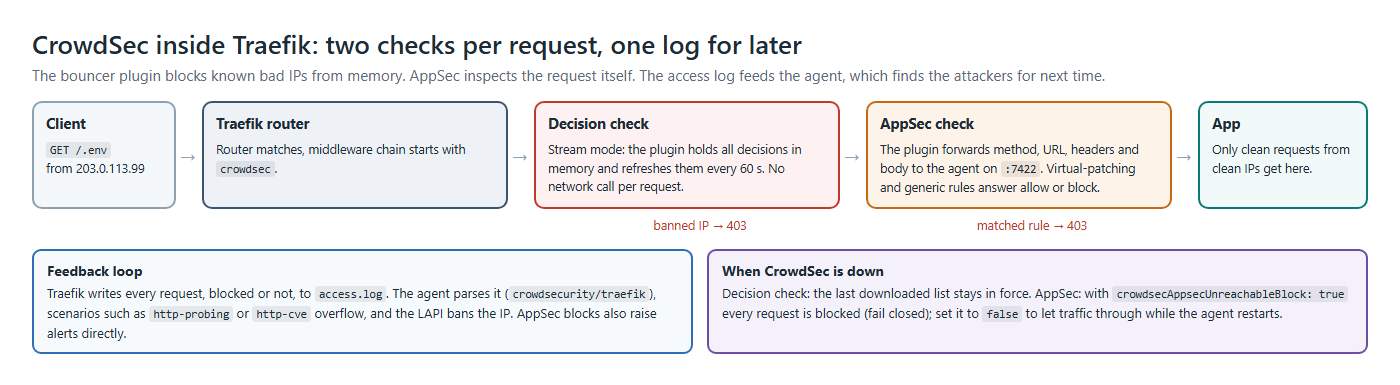
AppSec is CrowdSec’s web application firewall. It runs inside the agent and inspects requests that a bouncer forwards to it. /opt/crowdsec/agent/appsec.yaml:
source: appsec
listen_addr: 0.0.0.0:7422
appsec_configs:
  - crowdsecurity/appsec-default
  - crowdsecurity/generic-rules
labels:
type: appsecCode language: JavaScript (javascript)crowdsecurity/appsec-defaultloads the virtual patching rules fromappsec-virtual-patching: one rule per known, actively exploited CVE (Log4Shell, Confluence, Ivanti, exposed.envand.gitfiles…). They match the exploit request precisely, so false positives are rare.crowdsecurity/generic-rulescomes withappsec-generic-rulesand adds broader checks for common attack patterns.- Port 7422 is only reachable on the
traefikDocker network. Check the config names withcscli appsec-configs listinside the agent.
7.2 The bouncer plugin
The Traefik guide declares the plugin in Traefik’s static configuration. The middleware, in Traefik’s dynamic/infra.yml:
http:
  middlewares:
    crowdsec:
      plugin:
        crowdsec-bouncer:
          enabled: true
          logLevel: INFO
          crowdsecMode: stream
          updateIntervalSeconds: 60
          crowdsecLapiScheme: http
          crowdsecLapiHost: crowdsec-lapi:8080
          crowdsecLapiKey: REPLACE_WITH_BOUNCER_KEY_TRAEFIK
          crowdsecAppsecEnabled: true
          crowdsecAppsecHost: crowdsec-agent-traefik:7422
          crowdsecAppsecFailureBlock: true
          crowdsecAppsecUnreachableBlock: true
          clientTrustedIPs:
            - 192.0.2.0/24
- 2001:db8:10::/64Code language: JavaScript (javascript)| Option | Meaning |
|---|---|
crowdsecMode: stream | Download all decisions every 60 s and check from memory. No request waits for the LAPI, and if the LAPI is down the last list stays active. |
crowdsecLapiKey | The value of BOUNCER_KEY_TRAEFIK from /opt/crowdsec/.env |
crowdsecAppsecEnabled | Send every request to AppSec for inspection |
crowdsecAppsecFailureBlock | Block when AppSec returns an error |
crowdsecAppsecUnreachableBlock | Block when AppSec can’t be reached. Safer, but every app goes down while the agent restarts. Set to false if availability matters more. |
clientTrustedIPs | Never checked, never blocked: your own networks |
The crowdsec middleware is the first step of chain-public in the Traefik guide, so every internet-facing app gets both checks. Look up the option names in the plugin’s README for the version you pin.
8. Publishing the LAPI to other servers
The Debian servers need to reach the LAPI. Rather than publishing port 8080 in plain HTTP, route it through Traefik with a certificate from your internal CA. In Traefik’s dynamic/infra.yml:
http:
  middlewares:
    crowdsec-clients:
      ipAllowList:
        sourceRange:
          - 192.0.2.0/24
          - 203.0.113.53/32

  routers:
    crowdsec-lapi:
      rule: Host(`crowdsec.example.net`)
      middlewares: [crowdsec-clients]
      service: crowdsec-lapi

  services:
    crowdsec-lapi:
      loadBalancer:
        servers:
- url: http://crowdsec-lapi:8080Code language: JavaScript (javascript)- No
crowdsecmiddleware on this route. The servers that report attacks must always be able to reach the LAPI, even if one of them ends up on a blocklist by mistake. - The allow list contains the LAN and ns1’s public address. Nothing else on the internet can talk to the LAPI.
- Add
crowdsec.fullchain.crtto Traefik’scerts.yml, and pointcrowdsec.example.netat mgmt-01 in DNS. ns1 is outside the LAN, so it needs a route to mgmt-01’s port 443, through a port forward or a VPN.
Test from web-01:
curl -s -o /dev/null -w '%{http_code}\n' https://crowdsec.example.net/health # 200Code language: JavaScript (javascript)9. Debian web server
web-01 runs nginx. CrowdSec runs there as an agent only: it analyses nginx and SSH, and sends alerts to the central LAPI. The firewall bouncer enforces all decisions with nftables.
9.1 Install from CrowdSec’s repository
Debian’s own crowdsec package is far older than the 1.8 LAPI. Agents should never be newer than the LAPI, but they also shouldn’t lag many versions behind, so use CrowdSec’s repository. Download its setup script, read it, then run it:
apt install -y curl gnupg
curl -fsSL https://install.crowdsec.net -o /tmp/crowdsec-repo.sh
less /tmp/crowdsec-repo.sh
sh /tmp/crowdsec-repo.sh
apt install -y crowdsec crowdsec-firewall-bouncer-nftablesCode language: JavaScript (javascript)
The package starts a complete local CrowdSec (agent plus LAPI) and installs collections for the software it detects. The next steps turn that into an agent of the central LAPI.
9.2 Agent only, reporting to the central LAPI
Disable the local LAPI and expose metrics on the LAN address, in /etc/crowdsec/config.yaml.local:
api:
  server:
    enable: false
prometheus:
  enabled: true
  level: full
  listen_addr: 192.0.2.21
  listen_port: 6060Code language: CSS (css)
Register with the central LAPI:
cscli lapi register --url https://crowdsec.example.net --machine web-01Code language: JavaScript (javascript)This writes a random password to /etc/crowdsec/local_api_credentials.yaml. The machine is now known to the LAPI but not trusted yet. On mgmt-01, approve it:
docker exec crowdsec-lapi cscli machines list           # web-01: validated = false
docker exec crowdsec-lapi cscli machines validate web-01Code language: PHP (php)
Back on web-01:
systemctl restart crowdsec
cscli lapi status                                       # "You can successfully interact with Local API (LAPI)"Code language: PHP (php)
9.3 Collections and log sources
cscli collections install crowdsecurity/linux crowdsecurity/nginx \
    crowdsecurity/base-http-scenarios crowdsecurity/http-cve
Debian 13 has no /var/log/auth.log by default: SSH logs only to the journal. Tell CrowdSec where to find everything in /etc/crowdsec/acquis.d/web-01.yaml:
filenames:
  - /var/log/nginx/access.log
  - /var/log/nginx/error.log
labels:
  type: nginx
---
source: journalctl
journalctl_filter:
  - "_SYSTEMD_UNIT=ssh.service"
labels:
  type: syslogCode language: JavaScript (javascript)
Remove any acquisition the installer generated for files that don’t exist (/etc/crowdsec/acquis.yaml), then:
systemctl restart crowdsec
cscli metrics show acquisition       # lines read from nginx and the journalCode language: PHP (php)
9.4 The firewall bouncer
Create its key on mgmt-01:
docker exec crowdsec-lapi cscli bouncers add web-01-firewallThe key is shown once. On web-01, set the LAPI and key in /etc/crowdsec/bouncers/crowdsec-firewall-bouncer.yaml (only the lines that change):
mode: nftables
api_url: https://crowdsec.example.net/
api_key: REPLACE_WITH_THE_KEY
update_frequency: 10s
deny_action: DROP
prometheus:
  enabled: true
  listen_addr: 192.0.2.21
  listen_port: 60601Code language: JavaScript (javascript)
chmod 0600 /etc/crowdsec/bouncers/crowdsec-firewall-bouncer.yaml
systemctl enable --now crowdsec-firewall-bouncer
systemctl status crowdsec-firewall-bouncer --no-pager
nft list tables # tables crowdsec and crowdsec6Code language: PHP (php)The bouncer creates its own nftables tables with sets of banned IPv4 and IPv6 addresses (one set per origin: your agents, cscli, the community blocklist) and a chain that drops them. It doesn’t touch your ruleset, and nft list table ip crowdsec shows the current bans.
The internal CA.
api_urluses HTTPS, so web-01 must trust your internal CA: copyinternal-ca.crtto/usr/local/share/ca-certificates/and runupdate-ca-certificates. The agent and the bouncer then verify the LAPI’s certificate.
10. Debian BIND server
ns1 is an authoritative DNS server on the internet. The pattern is the same as web-01, with three differences.
1. What to watch. The interesting log on ns1 is SSH. The hub’s maintained collections cover sshd but not BIND query logs, so the agent’s job on ns1 is mainly to catch SSH attacks and report them to the LAPI. BIND’s own response rate limiting (rate-limit { … } in named.conf.options, see my BIND guide) handles query floods; that’s the right layer for DNS traffic.
cscli collections install crowdsecurity/linux/etc/crowdsec/acquis.d/ns1.yaml:
source: journalctl
journalctl_filter:
  - "_SYSTEMD_UNIT=ssh.service"
labels:
  type: syslogCode language: JavaScript (javascript)
Register, validate on mgmt-01 and set up the bouncer exactly as in sections 9.2 and 9.4, with the names ns1 and ns1-firewall and ns1’s own address for the metrics.
2. What it gains. Even with few local detections, ns1 enforces every decision: IPs caught scanning web-01, attacking Traefik or listed on the community blocklist are dropped by ns1’s firewall before they can probe BIND or SSH. That’s the main reason to run the bouncer on a server like this.
3. What must never be blocked. A wrongly banned secondary DNS server stops zone transfers and NOTIFYs, and your zones go stale on it. Put the secondaries, the monitoring and your own management addresses in the central allowlist (section 11), which the LAPI applies to every decision, including those from the community blocklist.
Never block your resolvers’ customers. Don’t add scenarios that ban by DNS query volume on an authoritative server. Large public resolvers send huge numbers of queries from a few addresses, and banning one makes your zones disappear for millions of users. Rate limiting answers is safer than blocking sources.
11. Allowlists
The parser whitelist in section 6.3 only protects against detections by that one agent. Allowlists on the LAPI apply centrally: no decision is created for an allowlisted IP, whatever agent or blocklist it comes from. On mgmt-01:
docker exec crowdsec-lapi cscli allowlists create infrastructure -d "Never ban our own infrastructure"
docker exec crowdsec-lapi cscli allowlists add infrastructure 192.0.2.0/24 2001:db8:10::/64 -d "LAN"
docker exec crowdsec-lapi cscli allowlists add infrastructure 198.51.100.0/24 -d "Secondary DNS provider"
docker exec crowdsec-lapi cscli allowlists inspect infrastructureCode language: PHP (php)
Keep the parser whitelist as a second layer. It also stops alerts, so your own vulnerability scanner doesn’t flood the alert list.
12. Ban duration and notifications
12.1 Escalating bans
The LAPI’s profiles decide what an alert becomes. Replace /opt/crowdsec/config/profiles.yaml:
name: default_ip_remediation
filters:
  - Alert.Remediation == true && Alert.GetScope() == "Ip"
decisions:
  - type: ban
    duration: 4h
duration_expr: Sprintf('%dh', (GetDecisionsCount(Alert.GetValue()) + 1) * 4)
notifications:
  - http_ntfy
on_success: break
---
name: default_range_remediation
filters:
  - Alert.Remediation == true && Alert.GetScope() == "Range"
decisions:
  - type: ban
    duration: 4h
notifications:
  - http_ntfy
on_success: breakCode language: JavaScript (javascript)
duration_expr makes repeat offenders wait longer: 4 hours the first time, 8 the second, 12 the third, and so on. An IP that comes back after every ban is almost certainly a bot.
12.2 Notifications to ntfy
/opt/crowdsec/config/notifications/http.yaml:
type: http
name: http_ntfy
log_level: info
format: |
  {{range . -}}
  {{$alert := . -}}
  {{range .Decisions -}}
  {{.Value}} banned for {{.Duration}}: {{.Scenario}} (machine {{$alert.MachineID}})
  {{end -}}
  {{end -}}
url: https://ntfy.example.net/crowdsec
method: POST
headers:
  Title: "CrowdSec ban"
  Tags: "shield"
  Authorization: "Bearer REPLACE_WITH_NTFY_TOKEN"Code language: PHP (php)
chmod 0600 /opt/crowdsec/config/notifications/http.yaml
cd /opt/crowdsec && docker compose restart crowdsec
docker exec crowdsec-lapi cscli notifications test http_ntfyWith the community blocklist active you’ll get a message for your own detections only; community decisions don’t trigger notifications. Busy servers still produce many bans: create a dedicated ntfy topic and mute it if it gets noisy.
13. Blocklist mirror for the router
Many routers and firewalls (OPNsense, pfSense, MikroTik and others) can download an IP list from a URL and drop everything on it. The blocklist mirror serves the LAPI’s decisions in that format, so banned IPs are dropped at the edge, before they reach any server.
/opt/crowdsec/mirror/cfg.yaml:
config_version: v1.0
crowdsec_config:
  lapi_key: REPLACE_WITH_BOUNCER_KEY_MIRROR
  lapi_url: http://crowdsec-lapi:8080/
  update_frequency: 10s
  include_scenarios_containing: []
  exclude_scenarios_containing: []
  only_include_decisions_from: []
  insecure_skip_verify: false

blocklists:
  - format: plain_text
    endpoint: /security/blocklist
    authentication:
      type: ip_based
      trusted_ips:
        - 192.0.2.1

listen_uri: 0.0.0.0:41412
tls:
  cert_file:
  key_file:

metrics:
  enabled: true
  endpoint: /metrics

log_media: stdout
log_level: infoCode language: PHP (php)
chmod 0640 /opt/crowdsec/mirror/cfg.yaml
cd /opt/crowdsec && docker compose up -d blocklist-mirror
curl -s http://192.0.2.10:41412/security/blocklist | head # from the router: one IP per lineCode language: JavaScript (javascript)On the router, create an alias or address list of type “URL table” with http://192.0.2.10:41412/security/blocklist, refreshed every few minutes, and a rule that drops inbound traffic from it. Only 192.0.2.1 may download the list: it reveals what you’ve blocked and why.
14. The community blocklist and privacy
By default the LAPI connects to CrowdSec’s Central API. It sends the IP, scenario and time of every attack your agents detect, and receives the community blocklist: IPs that many CrowdSec users have reported recently. It doesn’t send log lines, your IP addresses or anything about legitimate traffic.
docker exec crowdsec-lapi cscli capi status
docker exec crowdsec-lapi cscli decisions list --origin CAPI | headCode language: PHP (php)
For most setups this exchange is worth it: tens of thousands of known attackers are blocked before they’ve touched you once. If your policy forbids sharing any data, remove the online_client section from the LAPI’s configuration; you then lose the community blocklist too.
The Console (app.crowdsec.net) is a separate, optional step: cscli console enroll <key> shows your alerts in CrowdSec’s web interface and lets you subscribe to extra blocklists. It sends more alert detail to CrowdSec. Everything in this guide works without it.
15. Monitoring
Every component exposes Prometheus metrics. My Prometheus runs in Docker under /opt/compose/monitoring. /etc/prometheus/scrape.d/crowdsec.yml:
scrape_configs:
  - job_name: crowdsec
    static_configs:
      - targets: ['192.0.2.10:6060']
        labels: {role: lapi, node: mgmt-01}
      - targets: ['192.0.2.10:60601']
        labels: {role: agent, node: mgmt-01}
      - targets: ['192.0.2.21:6060', '203.0.113.53:6060']
        labels: {role: agent}
      - targets: ['192.0.2.21:60601', '203.0.113.53:60601']
        labels: {role: firewall-bouncer}Code language: CSS (css)
Restrict ports 6060 and 60601 on web-01 and ns1 to Prometheus in their nftables rules. ns1’s metrics travel over the same path as its LAPI connection.
/etc/prometheus/rules/crowdsec.yml:
groups:
  - name: crowdsec
    rules:
      - alert: CrowdSecDown
        expr: up{job="crowdsec"} == 0
        for: 5m
        labels:
          severity: warning
        annotations:
          summary: "CrowdSec {{ $labels.role }} on {{ $labels.instance }} is not answering"Code language: JavaScript (javascript)
cd /opt/compose/monitoring
P="docker run --rm --network none --entrypoint promtool -v /etc/prometheus:/etc/prometheus:ro quay.io/prometheus/prometheus:v3.13.5"
$P check config /etc/prometheus/prometheus.yml && $P check rules /etc/prometheus/rules/crowdsec.yml && docker compose kill -s SIGHUP prometheusCode language: PHP (php)CrowdSec publishes Grafana dashboards for the agent and LAPI metrics in its grafana-dashboards repository on GitHub; import them into Grafana with Prometheus as the data source.
The quickest health check is on the LAPI itself:
docker exec crowdsec-lapi cscli machines list     # every agent: last heartbeat within a minute
docker exec crowdsec-lapi cscli bouncers list     # every bouncer: last pull within a minute
docker exec crowdsec-lapi cscli metrics           # LAPI requests, decisions by originCode language: PHP (php)
An agent or bouncer whose last contact is hours old is silently not protecting its server.
16. Testing
One ban, every bouncer. The test that proves the whole design. Pick a test machine outside the LAN (a VPS, or a phone on mobile data) and note its public IP. On mgmt-01:
docker exec crowdsec-lapi cscli decisions add --ip 198.51.100.99 --duration 10m --reason "test"Code language: CSS (css)Within about 10 seconds (60 for Traefik):
| Where | Check | Expected |
|---|---|---|
| web-01 | nft list table ip crowdsec | grep 198.51.100.99 | Contains the IP; HTTP and SSH from it time out |
| ns1 | Same command; dig @203.0.113.53 example.net from the test machine | Contains the IP; the query times out |
| Traefik | Open any public app from the test machine | 403 Forbidden |
| Router | curl -s http://192.0.2.10:41412/security/blocklist from the router | Contains the IP |
docker exec crowdsec-lapi cscli decisions delete --ip 198.51.100.99Code language: CSS (css)SSH brute force. From the test machine, try six wrong passwords against ns1:
for i in $(seq 6); do ssh -o PreferredAuthentications=password -o NumberOfPasswordPrompts=1 nobody@ns1.example.net; doneCode language: JavaScript (javascript)On mgmt-01, docker exec crowdsec-lapi cscli alerts list shows crowdsecurity/ssh-bf from machine ns1, and the test machine is blocked everywhere.
AppSec. From the test machine:
curl -s -o /dev/null -w '%{http_code}\n' https://ntfy.example.net/.env # 403Code language: JavaScript (javascript)The request matches the virtual-patching rule for exposed .env files and is blocked by AppSec, even though the IP isn’t banned. docker exec crowdsec-agent-traefik cscli metrics show appsec counts it.
Allowlist. Add a test decision for an address inside the allowlist with cscli decisions add. It must never appear in nft list table ip crowdsec on web-01.
Clean up afterwards: cscli decisions delete --ip <test-ip> for every address you tested from.
17. Day-2 operations
Upgrades. Upgrade the LAPI first, then the agents. An agent newer than its LAPI can send data the LAPI doesn’t understand. With the WUD trigger on both containers, the Docker side updates together; on the Debian servers, apt upgrades CrowdSec from its repository. Check cscli version everywhere afterwards.
Hub updates. Parsers and scenarios improve constantly, independently of CrowdSec releases. On the Debian servers, the package sets up a daily hub upgrade; check that it exists (systemctl list-timers or /etc/cron.daily/) and run cscli hub update && cscli hub upgrade by hand if not. For the containers, run it by hand and restart:
docker exec crowdsec-agent-traefik cscli hub update
docker exec crowdsec-agent-traefik cscli hub upgrade
docker restart crowdsec-agent-traefik
Unbanning. cscli decisions delete --ip <ip> on the LAPI. Every bouncer drops the decision at its next pull.
Stale machines. Servers you decommission stay in the machine list. cscli machines delete <name> and cscli bouncers delete <name> remove them; cscli machines prune removes machines that never got validated.
Backups. Back up /opt/crowdsec/config, /opt/crowdsec/data and .env. The database holds active decisions and the machine and bouncer credentials; without it, every server has to register again.
Useful commands on the LAPI:
docker exec crowdsec-lapi cscli alerts list -l 20          # latest detections and which machine saw them
docker exec crowdsec-lapi cscli decisions list             # active bans from your agents
docker exec crowdsec-lapi cscli decisions list --origin CAPI | wc -l   # size of the community blocklist
docker exec crowdsec-lapi cscli alerts inspect -d <id>     # the log lines behind an alertCode language: PHP (php)
18. Troubleshooting
| Symptom | Likely cause and fix |
|---|---|
Debian agent: cscli lapi status fails with a certificate error | The internal CA isn’t installed on the server (update-ca-certificates). |
cscli lapi register works, but the agent can’t log in | The machine isn’t validated yet: cscli machines validate <name> on the LAPI. |
403 from Traefik when an agent registers | The server’s address isn’t in crowdsec-clients. |
| Agent reads lines but parses nothing | Wrong type label, or the log format doesn’t match: Traefik’s log must be JSON, nginx needs the default combined format. cscli explain --file <log> --type <type> shows where parsing stops. |
| No SSH detections on Debian 13 | There’s no auth.log. Use the journalctl source with _SYSTEMD_UNIT=ssh.service. |
Bouncer shows no recent pull in cscli bouncers list | Wrong key, or the bouncer can’t reach crowdsec.example.net. Check journalctl -u crowdsec-firewall-bouncer. |
LAPI logs database is locked | db_config.use_wal: true is missing in config.yaml.local. |
| All apps behind Traefik return 403 or 500 | AppSec unreachable (agent container down) with crowdsecAppsecUnreachableBlock: true. Start the agent, or set the option to false. |
| The agent can’t read container logs | The socket proxy isn’t on crowdsec-docker, or CONTAINERS/EVENTS are off. docker logs crowdsec-socket-proxy shows refused requests. |
| Your own address got banned | cscli decisions delete --ip <ip>, then add the network to the allowlist and the parser whitelist. |
| ntfy receives nothing | cscli notifications test http_ntfy; check the token, and that the profile lists http_ntfy. |
19. Checklist
Central LAPI
- ☐ LAPI and agent in separate containers, images pinned, WUD trigger on both
- ☐ Secrets only in
.env(mode 0600); none indocker-compose.yml - ☐ Port 8080 not published; other servers use
https://crowdsec.example.netwith an IP allow list and nocrowdsecmiddleware - ☐ Metrics and mirror published on the LAN address only
- ☐
use_wal: truefor SQLite - ☐ One machine per agent, one key per bouncer;
cscli machines listandcscli bouncers listall recent - ☐ Central allowlist with the LAN, secondaries and monitoring
- ☐ Escalating ban durations and ntfy notifications in
profiles.yaml
Docker agent and Traefik
- ☐ Traefik access log as JSON, read by the agent
- ☐ Container logs through the read-only socket proxy on an internal network
- ☐ AppSec listening on the Docker network only, with virtual patching and generic rules
- ☐ Traefik bouncer plugin in stream mode with AppSec; LAN in
clientTrustedIPs - ☐ A decision you choose about
crowdsecAppsecUnreachableBlock
Debian servers
- ☐ CrowdSec from CrowdSec’s repository, not newer than the LAPI
- ☐ Local LAPI disabled; registered and validated on the central LAPI
- ☐ SSH read from the journal; nginx logs on web-01
- ☐ nftables firewall bouncer with its own key, config file mode 0600
- ☐ Internal CA installed, so the LAPI’s certificate is verified
- ☐ On ns1: no query-volume bans; BIND rate limiting instead; secondaries allowlisted
Everything
- ☐ Router drops IPs from the blocklist mirror
- ☐ Prometheus scrapes the LAPI, agents and bouncers; down alert loaded
- ☐ The “one ban, every bouncer” test passed
20. Cheat sheet
Every command below runs cscli inside the LAPI container. Save typing with a shell function in root’s .bashrc on mgmt-01:
cs() { docker exec crowdsec-lapi cscli "$@"; }Code language: JavaScript (javascript)The tables use cs for brevity: cs decisions list is docker exec crowdsec-lapi cscli decisions list. On a Debian server, run cscli directly; it talks to the central LAPI with its machine credentials. Flags change between releases: cs <command> --help lists the ones your version has.
20.1 Status and health
| Command | What it shows |
|---|---|
cs version | CrowdSec version of the LAPI |
cs lapi status | Whether the LAPI answers and accepts the credentials |
cs capi status | Connection to CrowdSec’s Central API (community blocklist) |
cs console status | Console enrolment and which data is shared |
cs metrics | Everything: acquisition, parsers, scenarios, LAPI requests, decisions |
cs metrics show lapi | LAPI requests per route and method |
cs metrics show bouncers | What each bouncer pulled and blocked |
cs metrics show decisions | Active decisions by origin and reason |
docker logs crowdsec-lapi --since 30m | The LAPI’s own log |
20.2 Machines (agents)
cs machines add web-02 --password 'REPLACE_WITH_A_LONG_PASSWORD' -f /dev/nullCode language: JavaScript (javascript)| Command | What it does |
|---|---|
cs machines list | All agents, whether they’re validated, their IP and last heartbeat |
cs machines add <name> --password '<pw>' -f /dev/null | Create an agent with a fixed password (Docker agents). -f /dev/null keeps the credentials file out of the LAPI container. |
cs machines add <name> --auto -f - | Create an agent with a generated password and print its credentials file |
cscli lapi register --url https://crowdsec.example.net --machine <name> | On the server: request an account; writes local_api_credentials.yaml |
cs machines validate <name> | Approve a registered agent |
cs machines inspect <name> | Version, OS, collections and last heartbeat of one agent |
cs machines delete <name> | Remove an agent (server decommissioned or compromised) |
cs machines prune | Remove agents that never got validated or have been silent for a long time |
20.3 Bouncers
cs bouncers add web-02-firewallAPI key for 'web-02-firewall':
<the key, shown only once>
Please keep this key since you will not be able to retrieve it!Code language: JavaScript (javascript)| Command | What it does |
|---|---|
cs bouncers list | All bouncers, their IP, type, version and last pull |
cs bouncers add <name> | Create a bouncer and print a new API key, once |
cs bouncers add <name> --key '<key>' | Create a bouncer with a key you chose (for keys kept in a password manager or .env) |
cs bouncers inspect <name> | Details and last activity of one bouncer |
cs bouncers delete <name> | Revoke a bouncer’s key immediately |
cs bouncers prune --duration 168h | Remove bouncers that haven’t pulled for a week |
A key is shown only once. If it’s lost, delete the bouncer and add it again with the same name.
20.4 Decisions: who is blocked
| Command | What it shows or does |
|---|---|
cs decisions list | Active decisions from your own agents and manual bans |
cs decisions list -a | Including the community blocklist and subscribed lists |
cs decisions list --ip <ip> | Is this IP blocked, by what, and for how long? No active decisions means it isn’t |
cs decisions list --range 203.0.113.0/24 | Decisions for an IP or range inside this range |
cs decisions list --origin cscli | Only manual bans. Other origins: crowdsec (your agents), CAPI (community), lists (subscribed blocklists) |
cs decisions list --scenario crowdsecurity/ssh-bf | Only bans from one scenario |
cs decisions list --type ban | Only bans (other types: captcha, if a bouncer supports it) |
cs decisions list --since 1h | Decisions created in the last hour |
cs decisions list -o json | Machine-readable, for scripts and jq |
20.5 Decisions: ban and unban
| Command | What it does |
|---|---|
cs decisions add --ip <ip> --duration 24h --reason "manual: abuse report" | Ban one IP |
cs decisions add --range 203.0.113.0/24 --duration 7d --reason "manual: hostile hoster" | Ban a range |
cs decisions add --ip <ip> --type captcha --duration 1h | Captcha instead of a ban, for bouncers that support it |
cs decisions delete --ip <ip> | Unban an IP: removes every decision for it, from every origin |
cs decisions delete --range <cidr> | Unban a range |
cs decisions delete --id <id> | Remove one specific decision (ID from decisions list) |
cs decisions delete --scenario <scenario> | Remove all bans from a misbehaving scenario |
cs decisions import -i /tmp/ips.txt --format values --duration 24h --reason "imported list" | Ban a list of IPs, one per line. Copy the file into the container first, or pipe it with docker exec -i … -i -. |
Bouncers pick up new and deleted decisions at their next pull: within about 10 seconds for the firewall bouncers, 60 for Traefik.
20.6 Why was an IP banned?
Every decision comes from an alert, and every alert keeps the events that caused it.
cs decisions list --ip 203.0.113.99          # 1. is it blocked, by which scenario, until when
cs alerts list --ip 203.0.113.99             # 2. the alerts: ID, scenario, machine, time
cs alerts inspect -d 1234 # 3. the full story: source, country, AS, the log linesCode language: PHP (php)| Command | What it shows |
|---|---|
cs alerts list | Latest alerts: IP, scenario, which machine saw it, how many events, when |
cs alerts list -l 50 | The last 50 alerts |
cs alerts list --ip <ip> | All alerts for one IP |
cs alerts list --scenario crowdsecurity/http-probing | All alerts from one scenario |
cs alerts list --since 24h | Alerts of the last day |
cs alerts list -m | Include the machine name and more detail |
cs alerts inspect <id> | Summary of one alert and the decision it caused |
cs alerts inspect -d <id> | With the events: the parsed log lines that filled the bucket |
cs alerts delete --ip <ip> | Delete alerts for an IP (for example after testing) |
cs alerts flush --max-items 5000 | Trim the alert history in the database |
20.7 Allowlists
cs allowlists create infrastructure -d "Own infrastructure"
cs allowlists add infrastructure 192.0.2.0/24 2001:db8:10::/64 198.51.100.0/24 -d "LAN and secondary DNS"
cs decisions list --ip 192.0.2.10 # No active decisionsCode language: PHP (php)| Command | What it does |
|---|---|
cs allowlists list | All allowlists |
cs allowlists create <name> -d "<description>" | Create an allowlist |
cs allowlists add <name> <ip-or-cidr> … -d "<why>" | Add addresses; several at once, IPv4 and IPv6 |
cs allowlists add <name> <ip> -e 7d | Add an entry that expires (a contractor, a temporary scanner) |
cs allowlists inspect <name> | List the entries, with descriptions and expiry |
cs allowlists remove <name> <ip-or-cidr> | Remove an entry |
cs allowlists delete <name> | Delete the whole allowlist |
Adding an address to an allowlist doesn’t lift an existing ban: run cs decisions delete --ip <ip> as well.
20.8 Hub: collections, parsers, scenarios
Run these in the container that uses them: crowdsec-agent-traefik for the Docker agent (docker exec crowdsec-agent-traefik cscli …), or directly on a Debian server.
| Command | What it does |
|---|---|
cscli hub update | Download the latest index of the hub |
cscli hub upgrade | Upgrade all installed parsers, scenarios and collections |
cscli hub list | Everything installed, with versions and status |
cscli collections list -a | All available collections, installed or not |
cscli collections install crowdsecurity/nginx | Install a collection, then reload CrowdSec |
cscli collections remove crowdsecurity/nginx | Remove a collection |
cscli scenarios list | Installed scenarios |
cscli scenarios inspect crowdsecurity/ssh-bf | What a scenario detects, its thresholds and its metrics |
cscli parsers list | Installed parsers |
cscli appsec-configs list / cscli appsec-rules list | AppSec configurations and rules |
systemctl reload crowdsec / docker restart crowdsec-agent-traefik | Load hub changes |
20.9 Logs and parsing
| Command | What it does |
|---|---|
cscli metrics show acquisition | Lines read per source, and how many were parsed or unparsed |
cscli metrics show parsers | Hits and misses per parser |
cscli metrics show scenarios | Current and overflowed buckets per scenario |
cscli metrics show appsec-engine appsec-rule | Requests inspected and blocked by AppSec, per rule |
cscli explain --log '<one log line>' --type nginx | Walk one line through every parser and scenario, to see where it stops |
cscli explain --file /var/log/nginx/access.log --type nginx | The same for a whole file |
cscli explain --file <file> --type nginx -v | With every field each parser extracted |
20.10 Notifications and the Console
| Command | What it does |
|---|---|
cs notifications list | Configured notification plugins and whether a profile uses them |
cs notifications inspect http_ntfy | The configuration of one plugin |
cs notifications test http_ntfy | Send a test message |
cs console enroll <key> | Connect the LAPI to the CrowdSec Console |
cs console enable context / cs console disable context | Share or stop sharing alert context with the Console |
20.11 Debian servers: agent and firewall bouncer
| Command | What it does |
|---|---|
cscli lapi status | Can this agent reach and log in to the central LAPI? |
cscli config show | The effective configuration, including the LAPI URL |
systemctl status crowdsec crowdsec-firewall-bouncer | Are both running? |
journalctl -u crowdsec -n 50 | The agent’s log |
journalctl -u crowdsec-firewall-bouncer -n 50 | The bouncer’s log: connection errors, how many IPs it added |
nft list tables | The crowdsec and crowdsec6 tables must exist |
nft list table ip crowdsec | Every IPv4 address the firewall currently drops |
systemctl restart crowdsec-firewall-bouncer | Re-download all decisions |
20.12 Docker stack
| Command | What it does |
|---|---|
docker compose ps | State of the LAPI, the agent, the mirror and the socket proxy |
docker logs crowdsec-agent-traefik --since 30m | Agent log: acquisition, parser and AppSec errors |
docker logs crowdsec-blocklist-mirror --since 30m | Mirror log: LAPI connection, who downloaded the list |
curl -s http://192.0.2.10:41412/security/blocklist | wc -l | Number of IPs in the mirror (from an allowed address) |
docker compose pull && docker compose up -d | Upgrade after changing the tags (LAPI first, then the agent) |