
Traefik is the reverse proxy in front of all my self-hosted apps. One management node takes every HTTPS request, presents the right certificate, runs security checks and forwards the request to the app. Apps on a second host sit behind a remote node that only talks to the management node, over mutual TLS.
This guide builds that setup from scratch, with everything I’d want in a production environment:
- File-based configuration only. No Docker socket in the proxy, so a Traefik bug can’t take over the host.
- Certificates from your own CA in one file, with strict SNI and modern TLS options. Optionally ACME with DNS-01 for public names.
- Middleware chains: a public chain with the CrowdSec bouncer, GeoBlock and rate limiting; an internal chain with an IP allow list and authentik forward auth. Security headers on every response.
- HTTP/3, HTTP to HTTPS redirect, sane timeouts, JSON access logs with log rotation.
- Traefik Manager as a web UI for routes, with backups and a poison-pill restart for static changes, without giving it the Docker socket.
- A remote node that accepts connections only from the management node, authenticated by a client certificate.
- Prometheus metrics, alerts for dead backends and expiring certificates, and a Grafana dashboard.
Written for: Traefik v3.7.19 and Traefik Manager 1.15.7 on Debian 13 “trixie”, with Docker and Docker Compose v2. All commands run as root.
Table of contents
- Architecture
- Placeholders
- How Traefik routes a request
- Directory layout on the management node
- Static configuration
- Docker Compose on the management node
- Certificates
- TLS options
- Middlewares and chains
- Plugins: CrowdSec bouncer and GeoBlock
- Routes and Traefik Manager
- The remote node
- Connecting the management node to the remote node
- Optional: ACME certificates with DNS-01
- Access logs and log rotation
- Monitoring with Prometheus and Grafana
- Firewall
- Testing
- Day-2 operations
- Troubleshooting
- Hardening checklist
1. Architecture
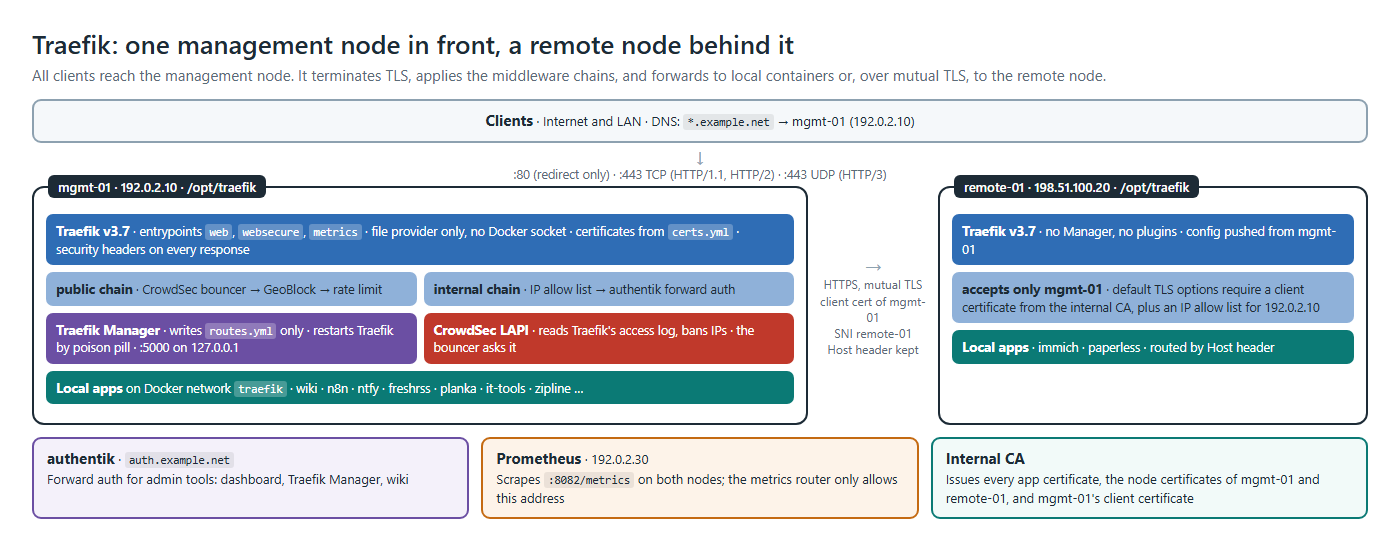
- mgmt-01 is the front door. DNS for every app name points here. It runs Traefik, Traefik Manager, the CrowdSec Local API and the apps that live on this host.
- remote-01 runs its own Traefik for the apps on that host. It has no plugins and no Manager, and it refuses every TLS handshake that doesn’t come with mgmt-01’s client certificate.
- Apps never publish ports. They join the Docker network
traefik, and only Traefik reaches them. - authentik protects admin tools with single sign-on. Prometheus scrapes both Traefik instances.
Why a second Traefik on the remote node instead of pointing mgmt-01 straight at the remote containers? Because the remote apps then don’t need published ports either, the link between the nodes is encrypted and authenticated in both directions, and remote-01 can host as many apps as you like behind one address.
2. Placeholders
| Placeholder | Meaning |
|---|---|
example.net | Your domain. Every app is <app>.example.net. |
mgmt-01.example.net, 192.0.2.10 | Management node |
remote-01.example.net, 198.51.100.20 | Remote node |
192.0.2.0/24, 2001:db8:10::/64 | LAN that may use internal apps |
192.0.2.30 | Prometheus server |
auth.example.net | authentik |
internal-ca.crt | Certificate of your internal CA |
ens18 | Network interface of the remote node |
NL, BE, DE | Countries GeoBlock allows on public apps |
vX.Y.Z | Plugin release tags. Pin them to the current release when you set this up. |
3. How Traefik routes a request
Traefik has two kinds of configuration, and knowing which is which saves a lot of confusion:
- Static configuration (
traefik.yml): what Traefik is. Entrypoints (ports), providers (where dynamic configuration comes from), plugins, metrics, logs. Read once at start-up. A change needs a restart. - Dynamic configuration (the files in
dynamic/): what Traefik does. Routers, middlewares, services, certificates, TLS options. Reloaded within seconds whenever a file changes. No restart, no dropped connections.
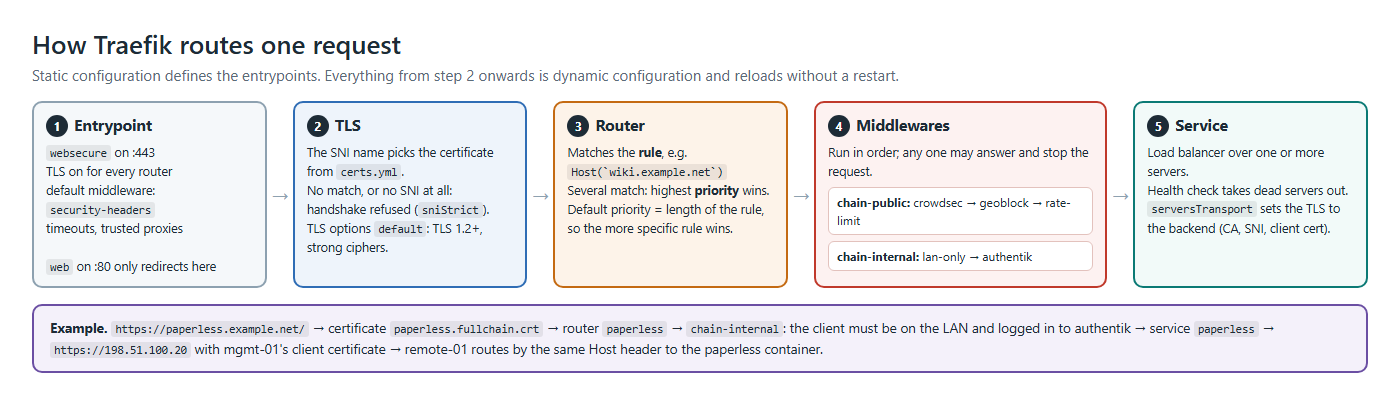
The building blocks:
| Block | Job | Defined in |
|---|---|---|
| Entrypoint | A port Traefik listens on: web (80), websecure (443), metrics (8082) | static |
| Router | Matches a request by its rule, usually Host(...), and connects it to middlewares and a service | dynamic |
| Middleware | Inspects or changes the request on the way through: allow lists, auth, rate limits, headers, redirects | dynamic |
| Service | Where the request goes: one or more servers with load balancing and health checks | dynamic |
| Servers transport | How Traefik talks to the servers: CA to trust, SNI, client certificate, timeouts | dynamic |
When several routers match, the one with the highest priority wins. By default the priority is the length of the rule, so a rule that adds a PathPrefix(...) to a host beats the rule with only the host, without any extra configuration.
Names are scoped by provider: a middleware called lan-only in a file is lan-only@file. Inside the file provider you can leave out the @file. Built-in services such as the dashboard are api@internal and prometheus@internal.
4. Directory layout on the management node
Everything lives under /opt/traefik:
/opt/traefik/
├── docker-compose.yml
├── .env                  # Traefik Manager secrets, mode 0600
├── static/
│   └── traefik.yml       # static configuration
├── dynamic/
│   ├── certs.yml         # certificates and the default certificate
│   ├── infra.yml         # middlewares, TLS options, transports, admin and remote routers
│   └── routes.yml        # app routers and services, written by Traefik Manager
├── certs/                # certificates and keys, mode 0700
├── logs/                 # access.log
├── plugins-storage/      # downloaded plugins
└── manager/
    ├── config/           # Traefik Manager settings
    └── backups/          # a copy of routes.yml on every saveCode language: PHP (php)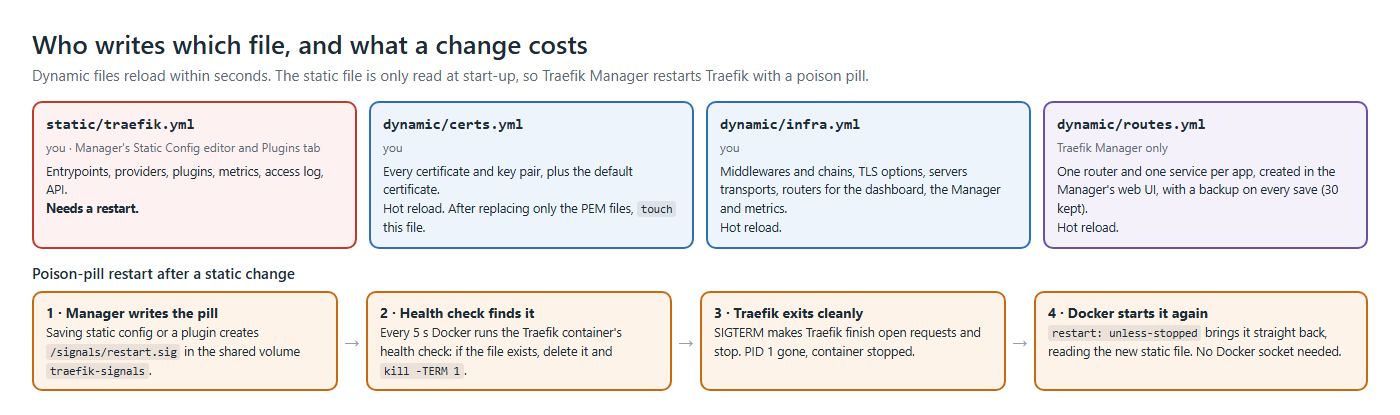
The split is deliberate. Traefik Manager edits only routes.yml. The files that keep you in control (certificates, middlewares, the routers for the dashboard and the Manager itself) are edited by hand, so a mistake in the web UI can never lock you out of the web UI.
Create the layout:
install -d -m 0755 /opt/traefik
cd /opt/traefik
install -d -m 0755 static dynamic logs plugins-storage manager manager/config manager/backups
install -d -m 0700 certs
install -m 0600 /dev/null .envCode language: JavaScript (javascript)
Install the internal CA certificate as certs/internal-ca.crt. Every other file in certs/ comes in section 7.
5. Static configuration
/opt/traefik/static/traefik.yml:
global:
  checkNewVersion: false
  sendAnonymousUsage: false

log:
  level: INFO
  format: json

accessLog:
  filePath: /var/log/traefik/access.log
  format: json
  bufferingSize: 100
  fields:
    defaultMode: keep
    headers:
      defaultMode: drop
      names:
        User-Agent: keep
        Referer: keep
        X-Forwarded-For: keep

api:
  dashboard: true
  insecure: false

entryPoints:
  web:
    address: ":80"
    http:
      redirections:
        entryPoint:
          to: websecure
          scheme: https
          permanent: true

  websecure:
    address: ":443"
    asDefault: true
    http:
      tls: {}
      middlewares:
        - security-headers@file
    http3:
      advertisedPort: 443
    transport:
      respondingTimeouts:
        readTimeout: 600s      # large uploads (photos, documents)
        idleTimeout: 180s

  metrics:
    address: ":8082"

  internal-api:
    address: ":8080"           # not published; Traefik Manager only

providers:
  file:
    directory: /etc/traefik/dynamic
    watch: true

metrics:
  prometheus:
    entryPoint: metrics
    manualRouting: true
    addEntryPointsLabels: true
    addRoutersLabels: true
    addServicesLabels: true

experimental:
  plugins:
    crowdsec-bouncer:
      moduleName: github.com/maxlerebourg/crowdsec-bouncer-traefik-plugin
      version: vX.Y.Z
    geoblock:
      moduleName: github.com/PascalMinder/geoblock
      version: vX.Y.ZCode language: PHP (php)
What each part does:
global: no update checks and no usage statistics sent to Traefik Labs.accessLog: one JSON line per request. All request headers are dropped except the three that help with debugging, so cookies andAuthorizationheaders never end up in a log file. CrowdSec reads this file (section 10).api.dashboard: true,insecure: false: the dashboard exists, but only behind a router you define, with authentication.insecure: truewould open it on port 8080 without any protection.web: port 80 does nothing but redirect to HTTPS with a permanent (308) redirect.websecurehas four settings worth explaining:asDefault: trueattaches every router that doesn’t name an entrypoint to this one, so a new route is never accidentally served on the metrics port.http.tls: {}turns on TLS for every router on this entrypoint, so routes don’t each need atlssection.http.middlewaresrunssecurity-headersin front of every router on the entrypoint. An app you forget to protect still gets HSTS and friends.http3answers HTTP/3 over QUIC on UDP 443 and advertises it to browsers with anAlt-Svcheader.readTimeoutis the time a client has to send the whole request. The v3 default of 60 seconds breaks large uploads over slow links. 600 seconds is a reasonable middle ground for photo and document apps.metricswithmanualRouting: true: metrics are not served automatically. Section 9 adds a router for them, so an IP allow list can protect them.internal-api: Traefik Manager reads Traefik’s API to show the state of routers and services. Withinsecure: falsethe API has no port of its own, so this entrypoint gives it one. It isn’t published, and section 9 limits it to the Manager’s network.providers.file: all dynamic configuration comes from the files indynamic/, watched for changes. There’s no Docker provider and no Docker socket.experimental.plugins: Traefik downloads both plugins at start-up from the plugin catalog (it needs outbound HTTPS toplugins.traefik.iofor that) and keeps them inplugins-storage.
Forwarded headers. Traefik is the first hop here, so it doesn’t trust any
X-Forwarded-Forheader a client sends and sets its own. If you ever put a load balancer or a CDN in front of it, add that device’s addresses underentryPoints.websecure.forwardedHeaders.trustedIPs, or every client will appear to come from the load balancer.
6. Docker Compose on the management node
/opt/traefik/docker-compose.yml:
services:
  traefik:
    image: traefik:v3.7.19
    container_name: traefik
    restart: unless-stopped
    ports:
      - "80:80"
      - "443:443"
      - "443:443/udp"                                 # HTTP/3
      - "192.0.2.10:8082:8082"                        # metrics, LAN address only
    volumes:
      - ./static:/etc/traefik/static:ro               # static config, Traefik only reads
      - ./dynamic:/etc/traefik/dynamic:ro
      - ./certs:/etc/traefik/certs:ro
      - ./logs:/var/log/traefik
      - ./plugins-storage:/plugins-storage            # keep downloaded plugins
      - traefik-signals:/signals                      # poison-pill restart
    command: ["--configFile=/etc/traefik/static/traefik.yml"]
    healthcheck:
      test: ["CMD-SHELL", "[ ! -f /signals/restart.sig ] || (rm /signals/restart.sig && kill -TERM 1)"]
      interval: 5s
      timeout: 3s
      retries: 1
    read_only: true
    tmpfs:
      - /tmp:size=16m
    security_opt:
      - no-new-privileges:true
    cap_drop:
      - ALL
    cap_add:
      - NET_BIND_SERVICE
    logging:
      driver: journald
      options:
        tag: traefik
    networks: [traefik, traefik-api]
    labels:
      - 'wud.tag.include=^v\d+\.\d+\.\d+$'

  traefik-manager:
    image: ghcr.io/chr0nzz/traefik-manager:1.15.7
    container_name: traefik-manager
    restart: unless-stopped
    depends_on: [traefik]
    ports:
      - "127.0.0.1:5000:5000"                         # emergency access via SSH tunnel only
    env_file: .env
    environment:
      - TRAEFIK_API_URL=http://traefik:8080
      - CONFIG_PATHS=/app/dynamic/routes.yml          # manage ONLY routes.yml
      - CERT_RESOLVER=none
      - DOMAINS=example.net
      - COOKIE_SECURE=true
      - ACCESS_LOG_PATH=/app/logs/access.log
      - BACKUP_KEEP_COUNT=30
      - STATIC_CONFIG_PATH=/app/traefik-static/traefik.yml   # NOT /app/static (that's TM's own CSS/JS)
      - RESTART_METHOD=poison-pill
      - SIGNAL_FILE_PATH=/signals/restart.sig
    volumes:
      - ./dynamic:/app/dynamic
      - ./static:/app/traefik-static                  # read-write: Static Config editor + Plugins tab
      - ./manager/config:/app/config
      - ./manager/backups:/app/backups
      - ./logs:/app/logs:ro
      - traefik-signals:/signals
    security_opt:
      - no-new-privileges:true
    networks: [traefik-api]
    labels:
      - 'wud.tag.include=^v\d+\.\d+\.\d+$'

volumes:
  traefik-signals:

networks:
  traefik:
    name: traefik
    enable_ipv6: true
  traefik-api:
    name: traefik-api
    ipam:
      config:
        - subnet: 172.31.255.0/29Code language: PHP (php)
The interesting parts:
- No Docker socket anywhere. Traefik reads files; the Manager writes files. Neither container can start, stop or inspect other containers.
- Read-only static mount for Traefik, read-write for the Manager. Traefik never needs to change its own configuration. The Manager’s Static Config editor and Plugins tab write
traefik.yml. STATIC_CONFIG_PATHpoints to/app/traefik-static./app/staticinside the Manager image holds its own CSS and JavaScript, so mounting your Traefik configuration there would break its web UI.- The poison pill. A static change needs a restart, and restarting a container normally means the Docker socket. Instead, the Manager writes
/signals/restart.siginto a volume both containers share. Traefik’s health check runs every 5 seconds: if the file exists, it deletes it and sends SIGTERM to PID 1, which is Traefik. Traefik shuts down cleanly, the container stops, andrestart: unless-stoppedstarts it again with the new static configuration. When there’s no pill, the test[ ! -f … ]succeeds and the container reports healthy. TRAEFIK_API_URL=http://traefik:8080: the Manager reads routers and services from Traefik’s API on theinternal-apientrypoint to show their status. Port 8080 is not published.- Two networks. Apps join
traefik. The Manager joins onlytraefik-api, a small private network that it shares with Traefik and nothing else. Traefik reaches the Manager’s web UI over it, and the API router in section 9 only answers addresses from its subnet. The API shows your whole configuration, including plugin settings, so no app container should be able to read it. - Emergency access: the Manager listens on 127.0.0.1 only. If Traefik is down, reach it through an SSH tunnel with
ssh -L 5000:127.0.0.1:5000 root@mgmt-01.example.netand openhttp://localhost:5000. Normal access goes through Traefik with SSO (section 11). .envholds the Manager’s own secrets, such as its login. See its README for the variable names, and keep the file at mode 0600.read_only,cap_drop: ALL,no-new-privileges: the Traefik container can write only to its log, plugin and signal volumes and a small/tmp. If it refuses to start after you add these,journalctl CONTAINER_NAME=traefik -n 50names what’s missing.- The
wud.tag.includelabels tell What’s Up Docker to only report proper release tags (v3.7.20), notlatestor release candidates. - The
traefiknetwork is the one every app joins.enable_ipv6: truegives it IPv6; Docker 27 and later pick a unique local prefix automatically, older engines need asubnetunderipam.
Apps in other Compose projects join the same network and publish no ports:
services:
  wiki:
    image: …
    networks: [traefik]

networks:
  traefik:
    external: trueCode language: JavaScript (javascript)
Start it once the dynamic files from sections 7 to 11 exist:
cd /opt/traefik
docker compose config --quiet
docker compose up -d
docker compose ps
journalctl CONTAINER_NAME=traefik -n 30 --no-pager
7. Certificates
Every app gets its own certificate from the internal CA, with the app’s name in the SAN. Store each as a full chain (server certificate first, then any intermediates) next to its key:
certs/
├── internal-ca.crt
├── traefik.fullchain.crt          traefik.key
├── traefik-manager.fullchain.crt  traefik-manager.key
├── wiki.fullchain.crt             wiki.key
├── immich.fullchain.crt           immich.key
├── paperless.fullchain.crt        paperless.key
├── …
├── mgmt-01-client.crt             mgmt-01-client.key      # client certificate, section 13Code language: PHP (php)
Check a new certificate before you install it: the names, the dates, the chain and whether the key belongs to it.
openssl x509 -in wiki.fullchain.crt -noout -subject -ext subjectAltName -enddate
openssl verify -CAfile certs/internal-ca.crt -untrusted wiki.fullchain.crt wiki.fullchain.crt
diff <(openssl x509 -in wiki.fullchain.crt -noout -pubkey) <(openssl pkey -in wiki.key -pubout) && echo "key matches"
install -m 0600 -o root -g root wiki.fullchain.crt wiki.key /opt/traefik/certs/Code language: PHP (php)
/opt/traefik/dynamic/certs.yml lists them all:
tls:
  certificates:
    - certFile: /etc/traefik/certs/traefik.fullchain.crt
      keyFile:  /etc/traefik/certs/traefik.key
    - certFile: /etc/traefik/certs/traefik-manager.fullchain.crt
      keyFile:  /etc/traefik/certs/traefik-manager.key
    - certFile: /etc/traefik/certs/wiki.fullchain.crt
      keyFile:  /etc/traefik/certs/wiki.key
    - certFile: /etc/traefik/certs/immich.fullchain.crt
      keyFile:  /etc/traefik/certs/immich.key
    - certFile: /etc/traefik/certs/paperless.fullchain.crt
      keyFile:  /etc/traefik/certs/paperless.key
    # … one entry per app
  stores:
    default:
      defaultCertificate:
        certFile: /etc/traefik/certs/traefik.fullchain.crt
        keyFile:  /etc/traefik/certs/traefik.keyCode language: PHP (php)
You don’t tell Traefik which certificate belongs to which router. It reads the names out of every certificate and picks the one that matches the name the client asks for (SNI):
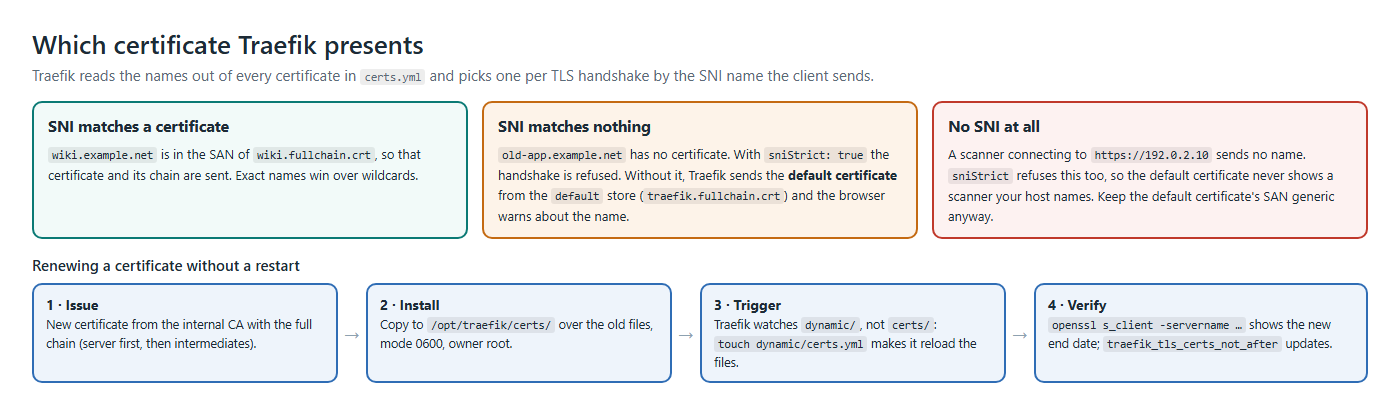
- The default certificate is what Traefik shows when no certificate matches. With
sniStrict(section 8) the handshake is refused in that case instead, but keep a default certificate configured: without one, Traefik generates a self-signedTRAEFIK DEFAULT CERT, which shows up in scanners and confuses people. - Renewing: copy the new files over the old ones, then
touch /opt/traefik/dynamic/certs.yml. Traefik watchesdynamic/, notcerts/, so without thetouchit keeps serving the old certificate until the next restart.
A quick expiry report for all certificates:
for f in /opt/traefik/certs/*.fullchain.crt; do
  printf '%-45s %s\n' "$(basename "$f")" "$(openssl x509 -in "$f" -noout -enddate | cut -d= -f2)"
done
Section 16 adds a Prometheus alert, so you don’t have to remember to run it.
8. TLS options
TLS options control the protocol versions and ciphers. Put them in /opt/traefik/dynamic/infra.yml (sections 8 to 13 all add to this file):
tls:
  options:
    default:
      minVersion: VersionTLS12
      sniStrict: true
      cipherSuites:
        - TLS_ECDHE_ECDSA_WITH_AES_256_GCM_SHA384
        - TLS_ECDHE_RSA_WITH_AES_256_GCM_SHA384
        - TLS_ECDHE_ECDSA_WITH_CHACHA20_POLY1305
        - TLS_ECDHE_RSA_WITH_CHACHA20_POLY1305
        - TLS_ECDHE_ECDSA_WITH_AES_128_GCM_SHA256
        - TLS_ECDHE_RSA_WITH_AES_128_GCM_SHA256
    modern:
minVersion: VersionTLS13Code language: JavaScript (javascript)defaultapplies to every router that doesn’t name other options. TLS 1.2 and 1.3 only, and for TLS 1.2 only forward-secret AEAD ciphers. TLS 1.3 ciphers aren’t configurable and are all strong.sniStrict: truerefuses handshakes without SNI or with a name that has no certificate. Scanners that connect to the bare IP address get nothing, not even a certificate that lists your host names.modernis TLS 1.3 only. Use it on a router withtls: { options: modern }for apps whose clients are all recent.- Curves are left at Go’s defaults, which prefer X25519 and include the post-quantum hybrid key exchange on current builds. Setting
curvePreferencesby hand can turn that off.
9. Middlewares and chains
Middlewares are defined once and reused by name. Add to /opt/traefik/dynamic/infra.yml:
http:
  middlewares:
    # Every response on websecure (attached to the entrypoint in section 5)
    security-headers:
      headers:
        stsSeconds: 31536000
        stsIncludeSubdomains: true
        forceSTSHeader: true
        contentTypeNosniff: true
        customFrameOptionsValue: SAMEORIGIN
        referrerPolicy: strict-origin-when-cross-origin
        permissionsPolicy: "camera=(), microphone=(), geolocation=(), payment=()"
        customResponseHeaders:
          X-Powered-By: ""
          Server: ""

    lan-only:
      ipAllowList:
        sourceRange:
          - 192.0.2.0/24
          - 2001:db8:10::/64

    prometheus-only:
      ipAllowList:
        sourceRange:
          - 192.0.2.30/32

    api-clients:
      ipAllowList:
        sourceRange:
          - 172.31.255.0/29

    rate-limit:
      rateLimit:
        average: 50
        period: 1s
        burst: 100

    authentik:
      forwardAuth:
        address: https://auth.example.net/outpost.goauthentik.io/auth/traefik
        trustForwardHeader: true
        authResponseHeaders:
          - X-authentik-username
          - X-authentik-groups
          - X-authentik-email
          - X-authentik-name
          - X-authentik-uid

    chain-public:
      chain:
        middlewares:
          - crowdsec
          - geoblock
          - rate-limit

    chain-internal:
      chain:
        middlewares:
          - lan-only
          - authentikCode language: PHP (php)
What they do:
security-headers: HSTS for a year (browsers then refuse plain HTTP for your names), no MIME sniffing, framing only by the same site, a strict referrer policy and no access to camera, microphone or location. Empty values remove theX-Powered-ByandServerheaders some apps send.stsPreloadis left off on purpose: the preload list is hard to get off again.lan-only: anything not from the LAN gets403 Forbidden.prometheus-onlyandapi-clients: protect the metrics router and the Manager’s API router (below).rate-limit: 50 requests per second per client IP on average, with bursts up to 100, then429 Too Many Requests. Single-page apps load many files at once, so don’t set this too low. Raise it for apps behind NAT, where many users share one IP.authentik: every request is first sent to authentik. Without a valid session the user is redirected to the login page; with one, authentik answers200and Traefik passes theX-authentik-*headers on to the app, which can use them for its own login. Set up a Proxy provider in forward auth mode in authentik first.trustForwardHeaderis safe here because Traefik itself is the first hop and sets those headers.chain-publicfor apps open to the internet: banned IPs first (cheapest check), then countries, then the rate limit.chain-internalfor admin tools: LAN only, and logged in.
authentik callback route. In forward-auth mode authentik needs to receive requests for
/outpost.goauthentik.io/on each protected host, for example after login. authentik’s Traefik documentation adds a router per app that matches the app’s host plus the path prefix/outpost.goauthentik.io/and points to the authentik outpost. Follow it for the authentik version you run.
The routers for Traefik’s own endpoints also go into infra.yml, under the same http: key:
  routers:
    dashboard:
      rule: Host(`traefik.example.net`)
      service: api@internal
      middlewares: [chain-internal]

    traefik-manager:
      rule: Host(`traefik-manager.example.net`)
      service: traefik-manager
      middlewares: [chain-internal]

    metrics:
      entryPoints: [metrics]
      rule: PathPrefix(`/metrics`)
      service: prometheus@internal
      middlewares: [prometheus-only]

    api:
      entryPoints: [internal-api]
      rule: PathPrefix(`/api`)
      service: api@internal
      middlewares: [api-clients]

  services:
    traefik-manager:
      loadBalancer:
        servers:
          - url: http://traefik-manager:5000Code language: CSS (css)
dashboard and traefik-manager have no entryPoints and land on websecure (asDefault), with TLS and the security headers from the entrypoint. metrics is plain HTTP on port 8082 and only answers Prometheus. api is plain HTTP on the unpublished port 8080 and only answers the traefik-api network.
10. Plugins: CrowdSec bouncer and GeoBlock
Plugins add middlewares that Traefik doesn’t have built in. Both are declared in the static configuration (section 5) and configured as middlewares here. Pin their versions; a plugin runs inside Traefik and sees every request.
Plugins fail closed. If a plugin can’t load (no internet at start-up, a bad version tag), every router that uses it is disabled, so those apps return 404 until it’s fixed. That is the safe failure for a security check. Check the Traefik log after every plugin change.
10.1 CrowdSec bouncer
CrowdSec reads Traefik’s access log, detects scans, brute-force attempts and known bad actors, and keeps a list of banned IPs (decisions) in its Local API. Its community blocklist adds IPs that other CrowdSec users have reported. The bouncer plugin asks the Local API and blocks those IPs before the request reaches any app.
Let CrowdSec read the access log. In its Compose file, mount the log directory and install the Traefik collection:
    volumes:
      - /opt/traefik/logs:/var/log/traefik:ro
    environment:
      - COLLECTIONS=crowdsecurity/traefik
    networks: [traefik]Code language: JavaScript (javascript)
and add an acquisition file for it, /etc/crowdsec/acquis.d/traefik.yaml inside the CrowdSec container’s configuration:
filenames:
  - /var/log/traefik/access.log
labels:
  type: traefikCode language: JavaScript (javascript)
Create a key for the bouncer:
docker exec crowdsec cscli bouncers add traefik-mgmt-01Then the middleware in infra.yml:
    crowdsec:
      plugin:
        crowdsec-bouncer:
          enabled: true
          logLevel: INFO
          crowdsecMode: stream
          updateIntervalSeconds: 60
          crowdsecLapiScheme: http
          crowdsecLapiHost: crowdsec:8080
          crowdsecLapiKey: REPLACE_WITH_BOUNCER_KEY
          clientTrustedIPs:
- 192.0.2.0/24Code language: JavaScript (javascript)streammode downloads the whole decision list every 60 seconds and checks requests against it in memory. No request ever waits for the Local API, and if CrowdSec is down, the last list stays in force.clientTrustedIPsare never checked: your own LAN can’t lock itself out.- The key is a secret:
chmod 600 /opt/traefik/dynamic/infra.yml.
10.2 GeoBlock
GeoBlock allows or denies requests by the client’s country. For apps that only you and your family use, allowing a handful of countries removes most of the internet’s background noise.
    geoblock:
      plugin:
        geoblock:
          allowLocalRequests: true
          logLocalRequests: false
          logAllowedRequests: false
          logApiRequests: false
          api: "https://get.geojs.io/v1/ip/country/{ip}"
          apiTimeoutMs: 750
          cacheSize: 15
          forceMonthlyUpdate: true
          allowUnknownCountries: false
          unknownCountryApiResponse: "nil"
          blackListMode: false
          addCountryHeader: true
          countries:
            - NL
            - BE
            - DECode language: JavaScript (javascript)
blackListMode: falsemakescountriesan allow list: everything else gets403. Set it totrueto block only the listed countries instead.allowLocalRequests: truelets private addresses (your LAN) through without a lookup.allowUnknownCountries: falseblocks addresses the API can’t place.- Privacy: this plugin looks up each new client IP with an HTTP API (geojs.io by default) and caches the answer. Your visitors’ IPs are therefore sent to that API. If that’s not acceptable, point
apiat a self-hosted lookup service that answers in the same format, or use a GeoBlock plugin that reads a local GeoIP database. - Look up the option names in the plugin’s README for the version you pin; plugins change faster than Traefik.
Countries are a coarse filter. VPNs and cloud servers make any country look local, so GeoBlock complements CrowdSec and authentication; it doesn’t replace them.
11. Routes and Traefik Manager
App routes live in routes.yml. You create them in Traefik Manager’s web UI at https://traefik-manager.example.net: host name, backend URL, middlewares. Every save writes the file and keeps a backup in manager/backups/ (the last 30). Traefik reloads it within seconds.
What the Manager writes looks like this:
http:
  routers:
    wiki:
      rule: Host(`wiki.example.net`)
      entryPoints: [websecure]
      middlewares: [chain-internal@file]
      service: wiki
      tls: {}

    ntfy:
      rule: Host(`ntfy.example.net`)
      entryPoints: [websecure]
      middlewares: [chain-public@file]
      service: ntfy
      tls: {}

  services:
    wiki:
      loadBalancer:
        servers:
          - url: http://wiki:3000
        healthCheck:
          path: /
          interval: 30s
          timeout: 5s

    ntfy:
      loadBalancer:
        servers:
- url: http://ntfy:80Code language: PHP (php)- The backend URL uses the container name on the
traefiknetwork. Docker’s DNS resolves it, and the traffic never leaves the host. - Plain HTTP to the container is fine on the same host. For a backend on another host, use HTTPS and a servers transport (section 13).
- The health check takes a dead backend out of the load balancer and shows it as down in the dashboard and in the metrics (section 16).
CERT_RESOLVER=nonein the Compose file tells the Manager not to add an ACME resolver to new routes, because the certificates come fromcerts.yml.
Adding an app is three steps: the container joins the traefik network, its certificate goes into certs/ and certs.yml, and you create the route in the Manager.
The Manager also has a Static Config editor and a Plugins tab. Both write traefik.yml and then restart Traefik with the poison pill, so expect a few seconds of downtime on every save there.
12. The remote node
remote-01 runs Traefik for its own apps with the same layout under /opt/traefik, minus the Manager and plugins.
12.1 Static configuration
/opt/traefik/static/traefik.yml on remote-01:
global:
  checkNewVersion: false
  sendAnonymousUsage: false

log:
  level: INFO
  format: json

accessLog:
  filePath: /var/log/traefik/access.log
  format: json
  fields:
    headers:
      defaultMode: drop

api:
  dashboard: true
  insecure: false

ping:
  entryPoint: metrics

entryPoints:
  websecure:
    address: ":443"
    asDefault: true
    http:
      tls: {}
      middlewares:
        - only-mgmt@file
    forwardedHeaders:
      trustedIPs:
        - 192.0.2.10
    transport:
      respondingTimeouts:
        readTimeout: 600s

  metrics:
    address: ":8082"

providers:
  file:
    directory: /etc/traefik/dynamic
    watch: true

metrics:
  prometheus:
    entryPoint: metrics
    manualRouting: true
    addRoutersLabels: true
    addServicesLabels: trueCode language: JavaScript (javascript)
Differences from mgmt-01:
- No port 80 and no HTTP/3. Only mgmt-01 talks to this node, over HTTPS.
only-mgmton the entrypoint rejects every source address except mgmt-01.forwardedHeaders.trustedIPstrusts theX-Forwarded-Forheader from mgmt-01 only, so the apps here log the real client address instead of mgmt-01’s.pingon the metrics entrypoint gives mgmt-01 a cheap health check (/ping).
12.2 Dynamic configuration
/opt/traefik/dynamic/certs.yml on remote-01 holds the node’s own certificate (SAN remote-01.example.net) and the client authentication:
tls:
  certificates:
    - certFile: /etc/traefik/certs/remote-01.fullchain.crt
      keyFile:  /etc/traefik/certs/remote-01.key
  stores:
    default:
      defaultCertificate:
        certFile: /etc/traefik/certs/remote-01.fullchain.crt
        keyFile:  /etc/traefik/certs/remote-01.key
  options:
    default:
      minVersion: VersionTLS13
      sniStrict: true
      clientAuth:
        caFiles:
          - /etc/traefik/certs/internal-ca.crt
        clientAuthType: RequireAndVerifyClientCertCode language: JavaScript (javascript)
/opt/traefik/dynamic/routes.yml on remote-01:
http:
  middlewares:
    only-mgmt:
      ipAllowList:
        sourceRange:
          - 192.0.2.10/32

    prometheus-only:
      ipAllowList:
        sourceRange:
          - 192.0.2.30/32

  routers:
    immich:
      rule: Host(`immich.example.net`)
      service: immich

    paperless:
      rule: Host(`paperless.example.net`)
      service: paperless

    dashboard:
      rule: Host(`traefik-remote-01.example.net`)
      service: api@internal

    metrics:
      entryPoints: [metrics]
      rule: PathPrefix(`/metrics`)
      service: prometheus@internal
      middlewares: [prometheus-only]

  services:
    immich:
      loadBalancer:
        servers:
          - url: http://immich-server:2283

    paperless:
      loadBalancer:
        servers:
          - url: http://paperless-webserver:8000Code language: JavaScript (javascript)
The routers match the same host names the clients use. remote-01 needs no certificate for them: the client’s TLS session ends on mgmt-01, and remote-01 only ever sees mgmt-01’s TLS session, which uses the node name.
12.3 Docker Compose on remote-01
services:
  traefik:
    image: traefik:v3.7.19
    container_name: traefik
    restart: unless-stopped
    ports:
      - "198.51.100.20:443:443"
      - "198.51.100.20:8082:8082"
    volumes:
      - ./static:/etc/traefik/static:ro
      - ./dynamic:/etc/traefik/dynamic:ro
      - ./certs:/etc/traefik/certs:ro
      - ./logs:/var/log/traefik
    command: ["--configFile=/etc/traefik/static/traefik.yml"]
    read_only: true
    security_opt:
      - no-new-privileges:true
    cap_drop:
      - ALL
    cap_add:
      - NET_BIND_SERVICE
    logging:
      driver: journald
      options:
        tag: traefik
    networks: [traefik]
    labels:
      - 'wud.tag.include=^v\d+\.\d+\.\d+$'

networks:
  traefik:
    name: traefik
    enable_ipv6: trueCode language: JavaScript (javascript)
12.4 Managing remote-01 from mgmt-01
Keep remote-01’s dynamic files on mgmt-01 (ideally in Git) under /opt/traefik/remote/remote-01/dynamic/, and push them with a small script, /usr/local/sbin/traefik-push-remote-01:
#!/bin/sh
# Push remote-01's dynamic configuration and show any errors after the reload.
set -eu
REMOTE=root@remote-01.example.net

rsync -a --delete --chmod=F600 \
    /opt/traefik/remote/remote-01/dynamic/ "$REMOTE:/opt/traefik/dynamic/"
sleep 3
ssh "$REMOTE" "journalctl CONTAINER_NAME=traefik --since '-15s' --no-pager | grep -i '\"level\":\"error\"' || echo 'reload OK'"Code language: PHP (php)
chmod 0750 /usr/local/sbin/traefik-push-remote-01Static changes on remote-01 are rare. Make them on the node itself and restart with docker compose restart traefik.
13. Connecting the management node to the remote node
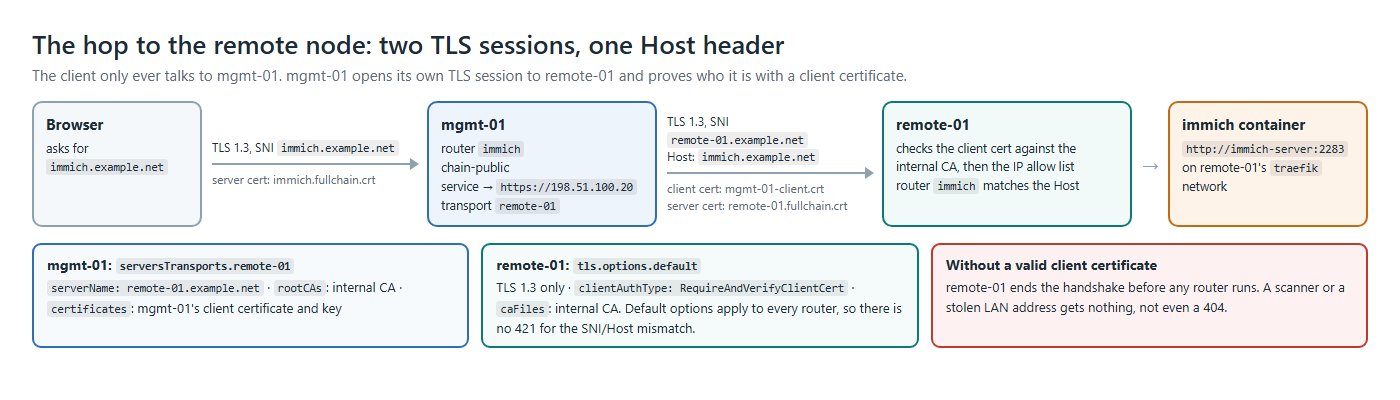
mgmt-01 needs a client certificate from the internal CA, with Extended Key Usage clientAuth (a server certificate without that EKU is rejected). Install it as certs/mgmt-01-client.crt and certs/mgmt-01-client.key on mgmt-01.
Then the servers transport, one shared service and the routers for remote-01’s apps, in infra.yml on mgmt-01:
http:
  serversTransports:
    remote-01:
      serverName: remote-01.example.net
      rootCAs:
        - /etc/traefik/certs/internal-ca.crt
      certificates:
        - certFile: /etc/traefik/certs/mgmt-01-client.crt
          keyFile:  /etc/traefik/certs/mgmt-01-client.key

  routers:
    immich:
      rule: Host(`immich.example.net`)
      middlewares: [chain-public]
      service: remote-01

    paperless:
      rule: Host(`paperless.example.net`)
      middlewares: [chain-internal]
      service: remote-01

    traefik-remote-01:
      rule: Host(`traefik-remote-01.example.net`)
      middlewares: [chain-internal]
      service: remote-01

  services:
    remote-01:
      loadBalancer:
        serversTransport: remote-01
        passHostHeader: true
        servers:
          - url: https://198.51.100.20
        healthCheck:
          scheme: http
          port: 8082
          path: /ping
          interval: 15s
          timeout: 3sCode language: PHP (php)
(Merge these keys into the http:, routers: and services: sections that already exist in infra.yml; a YAML file can’t have the same key twice.)
How it fits together:
- One service for all apps on remote-01.
passHostHeader: truesends the originalHostheader, and remote-01’s routers pick the app by that header. A new app on remote-01 needs a router on each node, but no new service. serverNameis the name mgmt-01 sends as SNI and expects in remote-01’s certificate. It differs from theHostheader on purpose. This normally triggers Traefik’s protection against domain fronting (421 Misdirected Request), but that only fires when the router for the Host uses different TLS options than the one for the SNI. On remote-01 every router usesdefault, so there’s no conflict.rootCAsmakes mgmt-01 verify remote-01’s certificate against the internal CA. Never useinsecureSkipVerify.certificatesis the client certificate mgmt-01 presents. remote-01’sRequireAndVerifyClientCertends the handshake without it.- The health check uses remote-01’s
/pingon the metrics port, so it tests the remote Traefik without depending on any single app. If remote-01 is down, its apps show as down in mgmt-01’s dashboard and metrics. - Certificates for the remote apps (immich, paperless) live on mgmt-01, because that’s where the client’s TLS session ends.
Both apps’ DNS names point to mgmt-01, like every other app.
14. Optional: ACME certificates with DNS-01
For names that browsers outside your network must trust, let Traefik get Let’s Encrypt certificates itself. The DNS-01 challenge works without opening port 80 and can issue wildcards. This example uses RFC 2136 dynamic updates against your own BIND primary (see my BIND authoritative DNS guide for the TSIG key and the update-policy).
Add to the static configuration:
certificatesResolvers:
  le-dns:
    acme:
      email: hostmaster@example.net
      storage: /etc/traefik/acme/acme.json
      caServer: https://acme-staging-v02.api.letsencrypt.org/directory   # remove after a successful test
      dnsChallenge:
        provider: rfc2136
        resolvers:
          - "9.9.9.9:53"Code language: CSS (css)
Add to the Traefik service in Compose:
    environment:
      - RFC2136_NAMESERVER=192.0.2.5:53
      - RFC2136_TSIG_ALGORITHM=hmac-sha256.
      - RFC2136_TSIG_KEY=traefik-acme.
      - RFC2136_TSIG_SECRET_FILE=/etc/traefik/certs/tsig-traefik-acme.secret
    volumes:
      - ./acme:/etc/traefik/acmeCode language: JavaScript (javascript)
install -d -m 0700 /opt/traefik/acmeA router then asks for a certificate instead of relying on certs.yml:
    public-app:
      rule: Host(`app.example.net`)
      middlewares: [chain-public]
      service: public-app
      tls:
        certResolver: le-dns
        domains:
          - main: "example.net"
            sans: ["*.example.net"]Code language: CSS (css)
Test against the staging CA first, delete acme.json, then remove the caServer line. Let’s Encrypt’s production CA has strict rate limits, and failed attempts count. If you want routes created in Traefik Manager to use the resolver, set its CERT_RESOLVER to le-dns.
15. Access logs and log rotation
The access log grows with every request. Rotate it on the host, /etc/logrotate.d/traefik:
/opt/traefik/logs/*.log {
    daily
    rotate 14
    compress
    delaycompress
    missingok
    notifempty
    postrotate
        docker kill --signal=USR1 traefik >/dev/null 2>&1 || true
    endscript
}
USR1 makes Traefik close and reopen its log files, so it writes to the new file after rotation. Test it with logrotate -d /etc/logrotate.d/traefik. Use the same file on remote-01.
Useful queries on the JSON log:
# Status codes in the last 10,000 requests
tail -n 10000 /opt/traefik/logs/access.log | jq -r '.DownstreamStatus' | sort | uniq -c | sort -rn

# Top 10 client addresses
tail -n 10000 /opt/traefik/logs/access.log | jq -r '.ClientHost' | sort | uniq -c | sort -rn | head

# Slowest requests (duration in nanoseconds)
tail -n 10000 /opt/traefik/logs/access.log | jq -r '[.Duration, .RequestHost, .RequestPath] | @tsv' | sort -rn | headCode language: PHP (php)
The access log contains client IP addresses and URLs, which are personal data. Keep the retention short and the directory readable by root only.
16. Monitoring with Prometheus and Grafana
Both nodes serve Prometheus metrics on port 8082. My Prometheus runs in Docker under /opt/compose/monitoring with a scrape.d directory (see my Prometheus 3 and Alertmanager in Docker guide).
/etc/prometheus/scrape.d/traefik.yml:
scrape_configs:
  - job_name: traefik
    static_configs:
      - targets: ['192.0.2.10:8082']
        labels:
          node: mgmt-01
      - targets: ['198.51.100.20:8082']
        labels:
node: remote-01Code language: CSS (css)/etc/prometheus/rules/traefik.yml:
groups:
  - name: traefik
    rules:
      - alert: TraefikDown
        expr: up{job="traefik"} == 0
        for: 2m
        labels:
          severity: critical
        annotations:
          summary: "Traefik on {{ $labels.node }} is not answering"

      - alert: TraefikBackendDown
        expr: traefik_service_server_up == 0
        for: 2m
        labels:
          severity: warning
        annotations:
          summary: "Backend {{ $labels.url }} of {{ $labels.service }} is down"

      - alert: TraefikHigh5xxRate
        expr: |
          sum by (node, service) (rate(traefik_service_requests_total{code=~"5.."}[5m]))
            / sum by (node, service) (rate(traefik_service_requests_total[5m])) > 0.05
        for: 10m
        labels:
          severity: warning
        annotations:
          summary: "More than 5% errors on {{ $labels.service }}"

      - alert: TraefikCertificateExpiring
        expr: (traefik_tls_certs_not_after - time()) / 86400 < 21
        for: 1h
        labels:
          severity: warning
        annotations:
          summary: "Certificate {{ $labels.cn }} expires in {{ $value | humanize }} days"Code language: JavaScript (javascript)
Check and reload:
cd /opt/compose/monitoring
P="docker run --rm --network none --entrypoint promtool -v /etc/prometheus:/etc/prometheus:ro quay.io/prometheus/prometheus:v3.13.5"
$P check config /etc/prometheus/prometheus.yml && $P check rules /etc/prometheus/rules/traefik.yml && docker compose kill -s SIGHUP prometheusCode language: PHP (php)
traefik_tls_certs_not_after covers every certificate Traefik has loaded, so the expiry alert watches all of certs.yml without any extra tooling.
In Grafana (installed from its apt repository, with Prometheus as a data source), import the Traefik Official Standalone Dashboard from grafana.com (ID 17346). It shows requests, error rates and latency per entrypoint, router and service. Add a node variable to switch between mgmt-01 and remote-01.
17. Firewall
Docker publishes ports past your host firewall. A published port is forwarded with NAT before the input chain sees it, so an nftables rule there doesn’t protect it. That’s why the setup protects ports in three other ways:
- Bind to one address. Metrics are published on the LAN address only (
192.0.2.10:8082), never on0.0.0.0. - Filter in Traefik. The metrics router allows only Prometheus; remote-01’s entrypoint allows only mgmt-01 and requires its client certificate.
- Filter in the
DOCKER-USERchain where a port must not even be reachable. On remote-01:
# 443: mgmt-01 only
iptables -I DOCKER-USER -i ens18 -p tcp -m conntrack --ctorigdstport 443 --ctdir ORIGINAL ! -s 192.0.2.10 -j DROP

# 8082: mgmt-01 (health check) and Prometheus only
iptables -I DOCKER-USER -i ens18 -p tcp -m conntrack --ctorigdstport 8082 --ctdir ORIGINAL -j DROP
iptables -I DOCKER-USER -i ens18 -p tcp -m conntrack --ctorigdstport 8082 --ctdir ORIGINAL -s 192.0.2.30 -j RETURN
iptables -I DOCKER-USER -i ens18 -p tcp -m conntrack --ctorigdstport 8082 --ctdir ORIGINAL -s 192.0.2.10 -j RETURNCode language: CSS (css)
-I inserts at the top, so the last two RETURN rules end up before the DROP. --ctorigdstport matches the port the client connected to, before Docker’s NAT changed it. Docker leaves DOCKER-USER alone, but the rules don’t survive a reboot on their own: save them with iptables-persistent, or run them from a small systemd unit ordered After=docker.service.
On mgmt-01, ports 80 and 443 (TCP and UDP) are open to everyone who should reach your apps. The host’s own SSH and other services stay protected by your normal nftables rules.
18. Testing
Run these from a LAN client unless noted.
# HTTP redirects to HTTPS (308)
curl -sI http://wiki.example.net | head -3

# Certificate, protocol and headers
curl -sv https://wiki.example.net -o /dev/null 2>&1 | grep -E 'SSL connection|subject:|expire'
curl -sI https://wiki.example.net | grep -iE 'strict-transport|x-content-type|x-frame|referrer|alt-svc'

# No SNI: refused (sniStrict)
openssl s_client -connect 192.0.2.10:443 -noservername </dev/null 2>&1 | grep -iE 'alert|error'

# TLS 1.1: refused
openssl s_client -connect 192.0.2.10:443 -servername wiki.example.net -tls1_1 </dev/null 2>&1 | grep -iE 'alert|error'Code language: PHP (php)
The Alt-Svc: h3=":443" header shows HTTP/3 is advertised. Browsers switch to it on the next request; curl --http3 tests it if your curl supports it.
| Test | How | Expected |
|---|---|---|
| Internal app from outside | Open https://wiki.example.net on mobile data | 403 Forbidden (lan-only) |
| authentik | Open an internal app in a private window on the LAN | Redirect to auth.example.net |
| Rate limit | for i in $(seq 300); do curl -s -o /dev/null -w '%{http_code}\n' https://ntfy.example.net; done | sort | uniq -c | Some 429 |
| CrowdSec | docker exec crowdsec cscli decisions add --ip <test-ip> --duration 5m, request from that IP within a minute | 403, then cscli decisions delete --ip <test-ip> |
| GeoBlock | Request a public app through a VPN exit in a country you don’t allow | 403 |
| Remote node without client certificate | curl -vk https://198.51.100.20 -H 'Host: immich.example.net' from a LAN host | Handshake fails: certificate required |
| Remote app through mgmt-01 | Open https://immich.example.net | Immich loads; remote-01’s access log shows the real client IP |
| Remote node down | docker compose stop traefik on remote-01 | Service remote-01 down in mgmt-01’s dashboard within 15 s; TraefikBackendDown alert |
| Poison pill | Change the log level in the Manager’s Static Config editor; run docker events --filter container=traefik | die and start within about 5 seconds |
| Certificate renewal | Replace a certificate, touch dynamic/certs.yml | New end date in openssl s_client without a restart |
19. Day-2 operations
Upgrading Traefik. What’s Up Docker reports new release tags. Read the release notes (and the migration guide for a new minor version), change the tag in docker-compose.yml, then:
cd /opt/traefik
docker compose pull traefik
docker compose up -d traefik
journalctl CONTAINER_NAME=traefik -n 50 --no-pager
Upgrade one node at a time and check its log and dashboard before the next. The restart drops open connections for a second or two.
Upgrading plugins. Change the version in traefik.yml (or in the Manager’s Plugins tab, which restarts Traefik for you) and check the log for the plugin loading.
Adding an app on mgmt-01. Container on the traefik network without published ports, certificate in certs/ plus an entry in certs.yml, route in the Manager with the right chain.
Adding an app on remote-01. Container on remote-01’s traefik network, router and service in remote-01’s routes.yml (push it), certificate and a router pointing to the remote-01 service on mgmt-01.
Backups. Back up /opt/traefik on both nodes, without logs/ and plugins-storage/. certs/, .env and infra.yml contain private keys and secrets: store the backup encrypted. The Manager’s own backups in manager/backups/ let you roll routes.yml back from its web UI.
Useful commands:
docker compose ps                                   # health of both containers
journalctl CONTAINER_NAME=traefik -f                # Traefik's own log
tail -f /opt/traefik/logs/access.log | jq -c '{h:.RequestHost,p:.RequestPath,s:.DownstreamStatus,c:.ClientHost}'
docker exec crowdsec cscli decisions list           # current bans
docker exec crowdsec cscli metrics                  # what CrowdSec parsed and blocked
curl -s http://192.0.2.10:8082/metrics | grep traefik_tls_certs_not_after   # from Prometheus' hostCode language: PHP (php)
20. Troubleshooting
| Symptom | Likely cause and fix |
|---|---|
404 page not found for an app | No router matches. Check the host name in the rule, and the dashboard’s HTTP Routers page for errors such as a missing middleware or service. |
| Router shows an error: middleware does not exist | Typo in the name, or a plugin failed to load. Check journalctl CONTAINER_NAME=traefik for plugin errors. |
Browser shows TRAEFIK DEFAULT CERT or a certificate warning | No certificate in certs.yml covers the name, or the file paths are wrong. With sniStrict the handshake fails instead. Check the log for errors reading certificates. |
| New certificate not served | touch dynamic/certs.yml after replacing the files. |
502 Bad Gateway | Traefik can’t reach the backend: container not on the traefik network, wrong port, or the app isn’t listening yet. |
500 with x509: certificate signed by unknown authority in the log | A servers transport doesn’t trust the backend’s CA. Add internal-ca.crt to its rootCAs. |
remote-01 apps return 502, log says remote error: tls: certificate required or bad certificate | mgmt-01’s client certificate is missing, expired or lacks the clientAuth EKU. |
421 Misdirected Request on remote-01 | A router on remote-01 uses TLS options other than default. Keep all routers there on default. |
403 for everyone on an internal app | The client’s real address isn’t in lan-only. Behind another proxy, set forwardedHeaders.trustedIPs so Traefik sees the client and not the proxy. |
| Login loop with authentik | Missing authentik outpost router for /outpost.goauthentik.io/, or the authentik provider’s external host doesn’t match the app’s URL. |
| Uploads fail after a minute | readTimeout on websecure (and on remote-01) is too short for the upload size. |
| Static change in the Manager has no effect | The poison pill didn’t fire: check that both containers mount the traefik-signals volume and that docker inspect traefik shows the health check. |
| CrowdSec bans nothing | CrowdSec doesn’t read the access log: cscli metrics must show lines parsed from /var/log/traefik/access.log. |
Metrics scrape fails with 403 | The Prometheus address isn’t in prometheus-only. |
21. Hardening checklist
Both nodes
- ☐ Traefik image pinned to a release tag; What’s Up Docker watching it
- ☐ No Docker socket mounted; file provider only
- ☐ Container
read_only,cap_drop: ALL,no-new-privileges - ☐
checkNewVersionandsendAnonymousUsageoff - ☐ Dashboard not
insecure; reachable only throughchain-internal - ☐ Metrics with
manualRoutingbehindprometheus-only, port bound to one address - ☐ Access log in JSON without cookies or authorization headers; rotated with
USR1 - ☐
certs/mode 0700, keys 0600;infra.yml0600
mgmt-01
- ☐ Port 80 only redirects; HTTP/3 on UDP 443
- ☐
sniStrict, TLS 1.2+, AEAD ciphers only; default certificate configured - ☐
security-headerson thewebsecureentrypoint - ☐ Every route uses
chain-publicorchain-internal - ☐ CrowdSec bouncer in
streammode, LAN inclientTrustedIPs; CrowdSec reads the access log - ☐ GeoBlock in allow-list mode, unknown countries blocked; plugin versions pinned
- ☐ Traefik Manager only edits
routes.yml; listens on 127.0.0.1; served throughchain-internal;.envmode 0600 - ☐ Traefik API on an unpublished entrypoint, reachable only from the
traefik-apinetwork - ☐ Every app container on the
traefiknetwork without published ports
remote-01 and the link
- ☐ TLS 1.3 only,
RequireAndVerifyClientCertwith the internal CA in thedefaultoptions - ☐
only-mgmton the entrypoint andDOCKER-USERrules for 443 and 8082 - ☐
forwardedHeaders.trustedIPsset to mgmt-01 only - ☐ mgmt-01’s servers transport verifies remote-01 (
rootCAs,serverName); noinsecureSkipVerify - ☐ mgmt-01’s client certificate has the
clientAuthEKU; its expiry is monitored - ☐ Remote dynamic configuration kept on mgmt-01 and pushed with the script
Monitoring
- ☐ Prometheus scrapes both nodes; alerts for Traefik down, backend down, 5xx rate and certificate expiry loaded
- ☐ Grafana dashboard with both nodes
- ☐ All tests in section 18 passed