HAProxy is a free and open source software that provides a high availability load balancer and proxy server for TCP and HTTP-based applications that spreads requests across multiple servers. It is written in C and has a reputation for being fast and efficient.
Keepalived main goal is to provide simple and robust facilities for loadbalancing and high-availability to Linux system and Linux based infrastructures. Loadbalancing framework relies on well-known and widely used Linux Virtual Server (IPVS) kernel module providing Layer4 loadbalancing. Keepalived implements a set of checkers to dynamically and adaptively maintain and manage loadbalanced server pool according their health. On the other hand high-availability is achieved by the Virtual Router Redundancy Protocol (VRRP). VRRP is a fundamental brick for router failover. In addition, Keepalived implements a set of hooks to the VRRP finite state machine providing low-level and high-speed protocol interactions. In order to offer fastest network failure detection, Keepalived implements the Bidirectional Forwarding Detection (BFD) protocol. VRRP state transition can take into account BFD hints to drive fast state transition. Keepalived frameworks can be used independently or all together to provide resilient infrastructures.
Step 1: Install Packages
The following packages will need to be installed on both nodes that are to act as a loadbalancer:
# apt install haproxy keepalivedCode language: PHP (php)Step 2: Configure Keepalived
Configure keepalived for the “MASTER” and “BACKUP” node, each containing the following values:
- Define the state as MASTER
- Define the interface
- Define the Virtual Router ID
- Define priority (higher will win)
- Define authentication
- Define Virtual IP Address
Change settings in /etc/keepalived/keepalived.conf on the “MASTER” node
! Configuration File for keepalived

global_defs {
   notification_email {
     admin@mydomain.org
   }
   notification_email_from lb-keepalived@mydomain.org
   smtp_server <smtp-server-ip>
   smtp_connect_timeout 30
   router_id lb-01
}

vrrp_instance VI_1_IPv4 {
    state MASTER
    interface ens224
    smtp_alert
    virtual_router_id 51
    priority 200
    advert_int 1

    virtual_ipaddress {
        <virtual-ip-address>/<mask> dev <interface>
    }
}Code language: HTML, XML (xml)
Change settings in /etc/keepalived/keepalived.conf on the “BACKUP” node
! Configuration File for keepalived

global_defs {
   notification_email {
     admin@mydomain.org
   }
   notification_email_from lb-keepalived@mydomain.org
   smtp_server <smtp-server-ip>
   smtp_connect_timeout 30
   router_id lb-01
}

vrrp_instance VI_1_IPv4 {
    state BACKUP
    interface ens224
    smtp_alert
    virtual_router_id 51
    priority 100
    advert_int 1

    virtual_ipaddress {
        <virtual-ip-address>/<mask> dev <interface>
    }
}Code language: HTML, XML (xml)
On both nodes enable and start the keepalived service
# systemctl enable keepalived
# systemctl restart keepalivedCode language: PHP (php)
On the “MASTER” node you should see the virtual-ip address avaialble
# ip addr listCode language: PHP (php)Step 3: Configure HAProxy
Change settings in /etc/haproxy/haproxy.conf on both “MASTER” and “BACKUP” nodes
- Define the <internal-ip-address> for communication for statistics and information
- Define the various frontend and backend services needed
global
    log /dev/log    local0
    log /dev/log    local1 notice
    chroot /var/lib/haproxy
    stats socket /run/haproxy/admin.sock mode 660 level admin expose-fd listeners
    stats timeout 30s
    user haproxy
    group haproxy
    daemon

    # Default SSL material locations
    ca-base /etc/ssl/certs
    crt-base /etc/ssl/private
    tune.ssl.default-dh-param 2048

    # Default ciphers to use on SSL-enabled listening sockets.
    # For more information, see ciphers(1SSL). This list is from:
    #  https://hynek.me/articles/hardening-your-web-servers-ssl-ciphers/
    # An alternative list with additional directives can be obtained from
    #  https://mozilla.github.io/server-side-tls/ssl-config-generator/?server=haproxy
    ssl-default-bind-ciphers ECDHE-ECDSA-AES128-GCM-SHA256:ECDHE-RSA-AES128-GCM-SHA256:ECDHE-ECDSA-AES256-GCM-SHA384:ECDHE-RSA-AES256-GCM-SHA384:ECDHE-ECDSA-CHACHA20-POLY1305:ECDHE-RSA-CHACHA20-POLY1305:DHE-RSA-AES128-GCM-SHA256:DHE-RSA-AES256-GCM-SHA384
    ssl-default-bind-ciphersuites TLS_AES_128_GCM_SHA256:TLS_AES_256_GCM_SHA384:TLS_CHACHA20_POLY1305_SHA256
    ssl-default-bind-options ssl-min-ver TLSv1.2 no-tls-tickets

listen stats
    bind <internal-ip>:8181
    mode http
    maxconn 5
    timeout client      100s
    timeout server      100s
    timeout connect     100s
    timeout queue       100s
    stats enable
    stats hide-version
    stats refresh 30s
    stats show-node
    stats auth admin:VbWWNsQD4QLTsMejWaGPjms5
    stats uri /haproxy?stats

defaults
     log     global
     mode    http
     option  httplog
     option  dontlognull
     timeout connect 5000
     timeout client  50000
     timeout server  50000
     errorfile 400 /etc/haproxy/errors/400.http
     errorfile 403 /etc/haproxy/errors/403.http
     errorfile 408 /etc/haproxy/errors/408.http
     errorfile 500 /etc/haproxy/errors/500.http
     errorfile 502 /etc/haproxy/errors/502.http
     errorfile 503 /etc/haproxy/errors/503.http
     errorfile 504 /etc/haproxy/errors/504.http

################
# WEB : 80
################
frontend vs_web_80
     bind *:80
     mode http
     default_backend pool_web_80

backend pool_web_80
     balance roundrobin
     option forwardfor
     option http-server-close
     http-request set-header X-Forwarded-Port %[dst_port]
     http-request add-header X-Forwarded-Proto https if { ssl_fc }
     server web1 www-01.internal.mydomain.org:80 check
     server web2 www-02.internal.mydomain.org:80 check

################
# WEB : 443
################
frontend vs_web_443
      bind *:443 ssl crt /etc/haproxy/ssl/mydomain.org-chain.pem
      mode http
      option tcplog
      default_backend pool_web_443

backend pool_web_443
      balance roundrobin
      option forwardfor
      option http-server-close
      http-request set-header X-Forwarded-Port %[dst_port]
      http-request add-header X-Forwarded-Proto https if { ssl_fc }
      server web1 www-01.internal.mydomain.org:443 check maxconn 20 ssl verify none
      server web2 www-02.internal.mydomain.org:443 check maxconn 20 ssl verify none
Before starting the service, you can check the configuration on each node
# haproxyctl configcheck
Configuration file is valid
On both nodes enable and start the haproxy service
# systemctl enable haproxy
# systemctl restart haproxy
Status can be checked using the CLI:
haproxyctl show backend
stats BACKEND UP 0
pool_web_80 BACKEND UP 2
pool_web_443 BACKEND UP 2
pool_ftp_21 BACKEND UP 1

haproxyctl show health
# pxname svname status weight
stats FRONTEND OPEN
stats BACKEND UP 0

vs_web_80 FRONTEND OPEN
pool_web_80 web1 UP 1
pool_web_80 web2 UP 1
pool_web_80 BACKEND UP 2

vs_web_443 FRONTEND OPEN
pool_web_443 web1 UP 1
pool_web_443 web2 UP 1
pool_web_443 BACKEND UP 2

vs_ftp_21 FRONTEND OPEN
pool_ftp_21 ftp1 DOWN 1
pool_ftp_21 ftp2 UP 1
pool_ftp_21 BACKEND UP 1
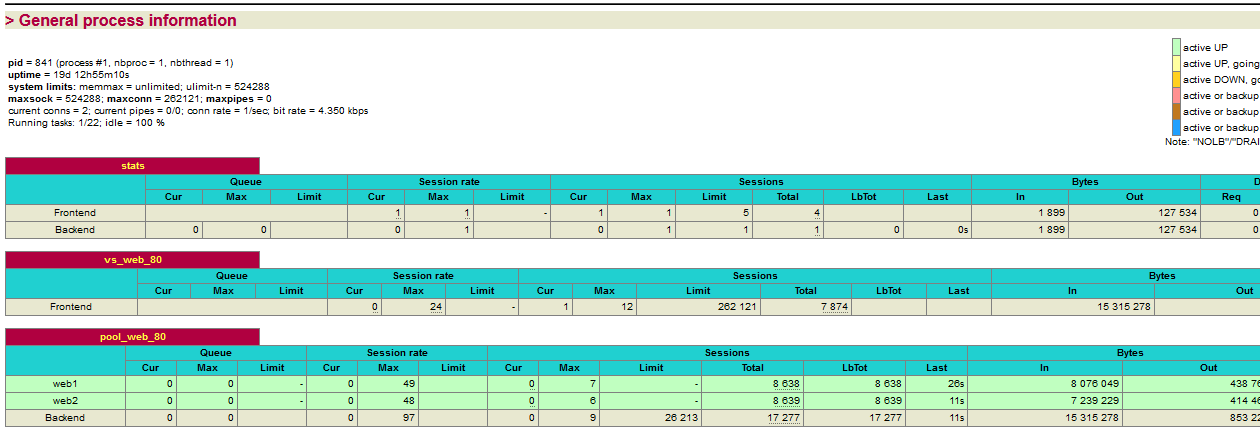
Or visit the haproxy service defined in the configuration file e.g. http://proxy-01.mydomain.org;8181/haproxy?stats