
VMware Cloud Foundation 9.1.2 went GA on 24 November 2026. A fresh VCF deployment is reasonably safe, but it isn’t hardened: ESX accepts TLS 1.2 with older ciphers, SSH policies differ per component, passwords never expire on some accounts and expire after 90 days on others, and nobody looks at the audit records. This guide walks through everything you can tighten in VCF 9.1.2, from one central place where possible (VCF Operations Fleet Management) and per component where it has to be.
The baseline for everything below is Broadcom’s own VCF 9.1 Security Configuration Guide (SCG): 260 controls, mapped to NIST 800-53 R5, PCI DSS 4.0.1 and the Secure Controls Framework, with PowerCLI audit scripts. Where this post gives a value, it’s the SCG value unless I say otherwise.
What you’ll end up with:
- One fleet password policy with length, complexity, history and account lockout for all VCF components, checked every hour and remediated from VCF Operations
- vCenter SSO and ESX password and lockout policies at the same level, because the fleet policy doesn’t cover those
- Lockdown mode on every ESX host, without breaking SDDC Manager
- SSH and the ESX Shell off, idle sessions closed after 15 minutes, TLS 1.3 only where your clients allow it
- Single sign-on with MFA through the VCF Identity Broker, and authorization through local groups
- Logs and audit records of every component in one place, and an audit trail you actually look at
- Compliance checks against the SCG with the official scripts, plus the VCF Operations security views
- Certificates from your own CA, patching in the right order, and backups of everything you can’t rebuild
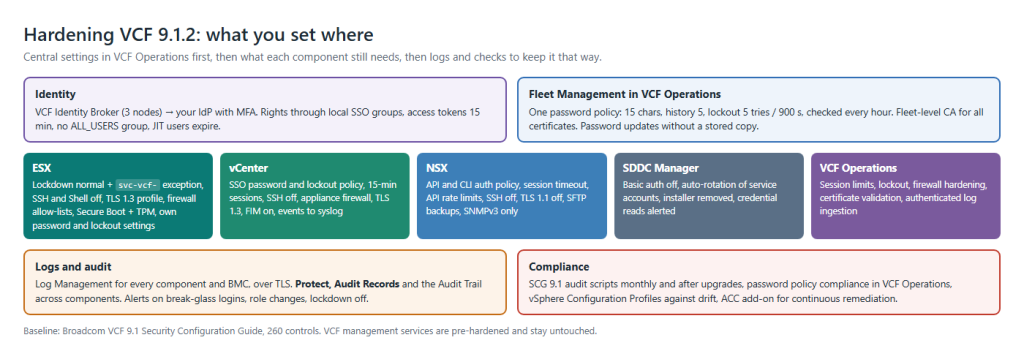
Written for: VCF 9.1.2 (VCF Operations build 25946717, ESX build 25946735, vCenter build 25946533). Most of it also applies to 9.1.0 and 9.1.1; where menus differ I say so. The names are examples: VCF Operations at
vcf-ops.example.org, management vCenter atvc-mgmt.example.org, NSX atnsx-mgmt.example.org, SDDC Manager atsddc.example.org, hostsesx01toesx04.example.org, the admin network10.10.0.0/24, the management network10.10.10.0/24, the log serverlogs.example.org.
Table of contents
- The hardening layers in VCF 9.1.2
- Before you start
- Fleet password policy and account lockout
- Identity: SSO, MFA and least privilege
- ESX hosts: lockdown mode and host hardening
- vCenter
- NSX
- SDDC Manager, VCF Operations and the management services
- Certificates and TLS
- Logging, audit records and the audit trail
- Compliance checks
- Network, storage and encryption
- Patching 9.1.2 in the right order
- Backups and break-glass accounts
- Troubleshooting
- Checklist
1. The hardening layers in VCF 9.1.2
VCF 9.1 moved a lot of security work into VCF Operations. You no longer set password rules per appliance: you write one policy and assign it to the fleet. Certificates come from one CA configured at fleet level. Logs, audit records and the audit trail live in VCF Operations too. What’s left per component is the configuration that the fleet tools don’t touch: ESX host settings, vCenter SSO, a few NSX CLI settings and some appliance options.

| Layer | Where you configure it | Section |
|---|---|---|
| Passwords and lockout for VCF components | VCF Operations, Manage, Passwords, Password Policy | 3 |
| Single sign-on, MFA, roles | VCF Operations Fleet Management, Identity Broker, your IdP | 4 |
| ESX host settings, lockdown mode | vCenter, PowerCLI | 5 |
| vCenter SSO policies, TLS, appliance | vSphere Client, VAMI, PowerCLI | 6 |
| NSX authentication and API limits | NSX CLI and API | 7 |
| SDDC Manager and VCF Operations options | Their own UI and API | 8 |
| Certificates | VCF Operations, fleet-level CA | 9 |
| Logs, audit records, audit trail | VCF Operations (Log Management, Protect, Audit Records) | 10 |
| Checking it all | SCG PowerCLI scripts, VCF Operations security views | 11 |
The VCF management services (fleet lifecycle, Identity Broker, Salt, log management and the other services running in the VCF services runtime) are pre-hardened by Broadcom and configured through VCF Operations Global Settings. Don’t log in to them and change things: they’re managed by VCF itself, and the SCG has no controls for them on purpose.
2. Before you start
Be on 9.1.2. It fixes four ESX CVEs (VMSA-2026-0011) and the vCenter issues from the same advisory. Hardening an unpatched platform is the wrong order. Section 13 has the patch order.
Read the impact column. Every SCG control has a column “Potential Functional Impact if Default Value is Changed”. Some controls need a host reboot (TLS profile), some restart services (vCenter TLS), and lockdown mode can lock you out if done wrong. Do every change on one host or a test cluster first, and roll out per cluster.
Have a break-glass plan. Before you turn on lockout and lockdown, make sure you know:
- the root passwords of every ESX host and appliance (in your password vault, not in a spreadsheet)
- that
administrator@vsphere.localworks and is in the vault - how to reach the DCUI of each host through its BMC (iDRAC, iLO)
Check the current password ages. A password policy with expiration applies immediately: a password last changed longer ago than the new expiry interval expires the moment you assign the policy. In VCF Operations, Manage, Passwords shows the last update date of every managed account. Rotate old ones first (section 3).
Get PowerCLI and the SCG. On your admin workstation (PowerShell 7 or Windows PowerShell 5.1):
Set-PSRepository -Name PSGallery -InstallationPolicy Trusted
Install-Module -Name VCF.PowerCLI -MinimumVersion 9.0.0 -Scope CurrentUser
Install-Module -Name VMware.vSphere.SsoAdmin -MinimumVersion 1.4.0 -Scope CurrentUserCode language: CSS (css)
Download just the 9.1 hardening guide from Broadcom’s GitHub repository with a sparse checkout:
git clone --filter=blob:none --sparse https://github.com/vmware/vcf-security-and-compliance-guidelines.git
cd vcf-security-and-compliance-guidelines
git sparse-checkout set security-configuration-hardening-guide/cloud-foundation/9.1Code language: JavaScript (javascript)
The folder has the guidance PDF, the controls spreadsheet (.xlsx and .csv, with a PowerCLI assessment and remediation command for most controls) and the tools folder with the audit and remediation scripts. A git pull later gets you the newest version; the guide is updated between releases.
Connect PowerCLI to the management vCenter. The SCG scripts need all three connections:
Connect-VIServer -Server vc-mgmt.example.org -User administrator@vsphere.local
Connect-CisServer -Server vc-mgmt.example.org -User administrator@vsphere.local
Connect-SsoAdminServer -Server vc-mgmt.example.org -User administrator@vsphere.localCode language: CSS (css)
Every command asks for the password. Never put passwords in a script.
3. Fleet password policy and account lockout
Since VCF 9.1, one password policy in VCF Operations sets length, complexity, history, expiration and account lockout for the local (OS) and application accounts of the VCF components: SDDC Manager, vCenter appliance accounts, NSX, VCF Operations and its cloud proxies, VCF Automation (9.1.1 and later), the management services and the other appliances. You assign it to the whole fleet, to the VCF management components, or to single VCF instances. An instance or management-component policy wins over the fleet policy, and since 9.1.1 an instance falls back to the fleet policy when you remove its own.
3.1 What the policy can do
| Setting | VCF default | Allowed range | This guide (SCG) |
|---|---|---|---|
| Minimum length | 15 | 8 to 64 | 15 |
| Upper case, lower case, digits, special characters | at least 1 each | 0 to 10 | 1 each |
| Password history | 5 | 1 to 10 | 5 |
| Password expiry | 365 days | 30 to 730 | 730 (see below) |
| Failed attempts before lockout | 3 | 0 to 5 | 5 |
| Lockout evaluation window | 900 s | 300 to 1800 | 900 |
| Lockout duration | 900 s | 600 to 1800 | 900 |
Why 730 days? The SCG follows NIST SP 800-63B: forced periodic password changes don’t make long passwords safer, so it recommends no forced rotation: rotate when there’s a reason (someone leaves, a suspected leak). The VCF policy can’t switch expiry off; 730 days is the longest it allows. If your organisation requires a shorter interval, use that; it’s your policy, not mine.
Why 5 attempts and not 3? A low threshold is itself a denial-of-service risk: a script or monitoring tool with an old password locks the account again and again. Five failed attempts within 15 minutes, then 15 minutes locked, stops guessing and survives a typo.
Use only ! @ # $ ^ as special characters in VCF passwords. Those five are accepted by every VCF component; others work on some and fail on others.
3.2 Create the policy
In VCF 9.1.1 and 9.1.2:
- Log in to VCF Operations and click Manage in the top bar.
- In the left pane click Passwords, then the Password Policy tab.
- Click Create Policy, name it (for example
fleet-scg-baseline), set the values from the table and click Create.
In 9.1.0 the same page is under Manage, Fleet management, Fleet settings, Password policy.
3.3 Before you apply it
- Check the ages. On Manage, Passwords, sort by last update. Anything older than your expiry interval expires the moment you apply the policy. Update those passwords first.
- Check the Salt connections. Password policy tasks run through Salt master and Salt RaaS. Right after a deployment or upgrade of the management services, give them about 30 minutes to connect to all nodes before you apply a policy, or the task fails.
- Know what isn’t covered:
- ESX hosts aren’t managed by the fleet policy by default. Section 5 sets the same rules on the hosts.
- vCenter SSO users (
@vsphere.local) follow the vCenter SSO policy. Section 6. administrator@vsphere.localdoesn’t get expiration or lockout from the policy by default. That’s deliberate: it’s your break-glass account. You can enforce it with the vCenter APIcom.vmware.identity.admin.administrator.PasswordPolicy, but I’d rather keep it unlocked with a long random password in the vault, and alert on every login (section 10).- Non-expiring accounts (service and inter-component accounts) don’t get expiration and lockout by default, so a patch can’t break the platform. VCF 9.1.1 and later can enforce them per account through the VCF Operations API; only do that when your auditor asks for it.
3.4 Apply it
- On the Password Policy tab, click the ellipsis next to the policy and choose Apply Policy to Fleet. Wait for the task to finish.
- For a separate policy per instance, choose Apply Policy to Component Groups and select the VCF instances or VCF Management.
VCF Operations checks every hour whether each component still matches its assigned policy. A component that drifted (someone edited /etc/security/pwquality.conf by hand, for example) shows as non-compliant, and you remediate it from the same page. Make a habit of it: a non-compliant component means someone changed something outside VCF Operations, so find out who (section 10) before you remediate.
3.5 Set new passwords
Complexity rules only apply to new passwords. Existing short passwords keep working until they’re changed. So right after the policy is active, update all passwords from Manage, Passwords: select the accounts and choose Update. VCF Operations changes the password both on the component and everywhere it’s used, and it doesn’t keep a copy: put the new passwords in your vault.
For the inter-component service accounts that only SDDC Manager manages, turn on auto-rotation in SDDC Manager (every 30, 60 or 90 days). Nobody types those passwords, so regular rotation costs nothing. Don’t change inter-component passwords or permissions on the components themselves: that breaks the integration.
3.6 Locked accounts
When an account is locked, VCF Operations raises an alert. Since 9.1.1 you can update the password of a locked or expired account from VCF Operations, but the update doesn’t unlock it: the account stays locked until the lockout duration ends. If you can’t wait, unlock it on the component:
# On a Photon-based appliance (SDDC Manager, VCF Operations, NSX shell as root)
faillock --user admin           # show the failed attempts
faillock --user admin --reset   # unlockCode language: PHP (php)
For VCF Operations on 9.1.0: the root account there didn’t take the expiry from the policy (fixed in 9.1.1). If you can’t patch yet, set it per node with chage -M 730 root and check with chage -l root.
4. Identity: SSO, MFA and least privilege
Most attacks on a private cloud start with a stolen admin password, not an exploit. This is where the biggest gain is.
Use the VCF Identity Broker with an external IdP that enforces MFA. The Identity Broker (VIDB) connects all VCF components to one identity provider: SAML, OIDC, AD/LDAP, and since 9.1.2 also Integrated Windows Authentication (Kerberos). Configure it in VCF Operations Fleet Management under Identity and Access. For production, deploy it as a three-node cluster. The MFA itself happens in your IdP (Entra ID, Okta, ADFS, Ping, or your own): VCF never sees the second factor, so make sure the IdP enforces it for everyone who gets an admin role.
Keep authentication and authorization apart. Let AD or the IdP say who someone is, but grant rights through local VCF SSO groups that you control. Someone who can add users to an AD group shouldn’t automatically become vCenter administrator. Concretely: create groups such as vcf-admins, vcf-operators and vcf-readonly in vCenter SSO, put the IdP groups in them, and give the roles to the local groups.
More settings in VCF Operations Fleet Management, Identity and Access:
| Setting | Value | Why |
|---|---|---|
ALL_USERS group | disabled (default) | Nobody gets access just because they exist in the directory |
| Access token expiry | 15 minutes | Same as the session timeout |
| API token expiry | as short as your automation allows | A leaked token stops working |
| Just-in-time (JIT) user inactivity | set a period | JIT users who stop logging in are removed |
| Non-imported IdP users in VCF Operations | denied | Only imported users and groups get in |
Clean up accounts:
- In vCenter Administration, Single Sign On, Users and Groups, disable the local users nobody uses. The SCG baseline keeps only
Administratorenabled. - Keep the SSO group
SystemConfiguration.BashShellAdministratorsas small as possible: its members get a root shell on the vCenter appliance. - If the ESX hosts are joined to AD, don’t use the default
ESX Adminsgroup (Config.HostAgent.plugins.hostsvc.esxAdminsGroup). Anyone who can create a group with that name in AD becomes host admin. Use your own group name, and leaveesxAdminsGroupAutoAddonfalse. - Review roles and permissions in every component twice a year (SCG control
vcf-9.permissions-roles).
5. ESX hosts: lockdown mode and host hardening
ESX has the most controls in the SCG (120 of 260). Many are already the default in 9.1; this section sets the ones that aren’t, and checks the important defaults.
5.1 Lockdown mode without breaking SDDC Manager
Lockdown mode blocks direct logins to the host: everything goes through vCenter, with its roles and its audit trail. The SCG wants normal lockdown (lockdownNormal). Don’t use strict: it stops the DCUI too, and if vCenter is down you can only get back in through pre-enabled SSH with exception users, or by reinstalling.
VCF uses a service account on each host, svc-vcf-<hostname>, for password validation and lifecycle tasks. In lockdown mode that account is blocked too, unless it’s on the host’s Exception Users list. Without it, SDDC Manager shows the host as Disconnected under password management, and you get the error “Password validation cannot be performed when host … is in lockdown mode”.
So for every host: first the exception user, then lockdown.
# Lockdown mode for all hosts in one cluster, with the VCF service account as exception
$Cluster = "mgmt-cluster-01"
foreach ($vmhost in Get-Cluster $Cluster | Get-VMHost) {
    $short = $vmhost.Name.Split('.')[0]
    $ham = Get-View (Get-View $vmhost).ConfigManager.HostAccessManager

    # Check which svc-vcf account really exists on this host
    $esxcli = Get-EsxCli -VMHost $vmhost -V2
    $svc = $esxcli.system.account.list.Invoke() | Where-Object { $_.UserID -like "svc-vcf-*" } | Select-Object -ExpandProperty UserID
    if (-not $svc) { Write-Warning "$($vmhost.Name): no svc-vcf account found, skipping"; continue }

    $ham.UpdateLockdownExceptions(@($svc))
    $ham.ChangeLockdownMode('lockdownNormal')
    "{0}: lockdown {1}, exceptions {2}" -f $vmhost.Name, $ham.LockdownMode, ($ham.QueryLockdownExceptions() -join ',')
}Code language: PHP (php)
The script reads the real account name from the host instead of building it from the host name. Hosts commissioned at different times can have slightly different names, and a stale duplicate account on the list has been known to block host commissioning.
DCUI.Access lists the local users that can still log in at the DCUI when the host is isolated from vCenter. Keep it at root (the SCG default; root can’t be removed). Your break-glass path is then: BMC console, DCUI, root password from the vault.
If SDDC Manager still can’t rotate a host password with lockdown on, take that one host out of lockdown (Configure, System, Security Profile, Lockdown Mode, Edit, Disabled), rotate, and turn lockdown on again. Don’t leave hosts unlocked “for now”.
5.2 Settings that don’t need a reboot
This script sets the SCG values that differ from the 9.1 defaults, plus the important defaults so they’re guaranteed. Change the NTP servers, log server and allowed networks to yours first.
$Cluster   = "mgmt-cluster-01"
$LogHost   = "tcp://logs.example.org:514"          # or ssl://...:1514 for TLS, see section 10
$Ntp       = @("ntp1.example.org","ntp2.example.org","ntp3.example.org")
$Banner    = "Authorized users only. Activity on this system is logged and monitored."

$settings = [ordered]@{
    # Passwords and lockout (same values as the fleet policy)
    "Security.PasswordQualityControlPwquality" = "retry=3 dcredit=-1 ucredit=-1 lcredit=-1 ocredit=-1 minlen=15 difok=4 enforce_for_root"
    "Security.AccountLockFailures"             = 5
    "Security.AccountUnlockTime"               = 900
    "Security.PasswordHistory"                 = 5
    "Security.PasswordMaxDays"                 = 99999   # no forced rotation; 0 does NOT disable it on ESX
    # Sessions and shells
    "UserVars.ESXiShellInteractiveTimeOut"     = 900     # idle shell sessions closed after 15 min
    "UserVars.ESXiShellTimeOut"                = 600     # SSH/Shell service stops itself after 10 min
    "UserVars.HostClientSessionTimeout"        = 900
    "UserVars.DcuiTimeOut"                     = 600
    "UserVars.SuppressShellWarning"            = 0
    "Config.HostAgent.vmacore.soap.sessionTimeout" = 15
    "Config.HostAgent.plugins.solo.enableMob"  = $false
    # Telemetry and banners
    "UserVars.HostClientCEIPOptIn"             = 2
    "Annotations.WelcomeMessage"               = $Banner
    "Config.Etc.issue"                         = $Banner
    # Memory
    "Mem.MemEagerZero"                         = 1       # wipe guest memory when a VM stops
    "Mem.EncryptTierNvme"                      = 1       # encrypt NVMe memory tiering
    # Logging and audit records
    "Syslog.global.logHost"                    = $LogHost
    "Syslog.global.auditRecord.storageEnable"  = $true
    "Syslog.global.auditRecord.remoteEnable"   = $true
    "Syslog.global.auditRecord.storageCapacity" = 100
    "Syslog.global.certificate.checkSSLCerts"  = $true
    "Syslog.global.certificate.strictX509Compliance" = $true
    "Config.HostAgent.log.level"               = "info"
    # Integrity
    "VMkernel.Boot.execInstalledOnly"          = $true
    # Hardware management NIC (Redfish host interface) off
    "Net.BMCNetworkEnable"                     = 0
}

foreach ($vmhost in Get-Cluster $Cluster | Get-VMHost) {
    foreach ($name in $settings.Keys) {
        $s = Get-AdvancedSetting -Entity $vmhost -Name $name -ErrorAction SilentlyContinue
        if ($null -eq $s) { Write-Warning "$($vmhost.Name): $name not found"; continue }
        if ("$($s.Value)" -ne "$($settings[$name])") {
            $s | Set-AdvancedSetting -Value $settings[$name] -Confirm:$false | Out-Null
            "{0}: {1} -> {2}" -f $vmhost.Name, $name, $settings[$name]
        }
    }

    # SSH, ESX Shell and SNMP stopped and on manual start
    Get-VMHostService -VMHost $vmhost | Where-Object { $_.Key -in 'TSM-SSH','TSM','snmpd' } |
        ForEach-Object { $_ | Set-VMHostService -Policy Off -Confirm:$false | Out-Null; if ($_.Running) { $_ | Stop-VMHostService -Confirm:$false | Out-Null } }

    # NTP
    $cur = @(Get-VMHostNtpServer -VMHost $vmhost)
    if (($cur -join ',') -ne ($Ntp -join ',')) {
        $cur | Where-Object { $_ } | ForEach-Object { Remove-VMHostNtpServer -VMHost $vmhost -NtpServer $_ -Confirm:$false }
        Add-VMHostNtpServer -VMHost $vmhost -NtpServer $Ntp -Confirm:$false | Out-Null
    }
    Get-VMHostService -VMHost $vmhost | Where-Object Key -eq 'ntpd' | Set-VMHostService -Policy On -Confirm:$false | Restart-VMHostService -Confirm:$false | Out-Null

    # The dcui account gets no shell
    $esxcli = Get-EsxCli -VMHost $vmhost -V2
    $esxcli.system.account.set.Invoke(@{ id = 'dcui'; shellaccess = 'false' }) | Out-Null
}Code language: PHP (php)
A few remarks:
Security.PasswordQualityControlPwqualityis a rawpam_pwqualitystring. A typo blocks every local password change, so test it on one host first.Security.PasswordMaxDays = 99999is how you say “never” on ESX. The vSphere Client may ask for an expiry email address first; PowerCLI doesn’t.Mem.MemEagerZeromakes VM shutdowns a little slower, in proportion to the VM’s memory. That’s the price of not leaving encryption keys in freed memory.Mem.EncryptTierNvmeonly matters if you use NVMe memory tiering; setting it anyway costs nothing.Syslog.global.certificate.strictX509Compliancerefuses log server certificates with RFC 5280 errors. If logging stops after this, fix the certificate, not the setting.
5.3 Firewall: only the networks that need the host
Every ESX firewall ruleset accepts connections from any address by default. Limit the management rulesets (SSH, the web and API services, CIM) to the management network and the admin network. Make a complete list first: vCenter, SDDC Manager, VCF Operations and cloud proxies, backup proxies, monitoring, jump hosts. Whatever you forget loses access.
Leave the rulesets for vMotion, vSAN, NFS and iSCSI alone: that traffic comes from the other hosts on their own VMkernel networks, not from the management network, and limiting it to the management network breaks vMotion and storage.
$Allowed  = @("10.10.10.0/24", "10.10.0.0/24")   # management network, admin network
$Mgmt     = @("sshServer", "webAccess", "vSphereClient", "CIMHttpServer", "CIMHttpsServer", "CIMSLP", "snmp")
foreach ($vmhost in Get-Cluster $Cluster | Get-VMHost) {
    $esxcli = Get-EsxCli -VMHost $vmhost -V2
    $rulesets = $esxcli.network.firewall.ruleset.list.Invoke() |
        Where-Object { $_.Name -in $Mgmt -and $_.Enabled -eq $true -and $_.AllowedIPconfigurable -eq $true }
    foreach ($rs in $rulesets) {
        foreach ($net in $Allowed) {
            $esxcli.network.firewall.ruleset.allowedip.add.Invoke(@{ rulesetid = $rs.Name; ipaddress = $net }) | Out-Null
        }
        $esxcli.network.firewall.ruleset.set.Invoke(@{ rulesetid = $rs.Name; allowedall = $false }) | Out-Null
        "{0}: {1} limited" -f $vmhost.Name, $rs.Name
    }
}Code language: PHP (php)
The allowed networks are added before “allow all” is switched off, so the host never ends up with a ruleset that accepts nothing. Run esxcli network firewall ruleset list on one host first: if you use other management services (a backup or monitoring agent with its own ruleset), add their names to $Mgmt. Check the result with esxcli network firewall ruleset allowedip list.
5.4 Settings that need a reboot or the BIOS
Do these per host in maintenance mode, as a rolling change through the cluster.
TLS profile. ESX 9.1 has named TLS profiles. The SCG wants NIST_2024_TLS_13_ONLY: TLS 1.3 with modern ciphers only. Every client of the host must speak TLS 1.3: vCenter, VCF components and your own monitoring and backup tools. If an older tool can’t, there’s a less strict profile with TLS 1.2 and modern ciphers.
$esxcli = Get-EsxCli -VMHost esx01.example.org -V2
$esxcli.system.tls.server.get.Invoke() | Select-Object -ExpandProperty Profile    # current profile
$esxcli.system.tls.server.set.Invoke(@{ profile = 'NIST_2024_TLS_13_ONLY' })      # active after rebootCode language: PHP (php)
The vSphere Client shows “(Reboot Required)” until the host has restarted.
Secure Boot, TPM 2.0 and configuration encryption. In the BIOS: UEFI Secure Boot on, TPM 2.0 on with SHA-256, Intel TXT on, and on AMD SEV-SNP and on Intel SGX/TDX if you’ll use confidential VMs. Boot only from the boot disk (no PXE, USB or virtual media), and lock the BIOS with a password. On the host, after that:
$esxcli = Get-EsxCli -VMHost esx01.example.org -V2
$esxcli.system.settings.encryption.get.Invoke()      # Mode should be TPM, RequireSecureBoot true
$esxcli.system.settings.encryption.set.Invoke(@{ mode = 'TPM'; requiresecureboot = $true; requireexecinstalledonly = $true })
$esxcli.system.settings.encryption.recovery.list.Invoke()   # BACK UP this recovery key, off the hostCode language: PHP (php)
With a TPM, the host’s configuration is sealed to that TPM: a stolen boot disk is useless elsewhere. Store the recovery key in your vault. Without it, a replaced motherboard means a host reinstall.
VIB acceptance level stays at PartnerSupported or higher, never CommunitySupported:
(Get-EsxCli -VMHost esx01.example.org -V2).software.acceptance.get.Invoke()Code language: CSS (css)The BMC (iDRAC, iLO) belongs to the host too: its own network, strong passwords and no shared accounts, IPMI cipher 0 off, unused services off, NTP and log forwarding on, configuration lock after setup, current firmware. The SCG counts these as ESX controls, and rightly so: whoever owns the BMC owns the host.
5.5 Don’t let it drift
Hosts in VCF 9 clusters can be managed with vSphere Configuration Profiles: the cluster has a desired configuration, and hosts that differ show up as non-compliant. Once a host is right, extract the configuration from that host and apply it to the cluster. A host someone “fixed” by hand then shows up as drifted, and a new host gets the hardened configuration straight away. Since 9.1.2 you can even give a scripted ESX installation the configuration profile JSON file instead of a long kickstart.
6. vCenter
6.1 SSO password and lockout policies
vCenter SSO has its own policies for the @vsphere.local users. Set them to the same values as the rest:
Get-SsoPasswordPolicy | Set-SsoPasswordPolicy -MinLength 15 -MaxLength 64 `
    -MinUppercaseCount 1 -MinLowercaseCount 1 -MinNumericCount 1 -MinSpecialCharCount 1 `
    -MinAlphabeticCount 2 -MaxIdenticalAdjacentCharacters 3 `
    -ProhibitedPreviousPasswordsCount 5 -PasswordLifetimeDays 9999

Get-SsoLockoutPolicy | Set-SsoLockoutPolicy -MaxFailedAttempts 5 -FailedAttemptIntervalSec 900 -AutoUnlockIntervalSec 300

Get-SsoPasswordPolicy; Get-SsoLockoutPolicyCode language: JavaScript (javascript)
The auto-unlock after 300 seconds is the SCG value and matters: without auto-unlock, an attacker locks all your accounts by failing on purpose, and you unlock them one by one.
6.2 Sessions, TLS and the appliance
| What | Where | Value |
|---|---|---|
| vSphere Client session timeout | Administration, Deployment, Client Configuration | 15 minutes |
| CEIP, in-product feedback, UI telemetry | Administration, Deployment, Customer Experience Improvement Program and Client Configuration | off |
| Login message | Administration, Single Sign On, Configuration, Login Message | your banner |
| SSH | VAMI (https://vc-mgmt.example.org:5480), Access | off |
| Root password expiry | VAMI, Administration, Password expires | No (in the vault, rotated on need) |
| Appliance firewall | VAMI, Firewall | only management and admin networks |
| Syslog | VAMI, Syslog | your log server, TLS if possible |
| Events to syslog | Advanced setting vpxd.event.syslog.enabled | true |
| Log level | Advanced setting config.log.level | info |
| vpxuser password rotation | Advanced setting VirtualCenter.VimPasswordExpirationInDays | 30 |
| Plugins | Administration, Client Plugins | remove what you don’t use |
The SSH switch and the TLS profile can also be set with PowerCLI:
(Get-CisService -Name "com.vmware.appliance.access.ssh").set($false)

Invoke-GetTlsProfilesGlobal
Invoke-ApplianceTlsProfilesGlobalSetTask -applianceTlsProfilesGlobalSetSpec (Initialize-ApplianceTlsProfilesGlobalSetSpec -VarProfile NIST_2024_TLS_13_ONLY)Code language: JavaScript (javascript)
Changing the vCenter TLS profile restarts the vCenter services: a few minutes without management. Do it in a maintenance window, after the hosts and your tools have shown they speak TLS 1.3.
File integrity monitoring is new in 9.1 and on by default: vCenter checks its installed files every four hours. Make sure its logs reach your log server via syslog (section 10); a FIM alert on vCenter is something you want to see the same day.
6.3 Content libraries and distributed switches
If you use them:
- Published content libraries require authentication, and the OVF security policy is applied.
- Distributed port groups: promiscuous mode, MAC changes and forged transmits on Reject; port-level overrides limited; NetFlow and port mirroring only where needed; CDP/LLDP off unless your network team uses it; the VDS health check off.
7. NSX
The fleet password policy covers the NSX root, admin and audit accounts. The NSX API and CLI have their own lockout and session settings on top of that. Log in to the NSX Manager as admin and run:
set auth-policy api max-auth-failures 5
set auth-policy api lockout-period 900
set auth-policy api lockout-reset-period 900
set auth-policy cli max-auth-failures 5
set auth-policy cli lockout-period 900

set password-complexity minimum-password-length 15
set password-complexity upper-chars -1
set password-complexity lower-chars -1
set password-complexity digits -1
set password-complexity special-chars -1
set password-complexity max-repeats 8

set service http session-timeout 900
set cli-timeout 900

set service http client-api-rate-limit 100
set service http client-api-concurrency-limit 40
set service http global-api-concurrency-limit 199

set service auth logging-level info
set service http logging-level info
set service manager logging-level info

stop service ssh
clear service ssh start-on-boot
clear ssh root-loginCode language: JavaScript (javascript)
Check with get auth-policy api, get auth-policy cli and get password-complexity. Run the commands on each NSX Manager node in the cluster and compare the output; settings that are per node otherwise differ between nodes. The values match the fleet policy, so the two never fight.
Also in NSX:
| What | Where | Value |
|---|---|---|
| TLS on the API | PUT /api/v1/cluster/api-service | TLS 1.1 off, CBC ciphers off |
| Backups | System, Lifecycle Management, Backup and Restore | SFTP target with SSH fingerprint, recurring, “Detect NSX configuration change” on |
| SNMP | System, Fabric, Profiles, Node Profiles | v1 and v2c removed; v3 only if needed |
| CEIP | System, Customer Experience Improvement Program | off |
| Local accounts | System, User Management | only admin (and audit if you use it) active |
| Login banner | System, General Settings, User Interface | your banner |
| Load balancer FIPS | PUT /policy/api/v1/infra/global-config with lb_fips_enabled: true | on |
| BGP / OSPF on Tier-0 | Tier-0 neighbors | authentication on, maximum prefixes set |
| Unicast RPF on Tier-0 interfaces | Tier-0 interfaces | Strict |
| Inactive interfaces and segments | Tier-0, Tier-1 | removed |
| Cluster node placement | vCenter DRS | anti-affinity rule for the three managers |
For the API TLS change, first do a GET of /api/v1/cluster/api-service, change only protocol_versions and cipher_suites in that output, and PUT it back with the same _revision. The API service restarts on every node; allow a minute.
8. SDDC Manager, VCF Operations and the management services
8.1 SDDC Manager
Turn off HTTP basic authentication on the API. With basic auth, every API call carries the password. Without it, clients first get a token:
SDDC=sddc.example.org
read -rp "User: " U; read -rsp "Password: " P; echo
TOKEN=$(curl -s -X POST "https://$SDDC/v1/tokens" -H 'Content-Type: application/json' \
    -d "{\"username\":\"$U\",\"password\":\"$P\"}" | jq -r .accessToken); unset P

curl -s -X PATCH "https://$SDDC/v1/sddc-manager" -H "Authorization: Bearer $TOKEN" \
    -H 'Content-Type: application/json' -d '{"basicAuthSpec":{"status":"DISABLE"}}'

curl -s "https://$SDDC/v1/sddc-manager" -H "Authorization: Bearer $TOKEN" | jq .basicAuthDetailsCode language: PHP (php)
The last command should show "status": "DISABLED". Check that your own scripts use tokens before you do this.
Watch who retrieves credentials from SDDC Manager through the API or the lookup_passwords CLI. Reading break-glass passwords is legitimate in an emergency and suspicious otherwise. Section 10 makes an alert for it.
The VCF Installer appliance must be gone after the deployment, unless it was converted into the SDDC Manager. An installer left running is an extra appliance with admin access to everything.
8.2 VCF Operations
Most of these are in Operate, Global Settings; the last three are elsewhere.
| Setting | Value |
|---|---|
| Session timeout | 15 minutes |
| Concurrent UI sessions | off (one session per user) |
| Account lockout | 5 failed attempts in 15 minutes |
| Password policy for local users (User Access, Password Policy) | length 15, 1 of each class |
| Login message | your banner |
| CEIP and in-page feedback | off |
| Certificate validation | on |
| Credential ownership enforcement | on |
| Action history retention | 365 days |
| Authenticated log ingestion | on |
| SSL Syslog and SSL for the log API (System Settings) | on |
Firewall hardening: admin portal https://vcf-ops.example.org/admin/, Administrator Settings, Security Settings | Activate Firewall Hardening |
| Unsigned PAK files: admin portal, Security Settings | not allowed (default) |
| Node placement: vCenter DRS | anti-affinity rule for multi-node clusters |
Firewall hardening closes the internal cluster ports of VCF Operations to everything except the other cluster nodes. If activating it fails with “Unable to change firewall rules”, the appliances are missing OVF environment properties; Broadcom KB 439330 has the fix.
8.3 VCF Automation and Operations for networks
If you run them:
- VCF Automation: access token lifetime 900 s, refresh token 86400 s, redirect URLs HTTPS only, a finite API token lifetime, operation limits set (never unlimited), activity log kept as long as your audit period, debug output off.
- VCF Operations for networks: idle session timeout 900 s, user identity in the audit log, login banner.
- Protection and Recovery: SSH off, NTP and log forwarding on.
9. Certificates and TLS
Self-signed certificates make it impossible for people and tools to tell your vCenter from someone pretending to be it. They train admins to click past warnings.
Since VCF 9.1 the certificate authority is configured once, for the whole fleet, in VCF Operations Fleet Management, Certificates. Supported are a Microsoft CA and an OpenSSL CA for both the instance components (vCenter, NSX, ESX) and the management components. In 9.1.2 VCF Operations can authenticate to a Microsoft CA with a TLS client certificate instead of a username and password: use that, so no AD service account with certificate rights is needed.
- Configure the CA at fleet level.
- Generate CSRs, sign and install the certificates in bulk for all components (9.1 supports bulk CSR, renew and import).
- Add your root CA to the trust store of your admin workstations and of every tool that talks to VCF.
- Make sure the certificate expiry alerts in VCF Operations go to someone (section 10).
On the TLS side: TLS 1.3-only profiles on ESX and vCenter (sections 5.4 and 6.2), TLS 1.1 and CBC ciphers off on the NSX API (section 7), and syslog over TLS (section 10). The order is: hosts first, then vCenter, and test your backup and monitoring tools after each step.
FIPS mode is available for VCF components; see “FIPS Configuration for VCF Components” in the VCF documentation. For VCF Operations, FIPS mode can’t be turned off again after you enable it, so only do it when a regulation requires it.
10. Logging, audit records and the audit trail
Hardening without logs means you won’t know when it’s undone.
Log Management (the former VCF Operations for Logs) is fully integrated into VCF Operations in 9.1: processing rules, log administration, retention and the log APIs are all under VCF Operations. Configure log collection for all deployed components, and set the retention to what your audit period requires.
Get every source in:
- ESX:
Syslog.global.logHostand the audit record settings from section 5.2. For TLS usessl://logs.example.org:1514(or the port your log server uses) together with strict X.509 checks. Store logs and audit records on a persistent location (Syslog.global.logDirandSyslog.global.auditRecord.storageDirectoryon a datastore or the OSDATA partition), not on a RAM disk. - vCenter: VAMI syslog, and
vpxd.event.syslog.enabled = trueso vCenter events and tasks are in the log too. - NSX: System, Fabric, Profiles, Node Profiles, Syslog Servers, with TLS.
- BMCs: their own syslog to the same server.
- SDDC Manager, VCF Operations, management services: collected by Log Management itself.
If you have a SIEM (Wazuh, for example), send it a copy from Log Management instead of pointing every component at two servers.
Audit records. VCF 9.1 uses one format for audit events in all components (ISO 8601 timestamps, severity, component ID). In VCF Operations, Protect, Audit Records shows the user actions of all components in one list. Filter on:
- Result: Failure (for example
sso.login.failure) - Severity: Warning and Critical
- Component type: vCenter, NSX, ESX
- Record category: Account, Auth, Certificate, Security, System
Audit trail. The Audit Trail puts those records on one timeline across components, in slices of 5 to 15 minutes: who logged in where, what they changed, and which accounts touched which component. It’s the tool for questions like “who powered off those VMs and how did they get the rights?”. It shows success and failure trends per 15 minutes, so a sudden spike in failed logins stands out.
Make alerts for:
- every login of
administrator@vsphere.local,rooton an appliance or host, andadminon NSX - reading passwords from SDDC Manager (API or CLI)
- changes to roles, permissions and the SSO configuration
- lockdown mode turned off, SSH or the ESX Shell started
- password policy compliance lost (section 3.4)
- certificates that expire within 30 days
- vCenter FIM findings
Send them through the VCF Operations notification plugins (email, webhook) to a place someone reads.
11. Compliance checks
11.1 The SCG audit scripts
The SCG tools folder has PowerCLI scripts that check vCenter, the hosts and the VMs against the baseline. They don’t change anything:
cd .\vcf-security-and-compliance-guidelines\security-configuration-hardening-guide\cloud-foundation\9.1\tools
.\connect.ps1 -vCenter vc-mgmt.example.org -User administrator@vsphere.local

# One host, one vCenter, then everything
.\audit-esx-9.ps1 -Name esx01.example.org -OutputFileName esx01.txt -AcceptEULA
.\audit-vcenter-9.ps1 -OutputFileName vcenter.txt -AcceptEULA
New-Item -ItemType Directory audit-2026-11 | Out-Null
.\audit-all.ps1 -OutputDirName .\audit-2026-11 -CSVOutputDirName .\audit-2026-11 -AcceptEULA

# Only the failures
Get-ChildItem .\audit-2026-11\*.txt | Select-String -Pattern '\[FAIL\]'Code language: CSS (css)
Every line has the SCG control ID, for example [FAIL] [esx-9.tls-ciphers] esx01.example.org: ..., so you can look up the control in the spreadsheet. You can also check a few controls only:
.\audit-esx-9.ps1 -Name esx01.example.org -Controls esx-9.lockdown-mode,esx-9.ssh,esx-9.tls-ciphersCode language: CSS (css)There are also remediate-*.ps1 scripts. They change your environment, can restart things, and contain Exit commands that you have to remove on purpose before they do anything. Use them in a lab; in production I prefer the scripts from section 5, which change only what I chose.
Run the audit monthly and after every upgrade, and keep the output: it’s your proof for the auditor and shows progress over time. Not every control can be checked by a script (BIOS settings, firewall design, patch levels); those stay on the manual checklist.
Document every deviation. If you deliberately keep TLS 1.2 because your backup tool needs it, write down why, who decided and when you’ll check again. That’s an SCG control of its own (vcf-9.secure-baseline).
11.2 In VCF Operations
- Password policy compliance, every hour, with remediation (section 3).
- The security operations views in VCF Operations show the security configuration of the whole environment in one place, and in 9.1.2 the VCF AI Assistant can also report on security posture, exposure to VMware security advisories and certificate health.
- Continuous compliance against the SCG or PCI DSS with automatic remediation of the VCF stack is part of VMware Advanced Cyber Compliance (ACC), an add-on licence. ACC uses Salt to detect drift on, for example, an ESX host and put it back. Without that licence, the scripts from 11.1 and the vSphere Configuration Profiles from 5.5 do the same job by hand.
12. Network, storage and encryption
The management network is the crown jewels. ESX management, vCenter, NSX, SDDC Manager, VCF Operations and the BMCs belong in networks that only admins and the components themselves can reach, behind a perimeter firewall. Admins come in through a jump host or VPN, not from the office LAN. The ESX firewall (section 5.3) and the vCenter appliance firewall (section 6.2) are the second line, not the first.
vMotion, vSAN and storage traffic each get their own VLAN, not routed to anything else. Then:
- vMotion: set encrypted vMotion to required on sensitive VMs (on Intel QAT hardware the encryption is offloaded in 9.1).
- vSAN: data-at-rest encryption on (since 9.1 it works together with global deduplication) and on OSA clusters data-in-transit encryption. Rotate the key encryption keys regularly (VMware suggests 60 days). Keep the managed disk claim off, and turn off the HCL download from the internet or send it through your proxy.
- NFS: Kerberos or an isolated network. iSCSI: mutual CHAP.
- Key provider: if you use the vSphere Native Key Provider, back it up with a strong password and keep the backup outside the cluster it protects.
Microsegmentation. With VMware vDefend, the distributed firewall and distributed IDS/IPS limit what an attacker can reach from a compromised VM. VCF doesn’t turn this on by default; it’s a design project of its own, not a setting.
VMs: VM hardware 17 or newer, Secure Boot in the guest, boot only from disk (bios.bootDeviceClasses = allow:hd), unneeded virtual hardware removed (CD, USB, serial, floppy), console connections limited to 1, and VMware Tools current with the guest operations, service discovery and customization features off where you don’t use them. The audit-vm-9.ps1 script checks those.
13. Patching 9.1.2 in the right order
Patching is the hardening that never ends. In VCF 9.1.2 lifecycle management runs from VCF Operations, and VCF Operations shows which patches are available for the management services too.
Don’t click “Upgrade All” before you’ve met the 9.1.2 dependencies:
- Patch the fleet lifecycle management service to 9.1.2 first, before anything else.
- Patch VCF Operations on its own: nothing else in parallel, no lifecycle tasks running, and start nothing else until it’s done.
- Coming from 9.1.0: patch the VCF services runtime before the Identity Broker and Salt RaaS it hosts, and VCF Automation before the migration service engine.
- While a software depot instance is being patched, other components wait: their binaries aren’t available until the depot is done.
- Then vCenter, NSX and ESX per workload domain.
ESX 9.1.2 is not live-patchable: the hosts need a reboot, with VMs migrated off. vCenter Quick Patch in 9.1 applies security patches to vCenter in about 5 minutes without taking it down. For later ESX patches that are live-patchable, 9.1 also supports hosts with a TPM.
Upgrading from 5.2 or 9.0 goes straight to 9.1.2, starting with VCF Operations 9.1.2; the VCF Upgrade Planning Tool helps with the order. Subscribe to the VMware security advisories, so you hear about the next VMSA before your auditor does.
14. Backups and break-glass accounts
Back up the management components on a schedule to an SFTP server that isn’t in the same failure domain: SDDC Manager, vCenter (VAMI file-based backup), NSX (section 7) and VCF Operations, plus the fleet-level backup settings for the management services in VCF Operations. Use a separate SFTP user per component, with SSH host key checking on.
Test a restore at least once a year, in a lab. A backup you’ve never restored is a hope, not a backup.
Keep outside VCF, in your vault:
- root passwords of all hosts and appliances,
administrator@vsphere.local, NSXadmin - the ESX TPM recovery keys (section 5.4)
- the backup encryption passphrases, the Native Key Provider backup
- the BMC credentials, and a written procedure for “vCenter is down and the hosts are in lockdown”
The vault itself must not run only on the VCF it protects.
15. Troubleshooting
| Problem | Likely cause | Fix |
|---|---|---|
| Passwords expired right after applying the policy | Last update older than the policy’s expiry interval | Update them from Manage, Passwords; next time check the ages first (section 3.3) |
| Password policy task fails right after a deployment | Salt RaaS not yet connected to all nodes | Wait about 30 minutes and retry |
| Component non-compliant with the password policy | Settings changed by hand on the component | Find who changed it in the audit records, then Remediate |
| Account still locked after a password update | An update doesn’t unlock | Wait for the lockout duration, or faillock --user <name> --reset on the appliance |
VCF Operations root still expires after 3 months (9.1.0) | Known limitation, fixed in 9.1.1 | Patch, or chage -M 730 root on each node |
| SDDC Manager shows a host as Disconnected, “Password validation cannot be performed … lockdown mode” | svc-vcf- account not on the Exception Users list | Add it (section 5.1), or take that host out of lockdown for the rotation |
| Host commissioning or brownfield import fails | Lockdown mode on the new host, or a stale service account on the exception list | Disable lockdown on new hosts until VCF has created its account; remove stale entries |
| Tool can’t connect to ESX or vCenter after the TLS change | The tool doesn’t speak TLS 1.3 | Update the tool, or use the TLS 1.2 modern profile on those hosts and document it |
Host doesn’t boot after setting requiresecureboot | Secure Boot isn’t actually on in the BIOS | Turn on Secure Boot in the BIOS; the setting does what it’s meant to do |
| ESX stops sending logs after the strict X.509 setting | The log server certificate has RFC 5280 errors | Reissue a correct certificate from your CA |
| Local password changes on ESX all fail | Typo in Security.PasswordQualityControlPwquality | Fix the string; test on one host first |
| Monitoring or backup loses access to ESX | Its address isn’t in the firewall’s allowed IPs | Add it to the allowed networks (section 5.3) |
| “Unable to change firewall rules” in VCF Operations | Missing OVF environment properties on the nodes | Broadcom KB 439330 |
| A script stops working after basic auth is off | It still sends username and password per call | Change it to the /v1/tokens flow |
16. Checklist
Preparation
- ☐ Everything on 9.1.2, VMSA-2026-0011 resolved
- ☐ All passwords in the vault, BMC access tested, password ages checked
- ☐ PowerCLI and the 9.1 SCG downloaded, a baseline audit run and saved
Passwords and identity
- ☐ Fleet password policy: 15 characters, 1 of each class, history 5, expiry 730 (or your policy), lockout 5 / 900 s / 900 s
- ☐ Policy applied, all passwords updated afterwards, compliance green
- ☐ SDDC Manager auto-rotation on for the inter-component accounts
- ☐ vCenter SSO password and lockout policies set
- ☐ Identity Broker (three nodes) with an IdP that enforces MFA, rights through local SSO groups
- ☐ Access tokens 15 minutes,
ALL_USERSoff, JIT inactivity set, unused accounts disabled - ☐ No
ESX Adminsdefault group, smallBashShellAdministratorsgroup
ESX
- ☐ Lockdown mode normal,
svc-vcf-account as exception, DCUI.Access root - ☐ SSH, ESX Shell and SNMP stopped and on manual start, shell and session timeouts set
- ☐ Password and lockout settings, MOB off, CEIP off, banners
- ☐ Firewall limited to the management and admin networks
- ☐ TLS profile
NIST_2024_TLS_13_ONLY(or a documented exception) - ☐ Secure Boot, TPM, configuration encryption with
requiresecureboot, recovery keys in the vault - ☐ Logs and audit records remote over TLS, stored persistently
- ☐ BMCs hardened, cluster configuration in vSphere Configuration Profiles
vCenter, NSX, SDDC Manager, VCF Operations
- ☐ vCenter: 15-minute sessions, SSH off, root without forced expiry, appliance firewall, TLS 1.3, syslog with events
- ☐ NSX: auth policies, password complexity, timeouts, API limits, SSH off, TLS 1.1 off, backups, SNMPv3 only
- ☐ SDDC Manager: basic auth off, VCF Installer removed
- ☐ VCF Operations: sessions, lockout, firewall hardening, certificate validation, authenticated log ingestion
Certificates, logs, compliance
- ☐ Fleet-level CA, all certificates from your CA, expiry alerts on
- ☐ All components and BMCs log to Log Management, retention set
- ☐ Alerts for break-glass logins, password retrieval, role changes, lockdown off, SSH on
- ☐ Audit records and audit trail reviewed regularly
- ☐ SCG audit monthly and after each upgrade, deviations documented
- ☐ vMotion and vSAN encryption where needed, management network behind a firewall
- ☐ Backups of all management components, restore tested