
Every VMware Cloud Foundation project starts the same way: an Excel build workbook that’s copied from the last project, with broken formulas, old VLANs nobody removed and an IP plan you check by hand three times. And then a sizing question: how much usable vSAN capacity do these hosts really give, and does the management domain still fit if the customer wants VCF Automation after all?
I built two web tools for that, and they’re now on this blog:
- VCF9 Workbook Generator: a guided form that produces the build workbook for VCF 9 on Dell PowerEdge and VxRail, with validation and a DNS list.
- VCF Calculators: vSAN sizing, management domain sizing and a fleet topology diagram for VCF 9.
Both run entirely in your browser, both are free, and neither one asks for passwords.
Unofficial tools. Neither is a Dell or Broadcom product, and neither is endorsed or supported by them. They’re built from public documentation and field experience. Always check the result against the official Broadcom VCF documentation, the vSAN ReadyNode Sizer and the Dell PowerEdge / VxRail documentation before you order hardware or deploy.
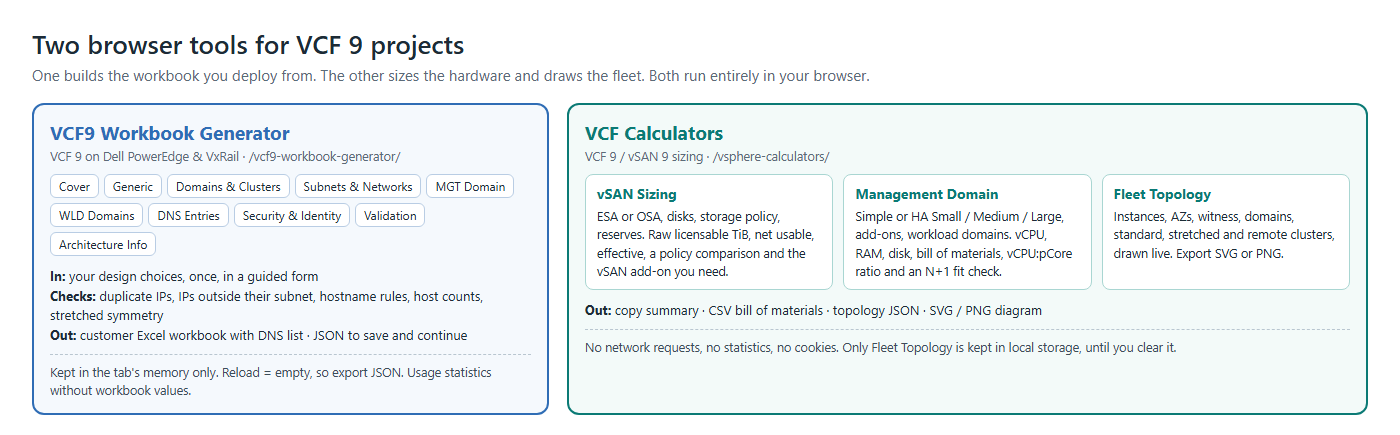
Table of contents
- The VCF9 Workbook Generator
- Workbook Generator: the tabs
- Workbook Generator: validation, import and export
- The VCF Calculators
- vSAN Sizing
- VCF Management Domain Sizing
- Fleet Topology
- Privacy and data handling
- Limits and good habits
1. The VCF9 Workbook Generator
Link: blog.cyberfront.org/index.php/vcf9-workbook-generator
The generator replaces the manual Excel build workbook for VCF projects on Dell PowerEdge and VxRail. You define everything once in a web form: version, domains, clusters, networks, appliances, security. The customer workbook is generated from that. No copied tabs, no formulas to repair, no IP plan to recheck by hand.
What you get out of it:
- Faster design and bring-up preparation. Domains, clusters, networks and hosts are created from your choices, with VCF 9 defaults filled in.
- Fewer bring-up failures. Built-in checks catch duplicate IPs, addresses outside their subnet, uppercase or too-long hostnames, uneven stretched clusters and other known bring-up blockers before you start.
- The same deliverable every time. Every project gets the same structured Excel workbook and the same DNS list.
- Background on every choice. The VCF Architecture Info tab explains the options, with diagrams and links to Broadcom and Dell documentation. Every i icon on the other tabs jumps to the matching explanation.
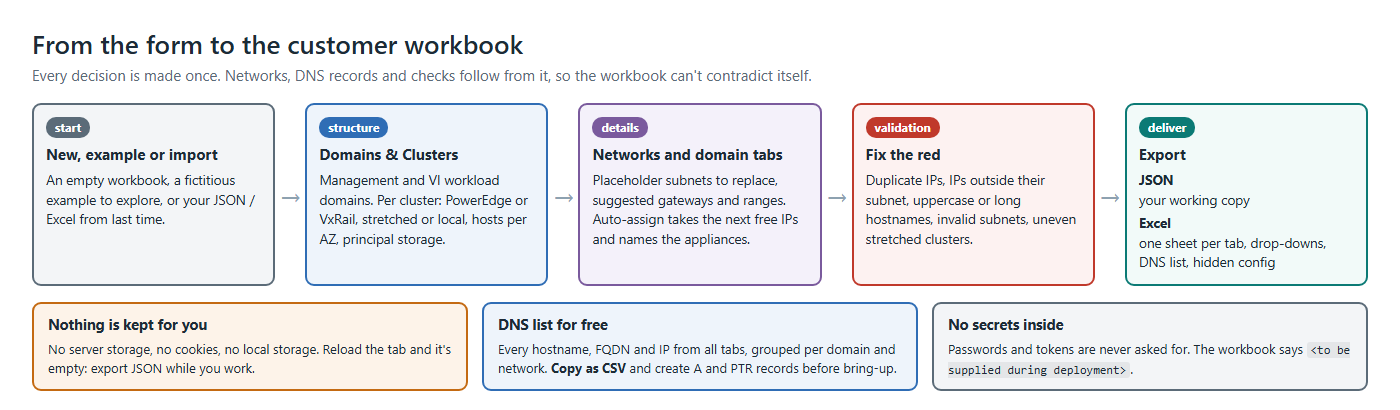
Start with one of three buttons:
| Button | What it does |
|---|---|
| New | An empty workbook |
| Load example | A complete design with fictitious values: one management domain, one workload domain, a stretched VxRail management cluster. The best way to look around |
| Import JSON / Excel | Continue earlier work |
2. Workbook Generator: the tabs
The tabs follow the order in which you’d make the decisions. Structural choices are made once, on Domains & Clusters, and every other tab follows from them.
| Tab | What you fill in |
|---|---|
| Cover | Title, customer / project, author, classification, version history, distribution and approval lists. The workbook version follows the latest version history entry |
| Generic | VCF version (9.0 to 9.1.2), deployment model (standard or consolidated), deployment type (High Availability or Single), fleet network deployment model, default NSX networking model (VPC or traditional Tier-0/Tier-1), stretched yes/no, CEIP, FIPS. DNS, NTP, time zone, SMTP, proxy or dark site, online depot account, SFTP backup, LLDP/CDP, syslog forwarding per component, certificate authority and CSR attributes, key provider |
| Domains & Clusters | The management domain and any VI workload domains. Per cluster: PowerEdge or VxRail, stretched or local, hosts in AZ1 and AZ2, principal storage (vSAN ESA, vSAN OSA, or Dynamic Node with FC, iSCSI or NFS) |
| Subnets & Networks | VLAN, subnet, gateway and allocatable range for every network, per cluster and per availability zone. Networks appear or disappear with your choices: the VxRail discovery network only for VxRail, witness networks only when something is stretched |
| MGT Domain, WLD1 Domain, … | One tab per domain: appliance hostnames and IPs (VCF Installer, SDDC Manager, vCenter, NSX Managers, VCF Operations and its cloud proxy, fleet management, the services platform), NSX model and size, then per cluster: compute and image, vSphere HA, vSAN encryption, VDS / NIC layout and hosts |
| DNS Entries | Generated from all tabs: every hostname, FQDN and IP, grouped per domain and network, with Copy as CSV |
| Security & Identity | The day-1 choices after bring-up: VCF Identity Broker (VIDB) single sign-on, identity source (AD over LDAPS, Entra ID, Okta and others), directory group to VCF role mapping, compliance benchmarks, remediation and drift, password policies and ESX host hardening |
| Validation | Every error and warning in one list |
| VCF Architecture Info | Background: fleet network models, standard vs consolidated, VPC vs traditional, naming rules, HA defaults, VDS / NIC layouts, stretched clusters, VxRail vs PowerEdge, principal storage, vLCM, FIPS, CA options, key providers, VIDB, compliance |
| Information | How to use it, privacy, usage statistics, version |
Three things save the most time:
- Placeholder subnets. Every network starts with its own placeholder (
10.0.x.0/24), so you can lay out the design before the network team has answered. Enter a real subnet and the generator suggests the gateway and the allocatable range. - Auto-assign. On the domain tabs, Auto-assign empty hostnames & IPs takes the next free addresses from each range and names the appliances consistently. Every range shows how many addresses are used and free, counting everything in the workbook.
- Colour coding on the networks tab: AZ1 green, AZ2 blue, stretched L2 yellow. A stretched network in AZ2 simply shows “same VLAN and subnet as AZ1”.
Passwords are never captured. Wherever one belongs, the workbook says <to be supplied during deployment>.
3. Workbook Generator: validation, import and export
3.1 Validation
The Validation tab shows a count on its tab label and lists every problem:
- Errors (red): duplicate IPs, addresses outside their subnet, invalid subnets, uppercase or too-long hostnames, host counts that don’t work (for example an uneven stretched cluster). Fix all of them before bring-up.
- Warnings: advisory. Read them, then decide.
With the example loaded, it says No issues found. Start a new workbook and it starts with a few dozen, which shrink as you fill it in.
3.2 Import and export
| Action | What it contains | Use it for |
|---|---|---|
| Export JSON | The complete configuration, all tabs | Saving your work, continuing later, sharing with colleagues on the design |
| Export Excel | The customer workbook: one sheet per tab, drop-down lists included, the DNS list, plus a hidden copy of the configuration | Delivery to the customer, reviews |
| Import JSON | Restores everything | Continuing work |
| Import Excel | Restores the configuration hidden in the workbook at export time | When only the Excel file is left. Edits made directly in Excel are not read back |
Export JSON is the only way to keep your work. The generator stores nothing, not on the server and not in the browser. Close or reload the tab and everything is gone. Export the JSON regularly while you work, and at the end of every session.
Each JSON records the generator version it was made with. Older files are migrated on import where possible, but check the imported data and keep the original file.
4. The VCF Calculators
Link: blog.cyberfront.org/index.php/vsphere-calculators
Three calculators for early sizing and design of VCF 9 and vSAN 9. They give a first answer in seconds, explain the rules behind it, and show the result visually. They complement the official sizing tools. They don’t replace them.
| Calculator | Answers |
|---|---|
| vSAN Sizing | How much usable capacity do these hosts and disks give, with this storage policy? How much vSAN capacity do I have to license? |
| VCF Management Domain Sizing | How many vCPU, how much RAM and disk does the management domain need, and do my management hosts fit it? |
| Fleet Topology | What does the fleet look like: instances, availability zones, domains, standard, stretched and remote clusters? As a diagram for the design document |
Each one ends with validation and design checks: OK, info, warning and error lines that explain why, not just what.
5. vSAN Sizing
You go through five steps:
- Cluster: ESA or OSA, standard cluster or 2-node with witness, number of hosts, TiB (binary, as vCenter shows it) or TB (decimal, as vendors sell it).
- Disks per host: for ESA the NVMe devices in the storage pool, for OSA the disk groups with cache and capacity devices. Common sizes are in the list, or enter a custom size.
- Storage policy: RAID-1 with FTT 1, 2 or 3, RAID-5 or RAID-6. Policies your host count can’t support are shown as not available.
- Reserves and overheads: the operations reserve (automatic or a custom percentage, or legacy flat slack space), a host rebuild reserve of one host’s capacity, metadata overhead, and the data reduction you expect.
- Licensing: VCF (1 TiB vSAN per core) or VVF (0.25 TiB per core), sockets and cores per host, with the 16-core minimum per CPU.
An example, the calculator’s default: 4 ESA hosts, each with 6 × 7.68 TB NVMe, RAID-1 FTT=1, 32 licensed cores per host.
| Result | Value |
|---|---|
| Raw licensable capacity | 168 TiB (184.32 TB) |
| vSAN datastore after metadata | 166.0 TiB |
| Net usable (protected) | 59.54 TiB, 35.5 % of raw |
| Licensed cores in the cluster | 128, so 128 TiB vSAN included with VCF |
| vSAN add-on capacity required | 40 TiB |
The breakdown shows where the rest goes:
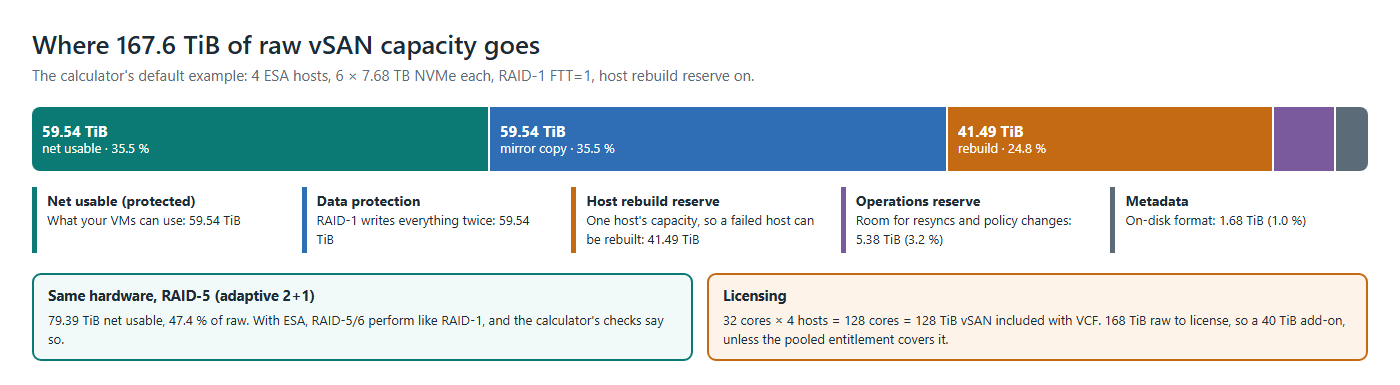
The policy comparison under it runs the same hardware through every policy. Here RAID-5 (adaptive 2+1) would give 79.39 TiB, a third more. The design checks say so as well: with ESA, RAID-5/6 perform like RAID-1. FTT=2 mirroring needs 5 hosts, RAID-6 needs 6, and the table says that instead of showing a number.
On licensing: vSAN is licensed per TiB of raw claimed capacity (for OSA only the capacity tier, not the cache). The entitlement is pooled, so a shortfall in this cluster may be covered by cores elsewhere. Otherwise you need the add-on.
Copy summary puts the result as text on the clipboard, for an email or a ticket.
6. VCF Management Domain Sizing
Sizing is based on VCF 9.1 with VCF Management Services and the VCF Installer deployment models:
- Deployment model: first instance (new fleet) or an additional instance that reuses the fleet’s VCF Operations, VCF Automation and log management. Then Simple, HA Small, HA Medium or HA Large.
- Management components, pre-filled from the model and all changeable: vCenter size and storage, NSX Manager size and node count, VCF Operations size and nodes, cloud proxy, VCF Automation.
- Add-ons: log management, real-time metrics, VCF Operations for Networks, Avi Load Balancer controllers, an NSX Edge cluster.
- Workload domains: each VI workload domain’s vCenter and NSX Managers run in the management domain. Dedicated or shared NSX per domain.
- Fit check: number of management hosts, cores and RAM per host, vCPU:pCore ratio, vSAN raw capacity per host, the vSAN policy for the management VMs, free space reserve, ESXi and vSAN memory overhead, and optionally VM swap.
The result is the total vCPU, memory and disk, a bill of materials per appliance (nodes, size, vCPU, RAM, disk, totals), and the checks. The Simple model with one workload domain, for example, comes to 90 vCPU, 305 GB RAM and 8.68 TB provisioned disk in 12 appliances. The checks also include:
- Simple model: no high availability for the management plane, so a failed NSX Manager means a restore from backup.
- VCF Automation is the largest single component, and can be deployed later.
- The management domain’s NSX is never shared with a VI workload domain.
- Whether the management cluster fits with N+1, at the vCPU:pCore ratio you chose. Broadcom’s maximum for the management domain is 2:1.
Export CSV gives the bill of materials for Excel, quotes and capacity plans.
7. Fleet Topology
Here you design the whole fleet: VCF instances with their location, deployment model (HA with 3 NSX Managers, or Simple with 1) and one or two availability zones, then per instance the management domain and VI workload domains, each with clusters. A cluster is standard, stretched (hosts in AZ1 and AZ2, with a witness site) or a remote / edge site, with principal storage vSAN ESA, vSAN OSA, a vSAN storage cluster client, NFS, Fibre Channel or vVols. Workload domains can get a dedicated NSX Manager or share one with another workload domain.
The diagram draws itself while you type: instances, AZs, the witness, domains, which vCenters and NSX Managers run in the management domain, and every host. Host names shows or hides the individual hosts. Fit to width and Show editor help with large fleets.
The checks look at the topology itself, for example:
- A stretched vSAN cluster needs a witness in a third site, at most 200 ms RTT to the data sites, and at most 5 ms between the AZs.
- A 3-node vSAN cluster at a remote site has no spare host for rebuilds.
- A remote cluster needs at least 10 Mbps and at most 300 ms RTT to the central site, and its vCenter and NSX stay in the central management domain.
Export SVG or PNG for design documents, Visio, draw.io or a slide. Save JSON keeps the design. Start with Load example to see a fleet with two instances, six domains, eight clusters and 46 hosts.
8. Privacy and data handling
Both tools are built so customer data stays with you. They differ in detail:
| Workbook Generator | VCF Calculators | |
|---|---|---|
| Where your input lives | In the memory of the browser tab only | In the memory of the page; Fleet Topology also in the browser’s local storage, so you can continue on the same device |
| Stored on the server | Nothing you enter | Nothing you enter |
| Cookies, browser storage | None | Local storage for Fleet Topology only, with a button to clear it |
| External requests | Only the Excel library (ExcelJS), when you import or export Excel, without workbook data | None |
| Usage statistics | Yes, in the site’s own database, no third-party analytics: page opened, example loaded, import / export, active time, browser family, time zone, referrer host, country. IP addresses only as a salted hash | None |
| On export | The name, company and optional email you enter in the export dialog, plus the shape of the design (version, model, counts of domains / clusters / hosts, platform, storage), never its values | Nothing |
| Never collected | Customer and project names, hostnames, IPs, subnets, VLANs, domain names, any value in the workbook | Anything you type |
| Passwords | Never captured; shown as <to be supplied during deployment> | Not asked for. Don’t enter any |
Raw usage events from the generator are deleted after 24 months, and only monthly totals remain. To have your name, company or email removed, contact me.
Once you export, the files are yours to protect. A build workbook with every hostname and IP of a customer’s private cloud deserves the customer’s classification, not a shared drive.
9. Limits and good habits
- Estimates, not a design sign-off. Check vSAN results with the official vSAN ReadyNode Sizer, and the whole design against the Broadcom VCF documentation, the VCF Planning and Preparation Workbook and the Dell documentation for your exact release.
- Export at the end of every session. The generator forgets everything when the tab closes. Both tools are a personal project, offered as-is, without a service level, and can change or be offline at any time. Your JSON, Excel, CSV, SVG and PNG files keep working without them.
- Keep the original JSON when you import into a newer version. Old files are migrated where possible, but check the result.
- Edit in the tool, not in Excel. Changes made directly in the exported workbook aren’t read back on import.
- Feedback is welcome. If a check is wrong, a default outdated or an option missing for your VCF release, let me know and I’ll fix it.
Links again: