
NetBox is the source of truth for your infrastructure: sites, racks, devices, cables, VLANs, prefixes, IP addresses, virtual machines, circuits and the relationships between them. It isn’t a monitoring tool and it doesn’t discover your network on its own. It holds the intended state, and everything else (DHCP, DNS, Prometheus, provisioning scripts) reads from it. Once the data is in NetBox, the spreadsheet with “free IPs” can go.
This guide builds NetBox on one Debian 13 VM, with PostgreSQL and Valkey on the same machine. That keeps it simple to run and simple to restore. The extras are where it gets interesting: people log in with authentik, and their authentik groups become NetBox groups with object permissions. On top of that come branching, a DNS plugin, topology maps, lifecycle tracking, vCenter sync, custom scripts, event rules and Prometheus service discovery. Secrets live in OpenBao.
What you’ll end up with:
- NetBox 4.7.6 from the release archive, in a versioned directory with a symlink, so an upgrade is a symlink switch and a rollback is switching it back
- PostgreSQL 17 and Valkey on the same VM, Valkey over a Unix socket only
- Gunicorn behind nginx with TLS from your internal CA
- Secrets in OpenBao, delivered to systemd through an environment file, not hard-coded in
configuration.py - authentik OIDC with a pipeline that syncs only
netbox-*groups, object permissions per group, and a local break-glass superuser - Plugins: netbox-branching, netbox-plugin-dns, netbox-topology-views, netbox-lifecycle and Prometheus service discovery
- netbox-sync pulling clusters, hosts and VMs from vCenter on a timer
- v2 API tokens, a custom provisioning script, event rules and Git data sources
- Prometheus metrics, nightly backups with a restore test, upgrades, troubleshooting and a checklist
Written against: NetBox v4.7.6 (released 24 November 2026), Python 3.13, PostgreSQL 17 and Valkey from Debian 13 “trixie”, and authentik 2026.8. Plugin versions were current on PyPI in late November 2026. All commands run as root unless noted.
Table of contents
- Architecture
- Placeholders
- Prerequisites
- Secrets in OpenBao
- PostgreSQL
- Valkey
- Install NetBox from the release archive
- configuration.py
- Gunicorn, systemd and nginx
- authentik SSO and permissions
- Plugins
- Filling NetBox: order and conventions
- vCenter sync with netbox-sync
- Automation: tokens, scripts, event rules, Git
- Monitoring and Prometheus service discovery
- Backups and a restore test
- Upgrades
- Troubleshooting
- Checklist
1. Architecture
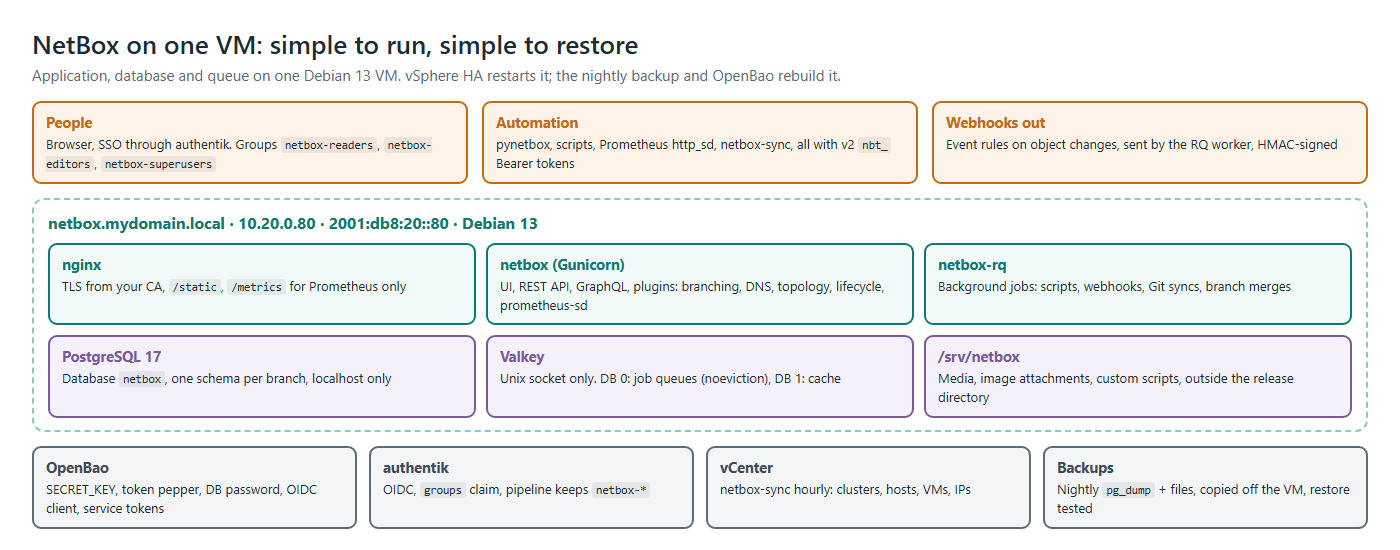
NetBox is a Django application. On this VM it runs as:
| Service | Does |
|---|---|
| nginx | TLS, static files, and /metrics for Prometheus only |
| netbox | Gunicorn serving the web UI, REST API, GraphQL and plugins |
| netbox-rq | The background worker: scripts, webhooks, data source syncs, branch merges |
| postgresql | All data: objects, change log, journal, users, tokens, and one schema per branch |
| valkey-server | Database 0 for task queues, database 1 for the cache |
Outside the VM:
- authentik signs users in.
- OpenBao holds the secrets that must survive a rebuild.
- vCenter is read by netbox-sync.
- Prometheus scrapes NetBox and reads its service discovery.
Availability: one VM. vSphere HA restarts it if its host dies, and the nightly backup (section 16) rebuilds it on a new VM in well under an hour. For a documentation and IPAM tool that’s usually the right trade. While NetBox is down, nothing in your network stops working. You just can’t look things up or change them.
Prefer your Patroni cluster for the database? Skip section 5, create the database and role on Patroni (with
GRANT CREATE ON DATABASEfor branching), and setHOSTto the Patroni VIP withsslmode=verify-fullin section 8. Everything else stays the same.
2. Placeholders
| Placeholder | Meaning |
|---|---|
netbox.mydomain.local / 10.20.0.80 / 2001:db8:20::80 | The NetBox VM |
bao.mydomain.local | OpenBao VIP, KV v2 at kv/ |
auth.mydomain.com | authentik |
vcenter.mydomain.local | vCenter |
10.20.0.90 | Prometheus |
/etc/ssl/mydomain-ca.crt | Your internal CA certificate |
3. Prerequisites
| VM | Size | Notes |
|---|---|---|
netbox | 4 vCPU, 8 GB, 60 GB | Debian 13 |
NetBox 4.7 supports Python 3.12, 3.13 and 3.14, PostgreSQL 15 or later and Redis 6.0 or later (Valkey speaks the same protocol). Debian 13 ships Python 3.13, PostgreSQL 17 and Valkey, so everything comes from the Debian archive.
apt update
apt install -y python3 python3-pip python3-venv python3-dev build-essential \
  libxml2-dev libxslt1-dev libffi-dev libpq-dev libssl-dev zlib1g-dev \
  postgresql valkey-server nginx curl jq git
python3 -V     # 3.13.xCode language: CSS (css)
Put your internal CA in the system store, because authentik, vCenter and OpenBao are checked against it:
cp mydomain-ca.crt /usr/local/share/ca-certificates/mydomain-ca.crt
update-ca-certificates
ln -sf /usr/local/share/ca-certificates/mydomain-ca.crt /etc/ssl/mydomain-ca.crt
DNS: netbox.mydomain.local with an A record 10.20.0.80 and an AAAA record 2001:db8:20::80.
4. Secrets in OpenBao
export BAO_ADDR=https://bao.mydomain.local:8200
bao login -method=oidc

bao kv put kv/netbox/app \
  secret_key="$(python3 -c 'import secrets,string; a=string.ascii_letters+string.digits+"@%^-_=+"; print("".join(secrets.choice(a) for _ in range(60)))')" \
  token_pepper_1="$(python3 -c 'import secrets,string; a=string.ascii_letters+string.digits+"@%^-_=+"; print("".join(secrets.choice(a) for _ in range(60)))')" \
  pg_password="$(openssl rand -base64 33 | tr -d '/+=')" \
  oidc_client_id="<from authentik, section 10>" \
oidc_client_secret="<from authentik, section 10>"Code language: JavaScript (javascript)| Key | Why it matters |
|---|---|
secret_key | Signs sessions and CSRF tokens. Changing it logs everyone out |
token_pepper_1 | NetBox hashes v2 API tokens with this pepper. Lose it, and every v2 token stops working. It has to survive a rebuild |
pg_password | The netbox PostgreSQL role |
oidc_* | authentik client credentials, filled in during section 10 |
The secret_key and pepper are 60 characters of letters, digits and a few symbols. NetBox requires at least 50. The symbol set leaves out $, quotes, brackets and &, so the values survive both systemd’s environment file and a bash source of the same file (section 8.1).
5. PostgreSQL
PGPW="$(bao kv get -field=pg_password kv/netbox/app)"
sudo -u postgres psql <<SQL
CREATE ROLE netbox LOGIN PASSWORD '${PGPW}';
CREATE DATABASE netbox OWNER netbox;
-- netbox-branching creates one schema per branch
GRANT CREATE ON DATABASE netbox TO netbox;
SQL
unset PGPWCode language: PHP (php)
Debian’s PostgreSQL listens on localhost only and uses scram-sha-256 for TCP connections from localhost, which is what NetBox uses. Nothing to open. Check it:
psql "host=localhost dbname=netbox user=netbox" -c 'select version();'Code language: JavaScript (javascript)6. Valkey
Valkey only has to serve NetBox on this machine, so it listens on a Unix socket and nowhere else. File permissions on the socket are the access control.
Add to /etc/valkey/valkey.conf (at the end, so these settings win):
# NetBox only: Unix socket, no TCP
port 0
unixsocket /run/valkey/valkey.sock
unixsocketperm 770

# Never evict: database 0 holds the job queues
maxmemory 512mb
maxmemory-policy noevictionCode language: PHP (php)
noeviction matters. An evicting policy such as allkeys-lru can silently drop queued jobs when memory runs short. With noeviction, Valkey refuses new writes instead, and you see the error.
systemctl restart valkey-server
ls -l /run/valkey/valkey.sock         # srwxrwx--- valkey valkeyCode language: PHP (php)
The netbox user (created in section 7) joins the valkey group so it can use the socket.
7. Install NetBox from the release archive
adduser --system --group --home /opt/netbox --no-create-home netbox
usermod -aG valkey netbox

cd /tmp
wget https://github.com/netbox-community/netbox/archive/refs/tags/v4.7.6.tar.gz
tar -xzf v4.7.6.tar.gz -C /opt
ln -sfn /opt/netbox-4.7.6 /opt/netbox
ls -l /opt | grep netboxCode language: JavaScript (javascript)
Each release goes in its own directory, and /opt/netbox is a symlink. An upgrade (section 17) builds the new version next to the running one and switches the symlink.
Media, scripts and reports live outside the release directory, so they don’t have to be copied at every upgrade:
mkdir -p /srv/netbox/{media,scripts,reports}
chown -R netbox:netbox /srv/netbox
8. configuration.py
8.1 Secrets for systemd
install -d -m 750 -o root -g netbox /etc/netbox
export BAO_ADDR=https://bao.mydomain.local:8200
umask 027
cat > /etc/netbox/netbox.env <<EOF
NETBOX_SECRET_KEY=$(bao kv get -field=secret_key kv/netbox/app)
NETBOX_TOKEN_PEPPER_1=$(bao kv get -field=token_pepper_1 kv/netbox/app)
NETBOX_PG_PASSWORD=$(bao kv get -field=pg_password kv/netbox/app)
NETBOX_OIDC_KEY=$(bao kv get -field=oidc_client_id kv/netbox/app)
NETBOX_OIDC_SECRET=$(bao kv get -field=oidc_client_secret kv/netbox/app)
EOF
chgrp netbox /etc/netbox/netbox.env && chmod 640 /etc/netbox/netbox.envCode language: JavaScript (javascript)
systemd reads this file for the services, and you source it in a shell before running manage.py or upgrade.sh. Values with $, quotes, spaces or brackets would break one of the two. The generators in section 4 avoid them. Check the authentik client secret too, and regenerate it in authentik if it contains any of those characters.
8.2 The file
/opt/netbox/netbox/netbox/configuration.py:
import os
from netbox_branching.utilities import DynamicSchemaDict

def env(name):
    try:
        return os.environ[name]
    except KeyError:
        raise RuntimeError(f"{name} is not set: is /etc/netbox/netbox.env loaded?")

# --- Required -----------------------------------------------------------------
ALLOWED_HOSTS = ['netbox.mydomain.local']
CSRF_TRUSTED_ORIGINS = ['https://netbox.mydomain.local']

SECRET_KEY = env('NETBOX_SECRET_KEY')

API_TOKEN_PEPPERS = {
    1: env('NETBOX_TOKEN_PEPPER_1'),
}

DATABASES = DynamicSchemaDict({
    'default': {
        'ENGINE': 'django.db.backends.postgresql',
        'NAME': 'netbox',
        'USER': 'netbox',
        'PASSWORD': env('NETBOX_PG_PASSWORD'),
        'HOST': 'localhost',
        'PORT': '',
        'CONN_MAX_AGE': 300,
    }
})
DATABASE_ROUTERS = ['netbox_branching.database.BranchAwareRouter']

REDIS = {
    'tasks':   {'URL': 'unix:///run/valkey/valkey.sock?db=0'},
    'caching': {'URL': 'unix:///run/valkey/valkey.sock?db=1'},
}

# --- Files outside the release directory --------------------------------------
MEDIA_ROOT = '/srv/netbox/media'
SCRIPTS_ROOT = '/srv/netbox/scripts'
REPORTS_ROOT = '/srv/netbox/reports'

# --- Security -----------------------------------------------------------------
LOGIN_REQUIRED = True
LOGIN_TIMEOUT = 8 * 3600
SESSION_COOKIE_SECURE = True
CSRF_COOKIE_SECURE = True
SECURE_SSL_REDIRECT = False          # nginx already redirects
SECURE_HSTS_SECONDS = 31536000
EXEMPT_VIEW_PERMISSIONS = []
ALLOW_TOKEN_RETRIEVAL = False

# --- SSO (section 10) ---------------------------------------------------------
REMOTE_AUTH_ENABLED = True
REMOTE_AUTH_BACKEND = 'social_core.backends.open_id_connect.OpenIdConnectAuth'
SOCIAL_AUTH_OIDC_OIDC_ENDPOINT = 'https://auth.mydomain.com/application/o/netbox/'
SOCIAL_AUTH_OIDC_KEY = env('NETBOX_OIDC_KEY')
SOCIAL_AUTH_OIDC_SECRET = env('NETBOX_OIDC_SECRET')
SOCIAL_AUTH_OIDC_SCOPE = ['openid', 'email', 'profile']
SOCIAL_AUTH_BACKEND_ATTRS = {'oidc': ('authentik', 'login')}
LOGOUT_REDIRECT_URL = 'https://auth.mydomain.com/application/o/netbox/end-session/'
SOCIAL_AUTH_PIPELINE = (
    'social_core.pipeline.social_auth.social_details',
    'social_core.pipeline.social_auth.social_uid',
    'social_core.pipeline.social_auth.auth_allowed',
    'social_core.pipeline.social_auth.social_user',
    'social_core.pipeline.user.get_username',
    'social_core.pipeline.user.create_user',
    'social_core.pipeline.social_auth.associate_user',
    'netbox.authentication.user_default_groups_handler',
    'social_core.pipeline.social_auth.load_extra_data',
    'social_core.pipeline.user.user_details',
    'netbox.custom_pipeline.sync_groups',
    'netbox.custom_pipeline.set_superuser',
)

# --- Plugins (section 11) -----------------------------------------------------
PLUGINS = [
    'netbox_branching',
    'netbox_dns',
    'netbox_topology_views',
    'netbox_lifecycle',
    'netbox_prometheus_sd',
]
PLUGINS_CONFIG = {
    'netbox_dns': {
        'zone_default_ttl': 3600,
        'zone_soa_mname': 'ns1.mydomain.local',
        'zone_soa_rname': 'hostmaster.mydomain.local',
        'zone_nameservers': ['ns1.mydomain.local', 'ns2.mydomain.local'],
    },
}

# --- Housekeeping and behaviour -----------------------------------------------
TIME_ZONE = 'Europe/Amsterdam'
CHANGELOG_RETENTION = 730            # days of change log
JOB_RETENTION = 90                   # days of job results
ENFORCE_GLOBAL_UNIQUE = True         # no duplicate prefixes or IPs in the global table
PREFER_IPV4 = False
METRICS_ENABLED = True
CENSUS_REPORTING_ENABLED = FalseCode language: PHP (php)
A few choices explained:
DynamicSchemaDictandDATABASE_ROUTERScome from netbox-branching. The plugin needs them, and theimportat the top needs the plugin in the virtualenv. Section 9.1 installs it together with NetBox, before the first start, so this works on day one.- The Unix socket URLs need no password: only
root,valkeyand members of thevalkeygroup can open the socket. ENFORCE_GLOBAL_UNIQUEstops two people entering the same prefix or IP address outside a VRF. With VRFs you can still overlap on purpose.ALLOW_TOKEN_RETRIEVAL = False: a token is shown once, when it’s created. After that, nobody can read it back, admins included.CENSUS_REPORTING_ENABLED = Falsestops NetBox reporting its version and deployment type to NetBox Labs.
8.3 The group sync pipeline
/opt/netbox/netbox/netbox/custom_pipeline.py:
from users.models import Group

PREFIX = "netbox-"
SUPERUSER_GROUP = "netbox-superusers"


def _claim_groups(response):
    groups = response.get("groups", [])
    if isinstance(groups, str):
        groups = [groups]
    # Only groups meant for NetBox. Everything else in authentik stays out.
    return {g for g in groups if g.startswith(PREFIX)}


def sync_groups(response, user, backend, *args, **kwargs):
    wanted = [Group.objects.get_or_create(name=name)[0] for name in sorted(_claim_groups(response))]
    user.groups.set(wanted)


def set_superuser(response, user, backend, *args, **kwargs):
    is_super = SUPERUSER_GROUP in _claim_groups(response)
    if user.is_superuser != is_super:
        user.is_superuser = is_super
        user.save(update_fields=["is_superuser"])Code language: PHP (php)
This file and configuration.py are inside the release directory, so section 17 copies them forward.
9. Gunicorn, systemd and nginx
9.1 Plugins first, then the upgrade script
The plugins (section 11) go in local_requirements.txt, so upgrade.sh installs them every time:
cat > /opt/netbox/local_requirements.txt <<'EOF'
dulwich
netboxlabs-netbox-branching==1.2.4
netbox-plugin-dns==1.7.4
netbox-topology-views==5.0.3
netbox-lifecycle==1.1.11
netbox-plugin-prometheus-sd==2.2.0
EOFCode language: JavaScript (javascript)
dulwich enables Git data sources (section 14).
Run the upgrade script. It builds the virtualenv, installs everything, runs the database migrations and collects static files:
set -a; . /etc/netbox/netbox.env; set +a
/opt/netbox/upgrade.shCode language: JavaScript (javascript)
Create the break-glass superuser:
source /opt/netbox/venv/bin/activate
cd /opt/netbox/netbox
python3 manage.py createsuperuser --username breakglass
deactivate
Store its password in the envelope with your other break-glass credentials. Day to day, everyone logs in through authentik.
9.2 Gunicorn and systemd
cp /opt/netbox/contrib/gunicorn.py /opt/netbox/gunicorn.py
cp /opt/netbox/contrib/netbox.service /opt/netbox/contrib/netbox-rq.service /etc/systemd/system/
In /opt/netbox/gunicorn.py, check bind = '127.0.0.1:8001', and set workers to about 2 × vCPU + 1 (9 for 4 vCPUs).
A drop-in gives both services the secrets and makes them wait for the database and Valkey. Gunicorn also gets a fresh directory for Prometheus metrics:
for svc in netbox netbox-rq; do
  mkdir -p /etc/systemd/system/${svc}.service.d
  cat > /etc/systemd/system/${svc}.service.d/override.conf <<'EOF'
[Unit]
After=postgresql.service valkey-server.service
Wants=postgresql.service valkey-server.service

[Service]
EnvironmentFile=/etc/netbox/netbox.env
EOF
done

cat >> /etc/systemd/system/netbox.service.d/override.conf <<'EOF'
RuntimeDirectory=netbox-metrics
Environment=PROMETHEUS_MULTIPROC_DIR=/run/netbox-metrics
EOF

systemctl daemon-reload
systemctl enable --now netbox netbox-rq
systemctl status netbox netbox-rq --no-pagerCode language: JavaScript (javascript)
Gunicorn runs several worker processes. The Prometheus client library needs a shared, empty directory to combine their metrics into one /metrics. RuntimeDirectory gives every start a fresh one.
Check the queues and the worker:
source /opt/netbox/venv/bin/activate && cd /opt/netbox/netbox
python3 manage.py rqstats
9.3 nginx
A certificate for netbox.mydomain.local (both addresses in the SAN), issued by your CA or by OpenBao’s PKI engine, in /etc/ssl/netbox/.
/etc/nginx/sites-available/netbox:
server {
    listen 443 ssl;
    listen [::]:443 ssl;
    http2 on;
    server_name netbox.mydomain.local;

    ssl_certificate     /etc/ssl/netbox/netbox.crt;
    ssl_certificate_key /etc/ssl/netbox/netbox.key;
    ssl_protocols       TLSv1.2 TLSv1.3;

    client_max_body_size 25m;

    location /static/ {
        alias /opt/netbox/netbox/static/;
        expires 7d;
    }

    location /metrics {
        allow 10.20.0.90;     # Prometheus
        allow 127.0.0.1;
        deny all;
        proxy_pass http://127.0.0.1:8001;
        proxy_set_header Host $http_host;
    }

    location / {
        proxy_pass http://127.0.0.1:8001;
        proxy_set_header Host $http_host;
        proxy_set_header X-Forwarded-Host $http_host;
        proxy_set_header X-Real-IP $remote_addr;
        proxy_set_header X-Forwarded-For $proxy_add_x_forwarded_for;
        proxy_set_header X-Forwarded-Proto $scheme;
        proxy_read_timeout 300s;
    }
}

server {
    listen 80;
    listen [::]:80;
    server_name netbox.mydomain.local;
    return 301 https://$host$request_uri;
}Code language: PHP (php)
/static/ points at the symlink, so a release switch serves the new release’s files automatically.
ln -s /etc/nginx/sites-available/netbox /etc/nginx/sites-enabled/netbox
rm -f /etc/nginx/sites-enabled/default
nginx -t && systemctl reload nginx
curl -sI https://netbox.mydomain.local/login/ | head -1     # HTTP/2 200Code language: JavaScript (javascript)
Firewall (nftables): allow TCP 80 and 443 from your client networks, and SSH from the admin VLAN only. PostgreSQL and Valkey aren’t listening on the network, so they need no rules.
10. authentik SSO and permissions
10.1 authentik
- Applications → Applications → New Application. Name
NetBox, slugnetbox. - Provider type OAuth2/OpenID Connect, a Confidential client.
- Redirect URI, type Strict Authorization:
https://netbox.mydomain.local/oauth/complete/oidc/ - Any signing key.
- Bind a group policy so only members of
netbox-readers,netbox-editorsornetbox-superuserssee and use the application. - Put the Client ID and Client Secret in OpenBao (
bao kv patch kv/netbox/app oidc_client_id=... oidc_client_secret=...), regenerate/etc/netbox/netbox.env(section 8.1), andsystemctl restart netbox.
authentik’s default profile scope puts the user’s group names in the groups claim. The pipeline from section 8.3 keeps only those starting with netbox-.
Prefer application entitlements? authentik can expose entitlements of the NetBox application as the
groupsclaim instead of directory groups, through a scope mapping namednetbox. Then setSOCIAL_AUTH_OIDC_SCOPE = ['openid', 'email', 'netbox']and name the entitlementsnetbox-readersand so on.
Log out, and the login page shows an authentik button next to the local login form.
10.2 Groups and object permissions
NetBox permissions are object permissions: a set of object types, a set of actions (view, add, change, delete), optionally a constraint that limits which objects, and the groups or users they apply to. The groups are created by the pipeline at first login, or you create them up front under Admin → Groups.
Under Admin → Permissions:
| Permission | Object types | Actions | Constraint | Groups |
|---|---|---|---|---|
read-all | All | View | none | netbox-readers, netbox-editors |
edit-infra | DCIM, IPAM, Virtualization, Circuits, Tenancy, Wireless | View, Add, Change, Delete | none | netbox-editors |
edit-tags-journal | Extras > Tag, Extras > Journal entry, Extras > Image attachment | View, Add, Change, Delete | none | netbox-editors |
branches | netbox_branching > Branch | View, Add, Change | none | netbox-editors |
dns-records | netbox_dns > Record | View, Add, Change, Delete | {"zone__name__endswith": "mydomain.local"} | netbox-editors |
run-scripts | Extras > Script | View, Run | none | netbox-editors |
Constraints are JSON filters on the object, so you can scope a team to its own site, tenant or VRF:
{"site__slug": "ams1"}Code language: JSON / JSON with Comments (json)netbox-superusers doesn’t need permissions: the pipeline makes its members superusers, who can do everything. Keep that group small.
11. Plugins
The plugins were installed in section 9.1 through local_requirements.txt and enabled in configuration.py. What each adds:
| Plugin | Version for 4.7 | Adds |
|---|---|---|
| netbox-branching | 1.2.4 | Git-like branches: make changes in a branch, review the diff, merge into main, or revert a merge. Each branch is a PostgreSQL schema |
| netbox-plugin-dns | 1.7.x | DNS zones, views, records and nameservers in NetBox, with records created automatically from IP addresses with a DNS name |
| netbox-topology-views | 5.0.3 | Topology maps drawn from your cables, per site, rack or role, with saved layouts and export |
| netbox-lifecycle | 1.1.x | End-of-sale and end-of-support dates, support contracts and licences per device and module |
| netbox-plugin-prometheus-sd | 2.2.0 | Prometheus HTTP service discovery endpoints for devices, VMs, services and IP addresses |
Check every plugin’s compatibility matrix before each NetBox upgrade. Plugins pin to NetBox minor versions, and one incompatible plugin stops NetBox from starting. netbox-plugin-prometheus-sd lists only “NetBox 4.0 and later” and its CI tested up to 4.6 when I wrote this, so test it on 4.7 on a staging copy first, or leave it out.
11.1 Branching in practice
- Click the branch selector at the top, Create branch
ams1-rack-12. Provisioning copies the main schema, which takes a few seconds. - Switch to the branch. Everything you do now (racks, devices, cables, IPs) happens in the branch only. Main is untouched.
- Sync the branch to pull in changes made in main in the meantime.
- Diff shows every change. Let a colleague review it.
- Merge. The changes are replayed in main as normal change log entries. If it goes wrong, revert the merge.
Merges run as background jobs, which is why netbox-rq must be running.
11.2 DNS from IPAM
With netbox-plugin-dns, a view internal and a zone mydomain.local in that view, plus the view linked to your prefixes, an IP address with DNS name grafana.mydomain.local gets an A record (and a PTR in the matching reverse zone, if you created one) automatically. Change the IP, and the records follow.
Feeding the zone to a real DNS server is a separate step: AdGuard rewrites, a BIND zone export, or the companion netbox-plugin-bind-provisioner for RFC 9432 catalog zones. Start by using NetBox as the record of truth, and automate the export once the data is clean.
12. Filling NetBox: order and conventions
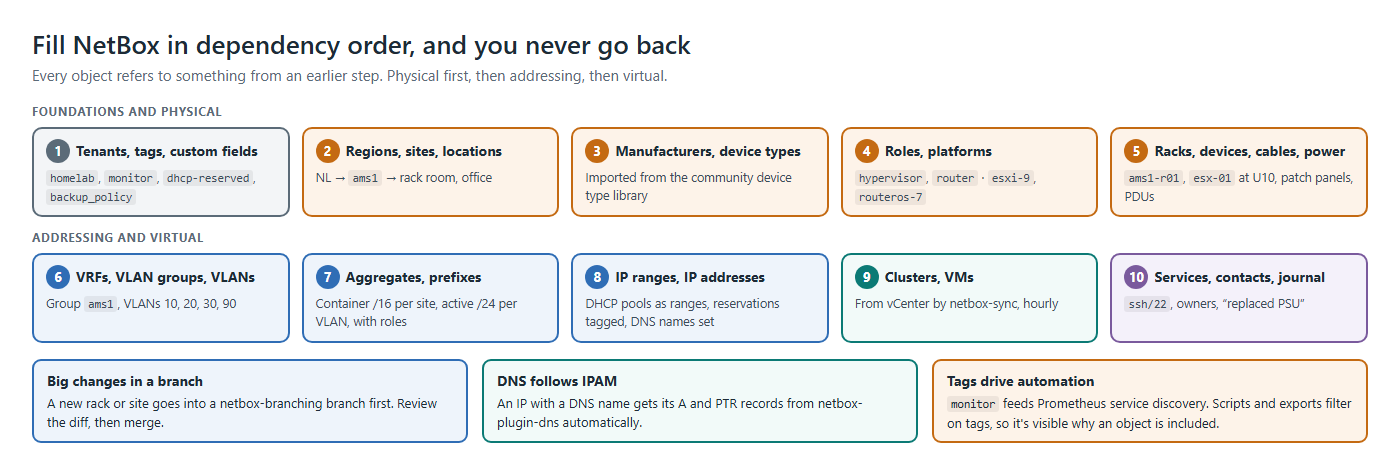
NetBox objects depend on each other. Fill them in this order and you never have to go back:
| Step | Objects | Example |
|---|---|---|
| 1 | Tenants, tags, custom fields | Tenant homelab. Tags prod, lab, dhcp-reserved, monitor. Custom field backup_policy (selection) on devices and VMs |
| 2 | Regions, sites, locations | Region NL, site ams1, locations rack-room, office |
| 3 | Manufacturers, device types, module types | Dell, MikroTik, Ubiquiti. Import from the device type library (below) |
| 4 | Device roles, platforms | Roles hypervisor, router, switch, firewall. Platforms esxi-9, routeros-7, debian-13 |
| 5 | Racks, devices, cables, power | ams1-r01, esx-01 at U10–U11, patch panels, PDUs |
| 6 | VRFs, VLAN groups, VLANs | VLAN group ams1, VLANs 10, 20, 30, 90 |
| 7 | RIRs, aggregates, prefixes | A container /16 per site, 10.20.0.0/24 active with role and VLAN |
| 8 | IP ranges, IP addresses | DHCP pool as an IP range, reservations tagged dhcp-reserved, DNS names set |
| 9 | Clusters, virtual machines | From vCenter, with netbox-sync (section 13) |
| 10 | Services, contacts, journal | ssh/22 on every Linux VM, owners, “replaced PSU” entries |
12.1 Device types from the community library
Don’t type device types by hand. The community devicetype-library has thousands, with every interface, console port and power port. The Device-Type-Library-Import script loads them, for the vendors you name:
git clone https://github.com/netbox-community/Device-Type-Library-Import.git /opt/nb-dt-import
cd /opt/nb-dt-import
python3 -m venv venv && . venv/bin/activate
pip install -r requirements.txt
cp .env.example .env    # set NETBOX_URL and NETBOX_TOKEN (a token with write rights)
./nb-dt-import.py --vendors dell,mikrotik,ubiquiti,apcCode language: PHP (php)
Check that the script version you clone supports NetBox 4.7 and v2 tokens before you run it.
12.2 Conventions that pay off
- Prefix roles and status. Mark
containerprefixes (a /16 per site) andactiveprefixes (each VLAN’s subnet). Mark pools of addresses that are all usable as “Is a pool”, and DHCP pools as IP ranges with statusreserved. - One tag per automation.
dhcp-reserved,monitor,backup: scripts and exports filter on tags, and humans can see why an object is included. - Config contexts hold structured data per site, role or platform, such as NTP servers, syslog targets or SNMP locations. Templates and scripts read it from the device.
- Journal entries instead of comments: dated, attributed and searchable (“replaced disk 3, RMA 12345”).
13. vCenter sync with netbox-sync
netbox-sync reads clusters, ESXi hosts, VMs, interfaces, IPs and VLANs from vCenter and keeps NetBox in step. It only touches objects it created, and marks what disappeared from vCenter as decommissioning (or deletes it after a delay, if you turn pruning on).
On the NetBox VM:
cd /opt
git clone https://github.com/bb-Ricardo/netbox-sync.git
cd netbox-sync
python3 -m venv .venv && . .venv/bin/activate
pip install --upgrade pip wheel && pip install -r requirements.txt
pip install --upgrade vcf-sdk    # only if you want vCenter tags syncedCode language: PHP (php)
A NetBox token for it: create a user svc-netbox-sync with a permission covering DCIM, IPAM, Virtualization and Tenancy (view, add, change, delete), and a v2 token for that user. v2 tokens start with nbt_ and are sent as Authorization: Bearer. netbox-sync detects that by itself.
A vCenter account: a read-only role on the vCenter root, propagated.
/opt/netbox-sync/settings.ini:
[common]
log_level = INFO

[netbox]
api_token = <nbt_ token from OpenBao>
host_fqdn = netbox.mydomain.local
validate_tls_certs = True
prune_enabled = True
prune_delay_in_days = 30

[source/vcenter]
type = vmware
host_fqdn = vcenter.mydomain.local
username = svc-netbox@vsphere.local
password = <from OpenBao>
validate_tls_certs = True
permitted_subnets = 10.20.0.0/16, 2001:db8:20::/48
cluster_site_relation = .* = ams1
host_role_relation = .* = hypervisor
vm_role_relation = .* = server
skip_vm_templates = True
vm_status_on_create = active
set_primary_ip = when-undefined
strip_vm_domain_name = TrueCode language: PHP (php)permitted_subnetsdecides which IPs are synced. Everything else (Docker bridges, link-local) stays out.set_primary_ip = when-undefinedlets you fix a VM’s primary IP by hand without netbox-sync overwriting it.
chmod 600 settings.ini
. .venv/bin/activate && ./netbox-sync.py -c settings.ini -n    # dry run first
./netbox-sync.py -c settings.iniCode language: PHP (php)
A timer, hourly:
# /etc/systemd/system/netbox-sync.service
[Unit]
Description=Sync vCenter into NetBox
After=network-online.target netbox.service

[Service]
Type=oneshot
WorkingDirectory=/opt/netbox-sync
ExecStart=/opt/netbox-sync/.venv/bin/python /opt/netbox-sync/netbox-sync.py -c /opt/netbox-sync/settings.iniCode language: PHP (php)
# /etc/systemd/system/netbox-sync.timer
[Timer]
OnCalendar=hourly
RandomizedDelaySec=5m
Persistent=true
[Install]
WantedBy=timers.targetCode language: PHP (php)systemctl daemon-reload && systemctl enable --now netbox-sync.timerCode language: CSS (css)Dell servers too? netbox-sync also has a
check_redfishsource that imports hardware details (serials, PSUs, disks, NICs) from inventory files written bycheck_redfishagainst iDRAC.
14. Automation: tokens, scripts, event rules, Git
14.1 API tokens
Create tokens per service account, never on a personal account, and give each account only the permissions it needs. NetBox 4.5 and later issue v2 tokens: hashed in the database with the pepper from section 4, prefixed nbt_, sent as a Bearer token:
curl -s -H "Authorization: Bearer $NB_TOKEN" -H "Accept: application/json" \
  "https://netbox.mydomain.local/api/ipam/prefixes/?status=active&limit=5" | jq '.results[].prefix'Code language: JavaScript (javascript)
Give tokens an expiry date and an allowed IP range (both are fields on the token), and store them in OpenBao.
With pynetbox:
import os
import pynetbox

nb = pynetbox.api("https://netbox.mydomain.local", token=os.environ["NB_TOKEN"])
prefix = nb.ipam.prefixes.get(prefix="10.20.0.0/24")
print(prefix.available_ips.list()[:5])Code language: JavaScript (javascript)
14.2 A custom script: provision a VM
Custom scripts run inside NetBox with full access to its models, and show up as forms in the UI. This one creates a VM, its interface, the next free IP from a prefix with a DNS name, and sets it as primary, all in one transaction:
/srv/netbox/scripts/provision_vm.py:
from django.db import transaction
from extras.scripts import Script, StringVar, ObjectVar, IntegerVar
from ipam.models import Prefix, IPAddress
from virtualization.models import Cluster, VirtualMachine, VMInterface
from dcim.models import DeviceRole


class ProvisionVM(Script):
    class Meta:
        name = "Provision VM"
        description = "Create a VM with an interface and the next free IP from a prefix"
        commit_default = False          # dry run unless you tick "commit"

    vm_name = StringVar(label="VM name", regex=r"^[a-z0-9-]+$")
    cluster = ObjectVar(model=Cluster)
    role = ObjectVar(model=DeviceRole, query_params={"vm_role": True})
    prefix = ObjectVar(model=Prefix, query_params={"status": "active"})
    vcpus = IntegerVar(default=2, min_value=1, max_value=32)
    memory_mb = IntegerVar(label="Memory (MB)", default=4096, min_value=512)
    domain = StringVar(default="mydomain.local")

    def run(self, data, commit):
        if VirtualMachine.objects.filter(name=data["vm_name"]).exists():
            self.log_failure(f"{data['vm_name']} already exists")
            return

        with transaction.atomic():
            vm = VirtualMachine(
                name=data["vm_name"], cluster=data["cluster"], role=data["role"],
                status="planned", vcpus=data["vcpus"], memory=data["memory_mb"],
            )
            vm.full_clean()
            vm.save()

            iface = VMInterface(virtual_machine=vm, name="eth0")
            iface.full_clean()
            iface.save()

            address = data["prefix"].get_first_available_ip()
            if not address:
                raise ValueError(f"No free IPs left in {data['prefix']}")
            ip = IPAddress(
                address=address, status="active", assigned_object=iface,
                dns_name=f"{vm.name}.{data['domain']}",
            )
            ip.full_clean()
            ip.save()

            vm.primary_ip4 = ip
            vm.save()

        self.log_success(f"Created {vm} with {ip} ({ip.dns_name})")
        return f"{vm.name} {ip.address.ip}"
Load it under Customization → Scripts → Add, pointing at the file. Run it with commit unticked first: NetBox runs it, shows the log, and rolls everything back. Thanks to netbox-plugin-dns, the A record exists the moment you commit.
14.3 Event rules
An event rule reacts to object changes (create, update, delete, job start or end) and runs a webhook or a script. Example: when a VM’s status changes to active, notify a webhook receiver (n8n, a small Flask app, or your deployment tool):
| Field | Value |
|---|---|
| Object types | Virtualization > Virtual machine |
| Events | Object updated |
| Conditions | {"and": [{"attr": "status.value", "value": "active"}]} |
| Action | Webhook vm-activated, POST to https://hooks.mydomain.local/netbox/vm, with a secret for HMAC signing |
Webhooks are sent by netbox-rq. The receiver checks the X-Hook-Signature header against the shared secret.
14.4 Git data sources
Keep scripts, export templates and config templates in Git instead of on disk:
- Operations → Data Sources → Add: type
git, URL of your repository, branchmain, and a read-only deploy token. - Sync it (or let it sync on a schedule).
- When you add a script, export template or config template, choose Data file instead of uploading. NetBox shows which commit it came from, and Sync pulls the latest version.
Changes then go through review in Git like any other code, and NetBox logs which version is in use.
15. Monitoring and Prometheus service discovery
15.1 NetBox’s own metrics
/etc/prometheus/scrape.d/netbox.yml:
scrape_configs:
  - job_name: netbox
    scheme: https
    tls_config:
      ca_file: /etc/prometheus/mydomain-ca.crt
    static_configs:
      - targets: ['netbox.mydomain.local']Code language: JavaScript (javascript)
nginx only lets Prometheus at /metrics.
/etc/prometheus/rules/netbox.yml:
groups:
  - name: netbox
    rules:
      - alert: NetBoxDown
        expr: up{job="netbox"} == 0
        for: 3m
        labels:
          severity: warning
        annotations:
          summary: "NetBox is not answering"
      - alert: NetBoxHigh5xx
        expr: sum(rate(django_http_responses_total_by_status_total{job="netbox",status=~"5.."}[5m])) > 0.2
        for: 10m
        labels:
          severity: warning
        annotations:
          summary: "NetBox is returning 5xx responses"Code language: JavaScript (javascript)
Check and reload:
docker run --rm -v /etc/prometheus:/etc/prometheus:ro --entrypoint promtool \
  quay.io/prometheus/prometheus:v3.13.5 check config /etc/prometheus/prometheus.yml
docker run --rm -v /etc/prometheus:/etc/prometheus:ro --entrypoint promtool \
  quay.io/prometheus/prometheus:v3.13.5 check rules /etc/prometheus/rules/netbox.yml
cd /opt/compose/monitoring && docker compose kill -s SIGHUP prometheusCode language: JavaScript (javascript)
Also watch the VM itself with node_exporter: disk space for PostgreSQL and the backups, and the netbox-rq service through the systemd collector. Background jobs quietly pile up if the worker dies.
15.2 Prometheus targets from NetBox
With netbox-plugin-prometheus-sd, Prometheus finds its targets in NetBox. Tag every VM that should be scraped with monitor. Then:
/etc/prometheus/scrape.d/netbox-sd.yml:
scrape_configs:
  - job_name: node-from-netbox
    http_sd_configs:
      - url: https://netbox.mydomain.local/api/plugins/prometheus-sd/virtual-machines/?status=active&tag=monitor
        refresh_interval: 5m
        authorization:
          type: Bearer
          credentials_file: /etc/prometheus/netbox-sd.token
        tls_config:
          ca_file: /etc/prometheus/mydomain-ca.crt
    relabel_configs:
      - source_labels: [__meta_netbox_primary_ip4]
        target_label: __address__
        replacement: '${1}:9100'
      - source_labels: [__meta_netbox_name]
        target_label: instance
      - source_labels: [__meta_netbox_role]
        target_label: roleCode language: JavaScript (javascript)
The token belongs to a service account with view permission on virtual machines and IP addresses only. Put a new VM into NetBox with status active and tag monitor, and Prometheus scrapes it within five minutes. Check the exact __meta_netbox_* labels your plugin version provides on Prometheus’ Service Discovery page before relying on them.
If service discovery should keep working while NetBox is down, keep the targets Prometheus already has: an http_sd source that fails keeps its last good list until the next successful refresh.
16. Backups and a restore test
| What | Where | How |
|---|---|---|
| Database | Local PostgreSQL | pg_dump below |
| Media, scripts | /srv/netbox | tar below |
configuration.py, custom_pipeline.py, gunicorn.py, local_requirements.txt | The release directory | tar below. Keep them in Git as well |
| nginx site, systemd drop-ins, Valkey settings | /etc | tar below |
| Secrets | OpenBao | Already backed up with Raft snapshots. The token pepper must survive |
Valkey only holds the cache and queued jobs, so it isn’t backed up.
/usr/local/sbin/netbox-backup:
#!/bin/bash
set -euo pipefail
umask 077
STAMP="$(date +%F)"
DIR=/var/backups/netbox
mkdir -p "${DIR}"

sudo -u postgres pg_dump -Fc netbox > "${DIR}/netbox-db-${STAMP}.dump"

tar -czf "${DIR}/netbox-files-${STAMP}.tar.gz" -C / \
  srv/netbox \
  opt/netbox/netbox/netbox/configuration.py \
  opt/netbox/netbox/netbox/custom_pipeline.py \
  opt/netbox/gunicorn.py \
  opt/netbox/local_requirements.txt \
  etc/nginx/sites-available/netbox \
  etc/systemd/system/netbox.service.d \
  etc/systemd/system/netbox-rq.service.d \
  etc/valkey/valkey.conf

find "${DIR}" -type f -mtime +14 -deleteCode language: PHP (php)
The service and timer:
# /etc/systemd/system/netbox-backup.service
[Unit]
Description=NetBox database and file backup
After=postgresql.service

[Service]
Type=oneshot
ExecStart=/usr/local/sbin/netbox-backupCode language: PHP (php)
# /etc/systemd/system/netbox-backup.timer
[Unit]
Description=Nightly NetBox backup
[Timer]
OnCalendar=*-*-* 02:15:00
RandomizedDelaySec=15m
Persistent=true
[Install]
WantedBy=timers.targetCode language: PHP (php)chmod 700 /usr/local/sbin/netbox-backup
systemctl daemon-reload && systemctl enable --now netbox-backup.timer
systemctl start netbox-backup.service && ls -l /var/backups/netbox/Code language: JavaScript (javascript)Copy /var/backups/netbox off the VM. A backup on the machine it protects isn’t a backup.
pg_dump includes the branch schemas too, so a restore brings back open branches with the rest.
The restore test, once, on a scratch VM:
- Build the VM with sections 3 to 7: the same NetBox version.
- Create the database and role (section 5), then
pg_restore -d netbox netbox-db-<date>.dumpas thepostgresuser. - Unpack the files archive into
/, and render/etc/netbox/netbox.envfrom OpenBao with the sameSECRET_KEYand token pepper. - Run
upgrade.sh. With the same versions, there are no migrations to apply. - Log in as
breakglass. Check devices, IPs, the change log, a branch, an image attachment, and that a v2 token still authenticates. If tokens fail, the pepper doesn’t match.
17. Upgrades
NetBox releases often, and minor versions (4.7 to 4.8) can contain breaking changes for plugins. Before every upgrade:
- Read the release notes of every version you skip over.
- Check the compatibility matrix of every plugin for the target version. If one isn’t ready yet, wait.
- Take a backup (
systemctl start netbox-backup.service), and a VM snapshot, and merge or close open branches.
Then:
NEW=4.7.7      # example
cd /tmp && wget https://github.com/netbox-community/netbox/archive/refs/tags/v${NEW}.tar.gz
tar -xzf v${NEW}.tar.gz -C /opt
OLD="$(readlink -f /opt/netbox)"
cp ${OLD}/local_requirements.txt ${OLD}/gunicorn.py /opt/netbox-${NEW}/
cp ${OLD}/netbox/netbox/configuration.py ${OLD}/netbox/netbox/custom_pipeline.py /opt/netbox-${NEW}/netbox/netbox/
# update plugin pins in local_requirements.txt if the matrix says so

systemctl stop netbox netbox-rq
ln -sfn /opt/netbox-${NEW} /opt/netbox
set -a; . /etc/netbox/netbox.env; set +a
/opt/netbox/upgrade.sh
systemctl start netbox netbox-rqCode language: PHP (php)
Media and scripts are in /srv/netbox, so there’s nothing else to copy. Check the login page, a few object views, manage.py rqstats, and the branch list. Delete the VM snapshot once you’re happy, and keep the old release directory until the next upgrade.
Rolling back is a symlink switch plus restarts, as long as no migrations ran. After a migration, roll back the VM snapshot (or restore the database dump you just made).
18. Troubleshooting
| Symptom | Likely cause | Fix |
|---|---|---|
RuntimeError: NETBOX_SECRET_KEY is not set from manage.py | Shell without the environment file | set -a; . /etc/netbox/netbox.env; set +a before manage.py and upgrade.sh |
ImportError: netbox_branching at startup | configuration.py imports the plugin, but the virtualenv doesn’t have it | Check local_requirements.txt, run upgrade.sh again |
| A plugin fails to load after an upgrade, NetBox doesn’t start | Plugin not compatible with the new NetBox | Roll the symlink back, or remove the plugin from PLUGINS until there’s a compatible version |
Permission denied on /run/valkey/valkey.sock | netbox not in the valkey group, or the services weren’t restarted after usermod | id netbox, then restart netbox and netbox-rq |
OOM command not allowed when used memory > 'maxmemory' | Valkey full with noeviction | Raise maxmemory, then check why: usually a pile of failed jobs. manage.py rqstats |
| Background jobs stay “pending” | netbox-rq not running | systemctl status netbox-rq, journalctl -u netbox-rq |
| v2 tokens rejected after a restore or rebuild | Different token pepper | Restore the original pepper from OpenBao |
| Everyone logged out after a rebuild | Different SECRET_KEY | Render it from OpenBao, not from a new generator run |
| authentik login: redirect URI error | URI in authentik differs from https://netbox.mydomain.local/oauth/complete/oidc/ | Exact match, trailing slash included |
| SSO works, but users have no rights | No groups claim, or groups not prefixed netbox- | Check the token in authentik’s debug view. Check that the group exists and has permissions |
| CSRF verification failed on login | CSRF_TRUSTED_ORIGINS doesn’t contain the URL users use | Add the exact https:// URL |
| Static files missing (unstyled pages) after an upgrade | upgrade.sh didn’t finish collectstatic | Run upgrade.sh again and read its output |
| netbox-sync creates duplicates | Existing objects don’t match by name, serial or MAC | Fix names first, or run with -n and read the log before the real run |
/metrics jumps or resets | Multiprocess directory missing or shared across restarts | RuntimeDirectory and PROMETHEUS_MULTIPROC_DIR in the drop-in |
Useful commands:
set -a; . /etc/netbox/netbox.env; set +a
source /opt/netbox/venv/bin/activate && cd /opt/netbox/netbox
python3 manage.py check                           # configuration problems
python3 manage.py showmigrations | grep '\[ \]'   # migrations not yet applied
python3 manage.py rqstats                         # queues and workers
python3 manage.py nbshell                         # Python shell with all models loaded
journalctl -u netbox -u netbox-rq -fCode language: PHP (php)
19. Checklist
Platform
- ☐ Debian 13 VM, internal CA in the system store
- ☐ Secrets in OpenBao:
secret_key,token_pepper_1,pg_password, OIDC client - ☐ PostgreSQL database
netbox,GRANT CREATEfor branching - ☐ Valkey on a Unix socket only,
noeviction,netboxin thevalkeygroup - ☐ NetBox 4.7.6 in
/opt/netbox-4.7.6, symlink/opt/netbox, media and scripts in/srv/netbox - ☐ Secrets only in
/etc/netbox/netbox.env(640, groupnetbox) - ☐
upgrade.shfinished, break-glass superuser in the envelope - ☐ Gunicorn and
netbox-rqrunning, nginx with TLS,/metricsfor Prometheus only - ☐ Firewall: 80 and 443 from clients, SSH from the admin VLAN
Access
- ☐ authentik application with a Strict redirect URI, bound to the
netbox-*groups - ☐ Pipeline syncs only
netbox-*groups,netbox-superuserssmall - ☐ Object permissions for readers and editors, constraints where teams share NetBox
- ☐ Service accounts with their own tokens, expiry dates and allowed IPs, tokens in OpenBao
Data and automation
- ☐ Plugins installed through
local_requirements.txt, versions pinned - ☐ Device types imported from the community library
- ☐ Sites, racks, VLANs, prefixes and IP ranges in the order from section 12
- ☐ netbox-sync dry run checked, timer active
- ☐ DNS view and zones, records following IP addresses
- ☐ Provisioning script tested without commit, then with
- ☐ Git data source for scripts and templates
Operations
- ☐ Prometheus scrapes NetBox, alerts loaded, node_exporter watches disk and
netbox-rq - ☐ Service discovery from NetBox for tagged VMs
- ☐ Nightly backup timer, archives copied off the VM
- ☐ Restore test done: data, branches, attachments and v2 tokens all work
- ☐ Upgrade procedure written down: release notes, plugin matrices, backup and snapshot, symlink,
upgrade.sh