
NetBird is an open-source mesh VPN built on WireGuard. Every device gets a tunnel straight to the devices it’s allowed to reach. There’s no central VPN concentrator that all traffic has to pass through. A control plane hands out keys, peer lists and firewall rules, and the peers find each other through NAT with ICE and STUN. When a direct path is impossible, they fall back to a relay. Access is deny by default: nothing talks to anything until a policy says so, and policies are written against groups that come from your identity provider.
This guide doesn’t stop at the five-minute quickstart. It builds a deployment you can lean on: the control plane on its own VM with its data in your Patroni PostgreSQL cluster, two external relays in different places, secrets kept in OpenBao, login through authentik, the dashboard and API reachable only by admins, signed peer authentication on relay and signal, and routing peers in pairs so a reboot doesn’t cut anyone off.
What you’ll end up with:
- The combined NetBird server (management, signal, embedded identity provider) on a Debian 13 VM behind Traefik, with pinned image versions
- PostgreSQL on Patroni for all three NetBird databases (main store, identity store, activity log), over TLS with certificate verification
- Two external relays with STUN on small public VMs, with WebSocket and QUIC, and the embedded relay switched off
- Secrets out of the config file: the store encryption key, relay secret and database password live in OpenBao and reach the container through a mode-600
.env - authentik as the SSO provider, with group sync from the
groupsclaim, plus a local break-glass owner with TOTP - Dashboard,
/apiand browser SSH locked to admin addresses in Traefik, while clients keep the endpoints they need - Peer authentication: Ed25519-signed tokens checked by signal and relay
- Split DNS for peers inside your own network, and a MikroTik rule for admins who work remotely
- Groups, policies and posture checks, Networks with two routing peers, and internal DNS through your AdGuard cluster
- Servers enrolled with setup keys by hand or with Puppet, plus Prometheus, backups, upgrades, troubleshooting and a checklist
Written against: the NetBird self-hosting documentation as of November 2026 (combined
netbird-servercontainer withconfig.yaml; v0.83.0 or later for secrets in environment variables; v1.0.0 or later for peer authentication), Debian 13 “trixie”, Docker Engine with the Compose plugin, PostgreSQL 17 under Patroni, and authentik 2026.8. All commands run as root unless noted.
Table of contents
- Architecture and concepts
- What “highly available” means here
- Placeholders
- Prerequisites, DNS and ports
- Secrets first: OpenBao
- Databases on Patroni
- Two external relays
- Install the management server
- config.yaml: PostgreSQL, external relays, no secrets
- First owner, authentik and account settings
- Keep the dashboard and API private
- Peer authentication for signal and relay
- Peers inside your own network
- Groups, policies and posture checks
- Networks: routing peers in pairs
- Internal DNS through NetBird
- Enrolling servers: setup keys and Puppet
- Monitoring
- Backups and a restore test
- Upgrades
- Troubleshooting
- Checklist
1. Architecture and concepts
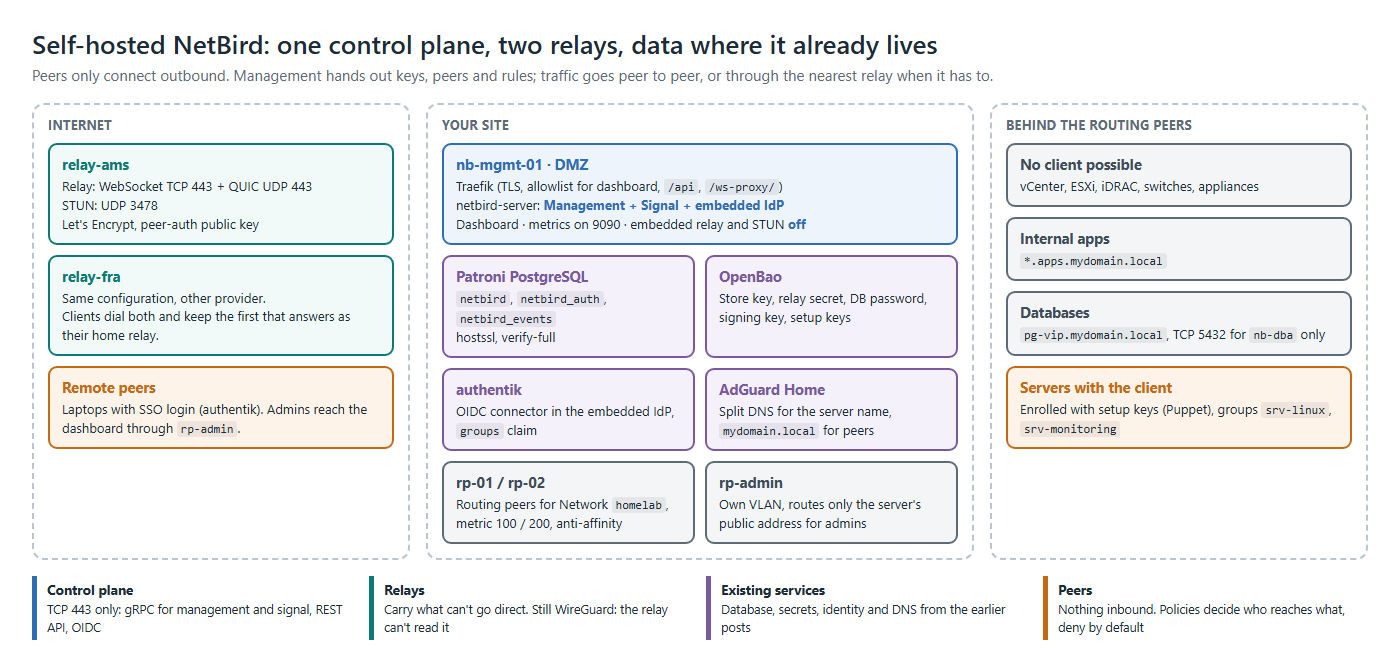
The pieces:
- Management is the brain. It stores accounts, peers, groups, policies, routes, DNS settings and setup keys, and pushes each peer only the part of the network it may see. It also serves the REST API that the dashboard uses.
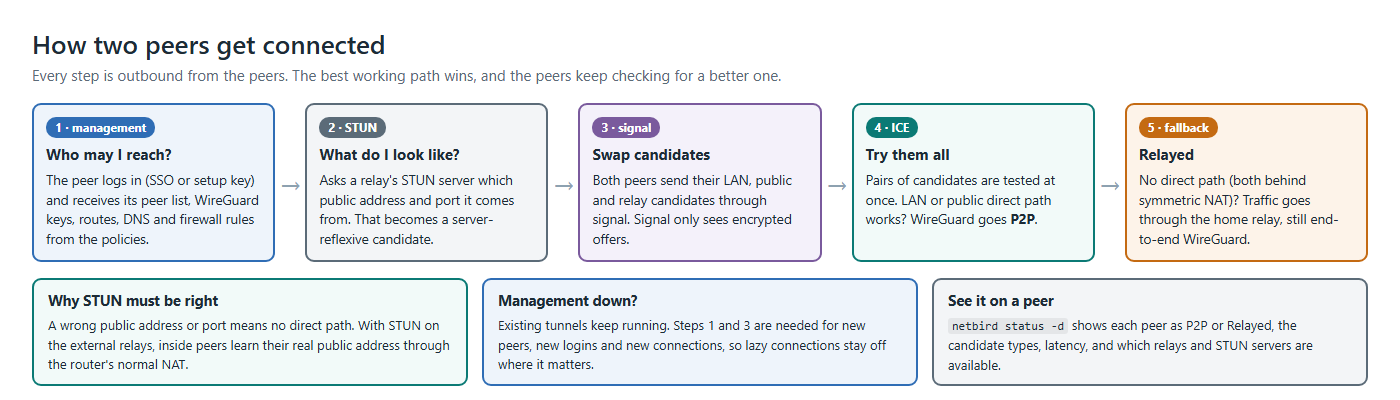
- Signal passes connection offers between peers so they can find each other. It sees encrypted session descriptions, never traffic. In the combined server, signal runs inside the management container.
- Relay carries traffic for peers that can’t reach each other directly (both behind strict NAT, for example). It speaks WebSocket over TCP 443 and QUIC over UDP 443. Relayed traffic is still WireGuard, so the relay can’t read it.
- STUN tells a peer which public address and port it appears to come from. That answer becomes a candidate address for a direct connection.
- The embedded identity provider (Dex inside the server) handles logins. It can hold local users, and it can send users on to an external provider such as authentik.
- The dashboard is a static web app that talks to the management API from the admin’s browser.
- Peers run the
netbirdclient. It creates thewt0WireGuard interface, programs the host firewall from the policies it receives, and sets up DNS.
Two ideas the rest of the guide depends on:
- Direct first, relay as a fallback. Peers try every candidate address they have (LAN, public through STUN, relayed) and keep the best one that works. Most connections end up direct, and the relay only carries what’s left. That’s why STUN must report the right address, which section 13 deals with.
- The control plane isn’t in the data path. Once two peers have a tunnel, traffic flows between them even if management is down. Management matters for changes: new peers, new logins, new policies, new connections.
2. What “highly available” means here
The community edition runs one management/signal instance. Running several replicas of management and signal is a feature of NetBird’s commercial license. This guide doesn’t pretend otherwise. Instead it removes every other single point of failure and makes the one that remains quick to bring back and harmless while it’s away.
| What fails | What users notice | What protects you |
|---|---|---|
| The management VM | Established tunnels keep working. New logins, new peers, policy changes and new peer-to-peer connections wait until it’s back | vSphere HA restarts the VM. All state is in PostgreSQL, so a rebuilt VM picks up where it left off (section 19) |
| One relay | Peers that used it move to the other relay | Two relays in different places (section 7) |
| Both relays | Direct connections keep working, relayed ones drop | Relays on different providers or sites |
| A PostgreSQL node | A few seconds of API errors during the Patroni failover | Patroni and its VIP |
| authentik | No new SSO logins. Peers enrolled with setup keys are unaffected | Local break-glass owner with TOTP (section 10) |
| OpenBao | Nothing at runtime. Secrets are only read when you deploy | Your three-node Raft cluster |
| One routing peer | Traffic to the routed subnets moves to the second routing peer | Two routing peers per Network (section 15) |
Two settings make a management outage hurt less:
- Lazy connections (peers only build a tunnel when traffic needs it) save resources but need signal every time a connection is first set up. If management is down, a lazy peer that wasn’t already connected can’t connect. Leave lazy connections off for groups that must keep working during an outage, such as routing peers and servers.
- Peer login expiration forces users to log in again periodically. That’s good, but a peer whose login expires while authentik or management is down stays disconnected until both are back. Servers enrolled with setup keys don’t expire.
3. Placeholders
| Placeholder | Meaning |
|---|---|
netbird.mydomain.com | Public name of the management server (dashboard, API, signal, OIDC) |
203.0.113.10 | Public address of your site, port-forwarded to the management VM |
nb-mgmt-01 / 10.20.10.10 | Management VM in the DMZ VLAN 10.20.10.0/24 |
relay-ams.mydomain.com / relay-fra.mydomain.com | The two relay VMs, each with its own public address |
pg-vip.mydomain.local | The Patroni VIP (or HAProxy front end) from my Patroni post |
bao.mydomain.local | The OpenBao VIP from my OpenBao post, KV v2 mounted at kv/ |
auth.mydomain.com | authentik |
10.20.0.53 | The AdGuard Home VIP from my AdGuard cluster post |
10.20.90.21, 10.20.90.22 | Admin workstations in the admin VLAN |
rp-01, rp-02 / 10.20.20.11, 10.20.20.12 | Routing peers for the homelab Network |
rp-admin / 10.20.30.11 | A dedicated routing peer that only carries admin traffic to the dashboard |
mydomain.local | Internal DNS zone |
NB_SERVER_TAG, NB_DASHBOARD_TAG, NB_RELAY_TAG | Image versions you pin (section 8) |
Replace them everywhere. Everything in angle brackets, such as <relay-secret>, is a value you generate or look up.
4. Prerequisites, DNS and ports
Virtual machines:
| VM | Size | Where | Notes |
|---|---|---|---|
nb-mgmt-01 | 2 vCPU, 4 GB, 30 GB | DMZ VLAN, behind your site router | Docker and Compose plugin. Official minimum is 1 vCPU and 2 GB |
relay-ams, relay-fra | 1 vCPU, 1 GB each | Two different public providers or sites | Docker and Compose plugin, public IPv4 (IPv6 if you have it) |
rp-01, rp-02 | 2 vCPU, 4 GB each | Inside the network you want to reach, on different ESXi hosts | NetBird client only |
rp-admin | 1 vCPU, 1 GB | Its own VLAN, not the DMZ | NetBird client only, routes nothing but admin access |
On every Docker host:
apt update && apt install -y ca-certificates curl jq gnupg
docker version && docker compose version
timedatectl set-ntp trueCode language: JavaScript (javascript)
Peer authentication (section 12) checks signatures, and certificates have lifetimes, so keep the clocks right.
Public DNS (no proxying through a CDN):
| Type | Name | Content |
|---|---|---|
| A | netbird.mydomain.com | 203.0.113.10 |
| A | relay-ams.mydomain.com | Public address of relay-ams |
| A | relay-fra.mydomain.com | Public address of relay-fra |
Ports:
| Host | Port | From | Purpose |
|---|---|---|---|
nb-mgmt-01 (via the site router) | TCP 443 | Internet | Dashboard, API, management and signal gRPC, OIDC |
nb-mgmt-01 | TCP 80 | Internet (optional) | Only the HTTP-to-HTTPS redirect. Built-in Traefik gets its certificate over 443 (TLS-ALPN-01), but port 80 must be free on the VM |
nb-mgmt-01 | UDP 3478 | none | Not needed: STUN moves to the relays |
nb-mgmt-01 | TCP 9090 | Prometheus only | Metrics (section 18) |
| each relay | TCP 443 and UDP 443 | Internet | Relay over WebSocket and QUIC |
| each relay | UDP 3478 | Internet | STUN |
| each relay | TCP 22 | Your admin addresses only | SSH |
| peers | nothing inbound | Peers only connect outbound |
Two things that are easy to get wrong:
- Open both 443 rules on the relays. With UDP 443 closed, the QUIC attempt quietly times out and WebSocket carries everything. Nothing reports an error.
- Docker-published ports bypass host firewalls such as UFW or firewalld. Filter at the site router or the provider’s firewall in front of each VM, not in the VM.
5. Secrets first: OpenBao
Generate the secrets once, store them in OpenBao, and render them onto each host when you deploy. Nothing secret lives in a file you might commit.
export BAO_ADDR=https://bao.mydomain.local:8200
bao login -method=oidc

bao kv put kv/netbird/server \
  relay_secret="$(openssl rand -base64 32)" \
  store_key="$(openssl rand -base64 32)" \
pg_password="$(openssl rand -base64 33 | tr -d '/+=')"Code language: JavaScript (javascript)| Key | Used by | Why it matters |
|---|---|---|
relay_secret | The management server and every relay | Management uses it to issue relay credentials, and the relays use it to check them. It must be byte-for-byte identical everywhere |
store_key | The management server | Encrypts setup keys, API tokens and other secrets in the database. Lose it and those fields can’t be read |
pg_password | The management server | The netbird database role |
A policy for the deploy role, read-only on this path:
# netbird-deploy.hcl
path "kv/data/netbird/*" {
  capabilities = ["read"]
}Code language: PHP (php)
bao policy write netbird-deploy netbird-deploy.hclCode language: CSS (css)Back up
store_keyoutside the cluster as well, for example in your break-glass envelope with the OpenBao recovery keys. A database restore without it gives you peers and policies, but no usable setup keys or tokens.
6. Databases on Patroni
NetBird uses three databases: the main store (accounts, peers, policies), the auth store of the embedded identity provider, and the activity store (audit events). One role owns all three.
On the Patroni leader (or through the VIP):
PGPW="$(bao kv get -field=pg_password kv/netbird/server)"
psql -h pg-vip.mydomain.local -U postgres <<SQL
CREATE ROLE netbird LOGIN PASSWORD '${PGPW}';
CREATE DATABASE netbird        OWNER netbird;
CREATE DATABASE netbird_auth   OWNER netbird;
CREATE DATABASE netbird_events OWNER netbird;
SQL
unset PGPWCode language: PHP (php)
Allow only the management VM, only over TLS. Patroni owns pg_hba.conf, so change it in the cluster configuration:
patronictl -c /etc/patroni/config.yml edit-configAdd this line to the existing postgresql.pg_hba list. The list replaces the whole file, so keep your other entries:
postgresql:
  pg_hba:
    # ...your existing lines...
    - hostssl netbird,netbird_auth,netbird_events netbird 10.20.10.10/32 scram-sha-256Code language: PHP (php)
Patroni reloads every member. Test from nb-mgmt-01 (apt install -y postgresql-client):
psql "host=pg-vip.mydomain.local dbname=netbird user=netbird sslmode=verify-full sslrootcert=/usr/local/share/ca-certificates/mydomain-ca.crt" -c 'select version();'Code language: JavaScript (javascript)verify-full checks that the server certificate is signed by your CA and that its name matches pg-vip.mydomain.local. If this fails, fix the certificate’s SAN before you go on. NetBird uses the same connection string.
7. Two external relays
The combined server can run its own relay, but then the relay shares a VM and an internet line with the control plane. Two relays elsewhere give you capacity that doesn’t depend on your site, and a second path when one provider has a bad day. Each client dials all relays in parallel and keeps the one that answers first, usually the nearest, as its home relay.
On each relay VM:
mkdir -p /opt/compose/netbird-relay && cd /opt/compose/netbird-relay
umask 077
relay.env for relay-ams (for relay-fra, change the two names):
NB_LOG_LEVEL=info
NB_LISTEN_ADDRESS=:443
NB_EXPOSED_ADDRESS=rels://relay-ams.mydomain.com:443
NB_AUTH_SECRET=<relay-secret>

# TLS from Let's Encrypt, obtained over 443 (TLS-ALPN-01): no port 80 needed
NB_LETSENCRYPT_DOMAINS=relay-ams.mydomain.com
NB_LETSENCRYPT_EMAIL=hostmaster@mydomain.com
NB_LETSENCRYPT_DATA_DIR=/data/letsencrypt

# Embedded STUN
NB_ENABLE_STUN=true
NB_STUN_PORTS=3478Code language: PHP (php)
Take <relay-secret> from bao kv get -field=relay_secret kv/netbird/server and paste it. Don’t retype it: one wrong character gives you a relay that looks healthy and refuses every peer.
docker-compose.yml:
services:
  relay:
    image: netbirdio/relay:${NB_RELAY_TAG}
    container_name: netbird-relay
    restart: unless-stopped
    ports:
      # A bare '443:443' is TCP only. QUIC needs the UDP line.
      - '443:443/tcp'
      - '443:443/udp'
      - '3478:3478/udp'
    env_file:
      - relay.env
    volumes:
      - relay_data:/data
    logging:
      driver: json-file
      options:
        max-size: "100m"
        max-file: "3"

volumes:
  relay_data:Code language: PHP (php)
Pin the version in a .env next to it (pick the current release from the NetBird releases page):
NB_RELAY_TAG=<version>Code language: HTML, XML (xml)Start it and check that all four listeners come up:
chmod 600 relay.env .env
docker compose up -d
docker compose logs relay | grep -E 'available on|WS server|QUIC server|STUN server'Code language: JavaScript (javascript)
You should see the exposed rels:// address, the WebSocket listener, the QUIC listener and STUN on 3478. A missing QUIC line means the relay has no TLS of its own.
The certificate is requested on the first connection, so trigger it:
curl -v https://relay-ams.mydomain.com/ 2>&1 | grep -E 'subject:|issuer:|verify ok'Code language: JavaScript (javascript)A 404 page not found body is expected. What matters is a valid certificate for the relay’s name. If the first try fails with a TLS error, wait a few seconds and try again: that request is what starts issuance.
Changes to
relay.envneeddocker compose up -d, notrestart. A container’s environment is fixed when it’s created.
8. Install the management server
Do this part with the port forward for TCP 443 switched off on your router. Right after the install, the /setup page lets whoever reaches it first create the owner account. You’ll create that account from inside your network (section 10) and only then open the port.
On nb-mgmt-01:
mkdir -p /opt/compose/netbird && cd /opt/compose/netbird
curl -fsSL https://github.com/netbirdio/netbird/releases/latest/download/getting-started.sh -o getting-started.sh
less getting-started.sh      # read what you're about to runCode language: PHP (php)
Run it unattended with the built-in Traefik (option 0), no NetBird Proxy:
export NETBIRD_DOMAIN=netbird.mydomain.com
export NETBIRD_LETSENCRYPT_EMAIL=hostmaster@mydomain.com
export NETBIRD_REVERSE_PROXY_TYPE=0
export NETBIRD_ENABLE_PROXY=false
export NETBIRD_NON_INTERACTIVE=true
bash getting-started.shCode language: JavaScript (javascript)
Stop the server straight away, before anything gets written to the default SQLite store:
docker compose stop netbird-server
ls
# docker-compose.yml  config.yaml  dashboard.env  getting-started.shCode language: CSS (css)
Already run Traefik from my Traefik post on this host? Use option 1 (“Existing Traefik”) with
NETBIRD_TRAEFIK_EXTERNAL_NETWORK,NETBIRD_TRAEFIK_ENTRYPOINTandNETBIRD_TRAEFIK_CERTRESOLVER, and setNETBIRD_TRUSTED_PEERSto the address Traefik reaches NetBird from. Without it, NetBird trusts forwarded client IP headers from any source. The rest of this guide assumes option 0.
Pin the versions. The generated file uses :latest, which means an unplanned upgrade every time something recreates the containers. Put the tags in .env:
umask 077
cat > .env <<'EOF'
NB_SERVER_TAG=<version>
NB_DASHBOARD_TAG=<version>
EOF
sed -i 's#netbirdio/netbird-server:latest#netbirdio/netbird-server:${NB_SERVER_TAG}#; s#netbirdio/dashboard:latest#netbirdio/dashboard:${NB_DASHBOARD_TAG}#' docker-compose.yml
grep -n 'image:' docker-compose.ymlCode language: PHP (php)
The server and the dashboard have their own version numbers. Take each from its own releases page.
9. config.yaml: PostgreSQL, external relays, no secrets
9.1 Secrets into .env
Append the secrets from OpenBao to .env (still mode 600):
cd /opt/compose/netbird
export BAO_ADDR=https://bao.mydomain.local:8200
PGPW="$(bao kv get -field=pg_password kv/netbird/server)"
cat >> .env <<EOF
NB_AUTH_SECRET=$(bao kv get -field=relay_secret kv/netbird/server)
NB_STORE_ENCRYPTION_KEY=$(bao kv get -field=store_key kv/netbird/server)
NB_PG_DSN='host=pg-vip.mydomain.local port=5432 dbname=netbird user=netbird password=${PGPW} sslmode=verify-full sslrootcert=/etc/netbird/pg-ca.pem'
EOF
unset PGPW
chmod 600 .envCode language: PHP (php)
NB_AUTH_SECRET replaces server.authSecret, and NB_STORE_ENCRYPTION_KEY replaces server.store.encryptionKey. Both need v0.83.0 or later: older versions ignore them, and a server without its encryption key generates a new one and can’t read existing data. Check the version you pinned before you remove anything from config.yaml.
9.2 The compose service
Give netbird-server the variables, the CA for PostgreSQL, and a metrics port for Prometheus. Add these keys to the existing service and leave its labels as they are:
  netbird-server:
    # ...image, networks, command and labels as generated...
    environment:
      - NB_AUTH_SECRET=${NB_AUTH_SECRET}
      - NB_STORE_ENCRYPTION_KEY=${NB_STORE_ENCRYPTION_KEY}
      - NETBIRD_STORE_ENGINE_POSTGRES_DSN=${NB_PG_DSN}
    ports:
      # STUN 3478/udp removed: the relays do STUN now
      - '10.20.10.10:9090:9090'
    volumes:
      - netbird_data:/var/lib/netbird
      - ./config.yaml:/etc/netbird/config.yaml:ro
      - /usr/local/share/ca-certificates/mydomain-ca.crt:/etc/netbird/pg-ca.pem:roCode language: PHP (php)
Publishing the metrics port on the DMZ address doesn’t restrict who can reach it. Allow TCP 9090 to 10.20.10.10 only from Prometheus at the router.
9.3 config.yaml
Edit the generated file. Keep the auth section exactly as the script wrote it, because it holds the redirect URIs and issuer. Change or add the rest:
server:
  listenAddress: ":80"
  exposedAddress: "https://netbird.mydomain.com:443"
  metricsPort: 9090
  healthcheckAddress: ":9000"
  logLevel: "info"
  logFile: "console"
  dataDir: "/var/lib/netbird"

  # authSecret: removed, comes from NB_AUTH_SECRET.
  # With relays.secret empty, the external relays use this value.

  # STUN on the relays. Setting relays.addresses switches off the
  # embedded relay AND the embedded STUN, so stuns is required.
  stuns:
    - uri: "stun:relay-ams.mydomain.com:3478"
      proto: "udp"
    - uri: "stun:relay-fra.mydomain.com:3478"
      proto: "udp"
  relays:
    addresses:
      - "rels://relay-ams.mydomain.com:443"
      - "rels://relay-fra.mydomain.com:443"
    credentialsTTL: "12h"

  auth:
    # ...as generated: issuer, dashboardRedirectURIs, cliRedirectURIs...

  store:
    engine: "postgres"
    # dsn from NETBIRD_STORE_ENGINE_POSTGRES_DSN
    # encryptionKey removed, comes from NB_STORE_ENCRYPTION_KEY

  authStore:
    engine: "postgres"
    dsn: "host=pg-vip.mydomain.local port=5432 dbname=netbird_auth user=netbird password=<pg-password> sslmode=verify-full sslrootcert=/etc/netbird/pg-ca.pem"

  activityStore:
    engine: "postgres"
    dsn: "host=pg-vip.mydomain.local port=5432 dbname=netbird_events user=netbird password=<pg-password> sslmode=verify-full sslrootcert=/etc/netbird/pg-ca.pem"

  # Anonymous usage metrics to NetBird: your call
  disableAnonymousMetrics: trueCode language: PHP (php)
The auth and activity stores have no environment variable for their connection strings, so the password is in this file. Protect it:
chmod 600 config.yamlCode language: CSS (css)The store encryption key is what protects the sensitive fields in the database. It’s in .env only, and backed up in OpenBao.
9.4 Start and verify
The environment changed, so recreate the container:
docker compose up -d
docker compose logs netbird-server | grep -E 'Postgres|taken from|Relay:|Relay addresses|Signal:'Code language: JavaScript (javascript)
You want to see:
using Postgres store engineserver.authSecret taken from NB_AUTH_SECRETandserver.store.encryptionKey taken from NB_STORE_ENCRYPTION_KEYRelay: falseandSignal: trueRelay addresses: [rels://relay-ams.mydomain.com:443 rels://relay-fra.mydomain.com:443](logged twice, which is normal)
The tables show up in PostgreSQL:
psql "host=pg-vip.mydomain.local dbname=netbird user=netbird sslmode=verify-full sslrootcert=/usr/local/share/ca-certificates/mydomain-ca.crt" -c '\dt' | headCode language: JavaScript (javascript)And the embedded relay really is off:
curl -s https://netbird.mydomain.com/relay --resolve netbird.mydomain.com:443:10.20.10.10
# Relay service not enabledCode language: PHP (php)
config.yamlis a bind mount. After you change onlyconfig.yaml, usedocker compose restart netbird-server:up -dsees nothing to change and keeps the old configuration. After you change.envordocker-compose.yml, usedocker compose up -d.
10. First owner, authentik and account settings
10.1 The owner account
From an admin workstation inside your network, with netbird.mydomain.com resolving to 10.20.10.10 (section 13 sets that up for good; a hosts entry works for now), open https://netbird.mydomain.com. You land on /setup. Create the owner with a long password. The page disappears once a user exists.
This local owner is your break-glass account for when authentik is down. Turn on TOTP MFA for local users in the dashboard settings and enroll the owner, then put the password and the TOTP seed in the break-glass envelope.
Now open the port forward for TCP 443 on the router.
10.2 authentik as the SSO provider
NetBird’s recommended way is to keep the embedded identity provider and add authentik to it as a connector. Users see an “authentik” button on the login page, and NetBird stores no passwords for them.
In authentik:
- Applications → Providers → Create → OAuth2/OpenID Provider.
- Name:
NetBird - Authorization flow:
default-provider-authorization-explicit-consent - Client type: Confidential
- Redirect URIs: leave empty for now
- Signing key: any certificate, for example the authentik self-signed one
- Under Advanced protocol settings: select the
openid,email,profilescopes and turn on Include claims in id_token
- Note the Client ID and Client Secret.
- Applications → Applications → Create. Name
NetBird, slugnetbird, providerNetBird. - On the application, bind a group policy so only members of
nb-userscan use it. Anyone else is stopped at authentik, before NetBird sees them.
In NetBird: go to Settings → Identity Providers → Add Identity Provider:
| Field | Value |
|---|---|
| Type | Generic OIDC |
| Name | authentik |
| Client ID / Client Secret | From the authentik provider |
| Issuer | https://auth.mydomain.com/application/o/netbird/ |
Copy the Redirect URL NetBird shows, but don’t click Add yet. Back in authentik, edit the provider. Add that URL as a Strict redirect URI, plus a second Strict entry https://netbird.mydomain.com/oauth2/logout/callback so logout returns cleanly. Then go back to NetBird and click Add Provider.
Log out and log back in with the authentik button.
10.3 Group sync
authentik puts the user’s group names in the groups claim. In NetBird, under Settings → Groups:
- Turn on JWT group sync with claim
groups - Set JWT allow groups to
nb-users, as a second check behind the authentik policy
From now on, membership of nb-admins, nb-users or any other group in authentik becomes a NetBird group the next time the user logs in. Policies (section 14) use those groups. Someone who leaves the team in authentik loses their access at the next login.
Promote yourself (your authentik user) to Admin in Users. Day to day, use that account and leave the local owner in the envelope.
10.4 Account settings worth changing
| Setting | Recommendation |
|---|---|
| Peer login expiration | On, for example 7 days. Applies to peers enrolled by a user login, not setup-key peers |
| Peer inactivity expiration | On, so a laptop left in a drawer needs a fresh login |
| Require user approval | On, so a new SSO user can’t do anything until an admin approves them |
| Lazy connections | Off for the groups in section 2 that must survive a management outage |
| Default “All” policy | Delete it in section 14. It lets every peer reach every other peer |
11. Keep the dashboard and API private
The quickstart publishes everything on 443. Clients need management gRPC, signal gRPC, /oauth2 and (with an embedded relay) /relay from anywhere. The dashboard, /api, /ws-proxy/ (browser SSH, RDP and VNC) and /management.ProxyService/ are for admins only.
All of those run in one process on one port, so no port firewall can separate them. Traefik sees each request’s path and source address before NetBird does, so the split happens in Traefik.
11.1 A file provider for Traefik
In docker-compose.yml, add to the traefik service’s command:
      - "--providers.file.directory=/etc/traefik/dynamic"
      - "--providers.file.watch=true"Code language: JavaScript (javascript)
and to its volumes:
- ./traefik-dynamic:/etc/traefik/dynamic:roCode language: JavaScript (javascript)11.2 The routers
traefik-dynamic/private-admin.yml:
http:
  middlewares:
    admin-only:
      ipAllowList:
        # Exact admin addresses, never whole subnets (see below)
        sourceRange: ["10.20.90.21/32", "10.20.90.22/32", "10.20.30.11/32"]
    deny-all:
      ipAllowList:
        sourceRange: ["192.0.2.1/32"]

  routers:
    private-api:
      rule: Host(`netbird.mydomain.com`) && (PathPrefix(`/api`) || PathPrefix(`/ws-proxy/`))
      entryPoints: [websecure]
      priority: 200
      middlewares: [admin-only]
      service: netbird-server@docker
      tls: {certResolver: letsencrypt}

    private-proxy-service:
      rule: Host(`netbird.mydomain.com`) && PathPrefix(`/management.ProxyService/`)
      entryPoints: [websecure]
      priority: 200
      middlewares: [admin-only]
      service: netbird-server-h2c@docker
      tls: {certResolver: letsencrypt}

    private-dashboard:
      rule: Host(`netbird.mydomain.com`)
      entryPoints: [websecure]
      priority: 50
      middlewares: [admin-only]
      service: dashboard@docker
      tls: {certResolver: letsencrypt}

    relay-exact-only:
      rule: Host(`netbird.mydomain.com`) && PathPrefix(`/relay`) && !Path(`/relay`)
      entryPoints: [websecure]
      priority: 260
      middlewares: [deny-all]
      service: netbird-server@docker
      tls: {certResolver: letsencrypt}Code language: PHP (php)
How the priorities fit together:
| Router | Priority | Job |
|---|---|---|
relay-exact-only | 260 | Blocks encoded side paths such as /relay%2F..%2Fapi before they reach the API handler |
private-api, private-proxy-service | 200 | Above the quickstart’s NetBird routers (100), so admin paths go through the allowlist |
| The quickstart’s gRPC and backend routers | 100 | Management, signal and /oauth2 stay public |
private-dashboard | 50 | Above the quickstart’s dashboard catch-all (1) |
deny-all allows only a documentation address that never reaches you, so every request it guards gets a 403. The service name in private-dashboard must match the dashboard’s traefik.http.services.<name> label in your docker-compose.yml. With a wrong name, Traefik skips the router and the dashboard stays public.
Apply it:
docker compose up -d traefik11.3 Who goes on the allowlist
Everyone on the allowlist reaches the dashboard and the API (which still ask for a login). So:
- Exact addresses only. Never a subnet that NetBird routes into, never the address of a routing peer that routes anything else, and never an address many devices share, such as an office NAT address. A routing peer with masquerade replaces the source of everyone it carries with its own address, and Traefik would treat all of them as admins.
10.20.30.11isrp-admin, a routing peer that only exists for admin access. Section 13.3 explains it.
11.4 Verify
From somewhere on the internet (a phone hotspot works):
curl -s -o /dev/null -w '%{http_code}\n' https://netbird.mydomain.com/
curl -s -o /dev/null -w '%{http_code}\n' https://netbird.mydomain.com/api/users
curl -s -o /dev/null -w '%{http_code}\n' https://netbird.mydomain.com/oauth2/.well-known/openid-configurationCode language: JavaScript (javascript)
Expect 403, 403, 200. From an admin workstation, expect 200, 401, 200 (the API wants a token). Then check that a client outside your network still connects (netbird status shows Management and Signal Connected) and that SSO login still works.
Repeat these three checks after every upgrade. A regenerated
docker-compose.ymlor a renamed service quietly reopens the dashboard.
12. Peer authentication for signal and relay
Without peer authentication, a relay admits anyone holding a valid relay credential, and signal accepts any peer that claims a public key. With it, management signs a token for each peer with an Ed25519 key. The token is bound to the peer’s WireGuard key and its authentication key. Signal and the relays check the signature, and check that the peer can prove it holds that key.
It needs v1.0.0 or later on management, signal, relay and clients, and it’s backward compatible: older clients keep working until you decide to refuse them.
With external relays, the order matters. As soon as management has a signing key, upgraded clients present signed tokens, and a relay that doesn’t know the public key refuses them.
12.1 Generate the key and get its public half
On nb-mgmt-01:
cd /opt/compose/netbird
umask 077
openssl genpkey -algorithm ed25519 -out peer_auth_signing.pem
openssl pkey -in peer_auth_signing.pem -pubout -outform DER | tail -c 32 | base64
# e.g. 3x1q...=   <- the public key for the relaysCode language: PHP (php)
Keep a copy in OpenBao:
bao kv put kv/netbird/peer-auth signing_key=@peer_auth_signing.pem public_key="<public-key>"Code language: HTML, XML (xml)12.2 Give the public key to both relays
On each relay, add to relay.env:
NB_PEER_AUTH_PUBLIC_KEYS=<public-key>
NB_PEER_AUTH_HOSTNAMES=relay-ams.mydomain.comCode language: HTML, XML (xml)
NB_PEER_AUTH_HOSTNAMES makes the relay refuse proofs made for any other name, so a proof captured on one relay can’t be replayed on the other. Use each relay’s own name.
docker compose up -d
docker compose logs relay | grep 'peer auth'
# peer auth tokens verified with Management Ed25519 key ids [...]Code language: PHP (php)
Nothing changes for peers yet. Don’t continue until both relays log that line.
12.3 Give the signing key to management
docker compose cp peer_auth_signing.pem netbird-server:/var/lib/netbird/peer_auth_signing.pem
shred -u peer_auth_signing.pemCode language: JavaScript (javascript)
In config.yaml:
server:
  peerAuth:
    signingKeyFile: "/var/lib/netbird/peer_auth_signing.pem"
    hostnames: ["netbird.mydomain.com"]Code language: JavaScript (javascript)
docker compose restart netbird-server
docker compose logs netbird-server | grep 'peer auth signing key'Code language: JavaScript (javascript)The key ID and public key in the log must match what the relays logged. If the file can’t be read, management doesn’t start.
12.4 Refuse unauthenticated peers (later)
Only once every client is on v1.0.0 or later:
- On each relay: add
NB_PEER_AUTH_REQUIRED=trueand removeNB_AUTH_SECRET. A relay runs with one or the other, never both and never neither. - On management: set
server.peerAuth.required: truefor the built-in signal.
Clients that don’t authenticate then lose relay and signal. Check netbird version across your fleet first. The dashboard’s peer list shows each peer’s client version.
Rotating the key without downtime: add the new public key next to the old one on the relays (NB_PEER_AUTH_PUBLIC_KEYS=OLD=,NEW=), swap the file on management, wait one credentials TTL (12 hours here), then remove the old key from the relays.
13. Peers inside your own network
13.1 The problem
Peers on the same network as the server send their traffic to 203.0.113.10, which only works if the router turns it around (hairpin NAT). Hairpinned traffic also reaches Traefik with a source address that isn’t the admin’s own, so the allowlist from section 11 fails.
Because STUN now runs on the external relays, inside peers already learn the right public address from STUN, through the router’s normal outbound NAT. That leaves only management, signal and the dashboard to sort out, and split DNS handles them.
13.2 Split DNS in AdGuard Home
Inside your network, answer netbird.mydomain.com with the server’s private address. In AdGuard Home (Filters → DNS rewrites, on both cluster nodes or through your sync):
| Domain | Answer |
|---|---|
netbird.mydomain.com | 10.20.10.10 |
The certificate is for the name, not the address, so it stays valid. Inside peers now reach management directly, Traefik sees their real addresses, and peers on the LAN connect to each other directly over the LAN.
Don’t serve this answer to remote peers through NetBird. If the nameserver group in section 16 sent
netbird.mydomain.comto AdGuard, a remote client could cache10.20.10.10for its own management server. That address is only reachable through the tunnel the client is trying to build, so the client stays disconnected until it’s restarted. Section 16 scopes NetBird DNS tomydomain.localonly.
13.3 Remote admins: a dedicated route through rp-admin
An admin at home resolves netbird.mydomain.com to the public address and gets the 403 they should. Give admins a route for the server’s public address through rp-admin, a routing peer in its own VLAN that carries nothing else:
- In NetBird, create a Network
admin-planewith resource203.0.113.10/32, routing peerrp-admin, masquerade on. - Add a policy: source group
nb-admins, destination resource203.0.113.10/32, TCP 443 only.
Admin browser traffic to 203.0.113.10:443 now goes through the tunnel to rp-admin. rp-admin sends it to the public address, and the router has to send it straight to the DMZ, only for this one source. On a MikroTik:
/ip firewall nat
add chain=dstnat src-address=10.20.30.11 dst-address=203.0.113.10 protocol=tcp dst-port=443 \
    action=dst-nat to-addresses=10.20.10.10 comment="NetBird admin path via rp-admin"Code language: JavaScript (javascript)
Move it above your other dstnat rules. rp-admin (10.20.30.0/24) and the server (10.20.10.0/24) are in different VLANs, so replies go back through the router and no source NAT is needed. Traefik sees 10.20.30.11, which is on the allowlist.
The admin’s NetBird client keeps its own management, signal and relay connections on the public path. The route only carries the browser. With NetBird down, the admin gets 403 again, which is what you want.
If your router can’t do a source-limited
dstnat, putrp-adminon a separate public IP and allowlist that instead. Don’t hairpin every inside client to make this work.
14. Groups, policies and posture checks
14.1 Groups
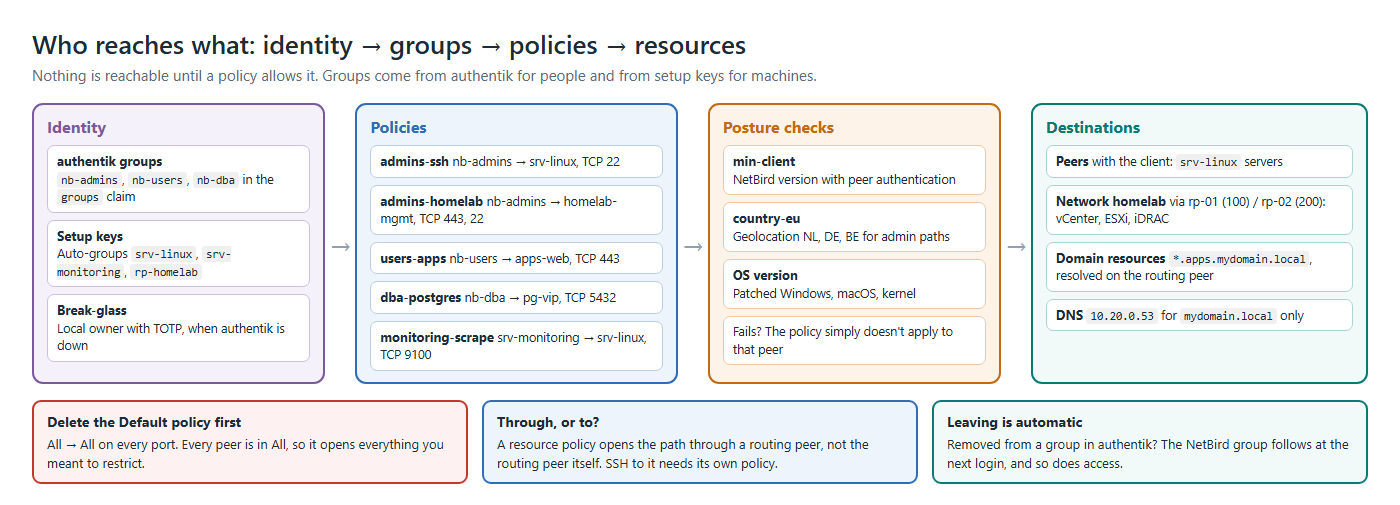
Two kinds of group:
| Group | Comes from | Members |
|---|---|---|
nb-admins, nb-users, nb-dba | authentik through JWT group sync | People. Their peers join the group when they log in |
srv-linux, srv-monitoring, rp-homelab, rp-admin | Auto-groups on setup keys (section 17) | Servers and routing peers |
Peers are always in the built-in All group, which is why the default policy is so dangerous.
14.2 Policies
Start by deleting the Default policy (All to All, everything). Then add exactly what’s needed:
| Policy | Source | Destination | Protocol / ports | Posture checks |
|---|---|---|---|---|
admins-ssh | nb-admins | srv-linux | TCP 22 | min-client, country-eu |
admins-homelab | nb-admins | Resource group homelab-mgmt (vCenter, ESXi, iDRAC) | TCP 443, 22 | min-client, country-eu |
users-apps | nb-users | Resource group apps-web | TCP 443 | min-client |
dba-postgres | nb-dba | Resource pg-vip | TCP 5432 | min-client |
monitoring-scrape | srv-monitoring | srv-linux | TCP 9100 | none |
dns-internal | All | Resource 10.20.0.53/32 | UDP 53, TCP 53 | none |
admins-dashboard | nb-admins | Resource 203.0.113.10/32 | TCP 443 | min-client |
Rules of thumb:
- Specific ports, never “All”. Policies are stateful, so return traffic needs no rule of its own.
- Prefer
/32resources over whole subnets. One policy then opens one host. - A policy to a resource behind a routing peer opens the path through that peer, not the peer itself. SSH to the routing peer needs its own peer-to-peer policy with the routing peer’s group as destination.
- Policies can be one-directional.
monitoring-scrapelets Prometheus reach the exporters, not the other way round.
14.3 Posture checks
A posture check is a condition the peer must meet before a policy applies to it. If a check fails, the policy is silently not applied to that peer, as if it didn’t exist.
| Check | Example | Why |
|---|---|---|
| NetBird version | min-client: at least the version that supports peer authentication | Old clients can’t do peer auth, and miss fixes |
| OS version | Windows 11, macOS 14, Linux kernel 6.1 or later | Keeps unpatched systems off sensitive resources |
| Geolocation | country-eu: allow NL, DE, BE | A stolen laptop logging in from elsewhere doesn’t get admin paths. Needs the GeoLite database, so leave disableGeoliteUpdate at false |
| Peer network range | Block when the peer’s local network is a known guest Wi-Fi range | Optional |
| Process | Require your EDR agent’s process to be running | Optional, per platform |
Attach the checks to the policy, not the group. Then the same admin can still reach the low-risk apps from a hotel while the infrastructure paths stay closed.
15. Networks: routing peers in pairs
Most things in a homelab can’t run a NetBird client: ESXi, iDRAC, switches, printers, appliances. A Network maps part of your infrastructure into NetBird. Resources are the destinations, routing peers carry the traffic, and policies decide who gets through.
15.1 The Network
Create Network homelab with these resources:
| Resource | Type | Resource group |
|---|---|---|
vcenter.mydomain.local | Domain | homelab-mgmt |
10.20.0.21/32 … 10.20.0.24/32 (ESXi) | IP | homelab-mgmt |
10.20.1.0/27 (iDRAC) | Range | homelab-mgmt |
*.apps.mydomain.local | Wildcard domain | apps-web |
pg-vip.mydomain.local | Domain | pg-vip |
10.20.0.53/32 | IP | (for dns-internal) |
Domain resources are resolved on the routing peer, so the routing peer must be able to resolve mydomain.local. It can if it uses AdGuard as its resolver. A wildcard such as *.apps.mydomain.local matches subdomains only, not apps.mydomain.local itself.
15.2 Two routing peers
Enroll rp-01 and rp-02 with a setup key that puts them in rp-homelab (section 17). Then add them to the Network individually:
| Routing peer | Metric | Role |
|---|---|---|
rp-01 | 100 | Primary (lowest metric wins) |
rp-02 | 200 | Secondary, takes over when rp-01 disappears |
If you added them as a group instead, they’d share one metric and still fail over, but neither would be the primary. Clients would pick by connection type and latency. Both work. Individual metrics are easier to reason about.
Keep the pair in different failure domains. In vSphere, give them a VM anti-affinity rule so they never end up on the same ESXi host:
New-DrsRule -Cluster (Get-Cluster "Cluster-01") -Name "netbird-routing-peers-apart" `
  -KeepTogether:$false -VM (Get-VM rp-01, rp-02)Code language: PHP (php)
Masquerade stays on, the default. The routing peer rewrites the source to its own LAN address, so the destinations need no return route. That also makes failover just work: the destination always answers whichever routing peer sent the packet.
15.3 Routing peer hosts
The client handles IP forwarding and its own nftables rules. On the host itself:
apt install -y netbird          # repository: section 17
netbird up --management-url https://netbird.mydomain.com \
  --setup-key-file /root/nb-setup.key --hostname rp-01
netbird status -dCode language: PHP (php)
Turn on the Routing Peer Disconnected notification in the dashboard, so you hear about it when one drops instead of finding out from users.
16. Internal DNS through NetBird
Remote peers need to resolve vcenter.mydomain.local and friends. Use a nameserver group:
| Field | Value |
|---|---|
| Nameserver | 10.20.0.53, UDP, port 53 |
| Match domains | mydomain.local only |
| Distribution groups | All (the dns-internal policy lets peers reach it) |
| Primary | Off: everything else keeps using the peer’s own resolver |
Keep it match-domain only. Peers then send mydomain.local queries to AdGuard through the routing peers, and everything else (including netbird.mydomain.com, see section 13.2) to their normal resolver.
10.20.0.53 is a resource in the homelab Network, so the queries travel through rp-01 or rp-02. Queries reach AdGuard from the routing peer’s address. Per-client statistics in AdGuard will show the routing peers, not the laptops.
Check from a remote peer:
netbird status -d | grep -A3 -i nameserver
resolvectl query vcenter.mydomain.local     # LinuxCode language: PHP (php)
17. Enrolling servers: setup keys and Puppet
People log in with SSO. Servers use setup keys: no browser, no login expiration.
17.1 Setup keys
Create one key per role under Setup Keys:
| Key | Auto-assigned group | Type | Expiry | Usage limit |
|---|---|---|---|---|
srv-linux | srv-linux | Reusable | 30 days | Unlimited, rotate monthly |
rp-homelab | rp-homelab | One-off | 7 days | 1 per routing peer |
rp-admin | rp-admin | One-off | 1 day | 1 |
ci-ephemeral | ci-runners | Reusable, ephemeral | 30 days | Unlimited |
Ephemeral peers are removed automatically once they’ve been offline for a while, which is right for CI runners and containers. The setup key only matters at enrollment. Once a peer is registered, expiring or revoking the key doesn’t disconnect it.
Store the keys in OpenBao:
bao kv put kv/netbird/setup-keys/srv-linux key="<setup-key>"Code language: HTML, XML (xml)17.2 By hand
apt-get install -y ca-certificates curl gnupg
curl -sSL https://pkgs.netbird.io/debian/public.key \
  | gpg --dearmor --output /usr/share/keyrings/netbird-archive-keyring.gpg
echo 'deb [signed-by=/usr/share/keyrings/netbird-archive-keyring.gpg] https://pkgs.netbird.io/debian stable main' \
  > /etc/apt/sources.list.d/netbird.list
apt-get update && apt-get install -y netbird

install -m 600 /dev/null /root/nb-setup.key
bao kv get -field=key kv/netbird/setup-keys/srv-linux > /root/nb-setup.key

netbird up --management-url https://netbird.mydomain.com \
  --setup-key-file /root/nb-setup.key --hostname "$(hostname -s)"
shred -u /root/nb-setup.key
netbird status -dCode language: PHP (php)
--setup-key-file keeps the key out of the process list and your shell history.
Useful netbird up flags for servers:
| Flag | When |
|---|---|
--block-inbound | A peer that only reaches out, never accepts: laptops of contractors, CI runners. Overrides policies |
--block-lan-access | A routing peer or exit node that mustn’t let users into its own LAN |
--disable-server-routes | A peer that must never act as a router, whatever someone adds in the dashboard |
--extra-dns-labels | Extra DNS names for the peer, such as --extra-dns-labels pg,db |
--wireguard-port | A fixed WireGuard port, useful behind a firewall with a static forward |
Health check for scripts and monitoring: netbird status --check ready exits 0 when the peer is ready and 1 when it isn’t.
17.3 With Puppet
A profile for the Puppet setup from my Puppet post, using puppetlabs-apt:
# site-modules/profile/manifests/netbird.pp
class profile::netbird (
  Sensitive[String[1]] $setup_key,
  String[1]            $management_url = 'https://netbird.mydomain.com',
  Array[String]        $extra_flags    = [],
) {
  apt::source { 'netbird':
    location => 'https://pkgs.netbird.io/debian',
    release  => 'stable',
    repos    => 'main',
    key      => {
      'name'   => 'netbird-archive-keyring.asc',
      'source' => 'https://pkgs.netbird.io/debian/public.key',
    },
  }

  package { 'netbird':
    ensure  => installed,
    require => Class['apt::update'],
  }

  service { 'netbird':
    ensure  => running,
    enable  => true,
    require => Package['netbird'],
  }

  file { '/root/.nb-setup.key':
    ensure    => file,
    mode      => '0600',
    content   => $setup_key,
    show_diff => false,
  }

  $flags = join($extra_flags, ' ')
  exec { 'netbird-enroll':
    command => "/usr/bin/netbird up --management-url ${management_url} --setup-key-file /root/.nb-setup.key --hostname ${facts['networking']['hostname']} ${flags}",
    unless  => '/usr/bin/netbird status --check ready',
    require => [Service['netbird'], File['/root/.nb-setup.key']],
  }
}
In Hiera, with the key encrypted (eyaml) or looked up from OpenBao:
profile::netbird::setup_key: >
  ENC[PKCS7,...]
lookup_options:
  profile::netbird::setup_key:
    convert_to: SensitiveCode language: CSS (css)
Ordinary servers get profile::netbird::extra_flags: ['--disable-server-routes'], so they can never become a router by accident. Routing peers keep the default (empty) and get the rp-homelab key.
18. Monitoring
The management server exposes Prometheus metrics on port 9090 (published on 10.20.10.10:9090 in section 9.2).
/etc/prometheus/scrape.d/netbird.yml:
scrape_configs:
  - job_name: netbird-management
    static_configs:
      - targets: ['10.20.10.10:9090']
        labels:
instance: nb-mgmt-01Code language: CSS (css)/etc/prometheus/rules/netbird.yml:
groups:
  - name: netbird
    rules:
      - alert: NetBirdManagementDown
        expr: up{job="netbird-management"} == 0
        for: 3m
        labels:
          severity: critical
        annotations:
          summary: "NetBird management on {{ $labels.instance }} is not answering"
          description: "Existing tunnels keep working; new logins, peers, policy changes and new connections do not."Code language: JavaScript (javascript)
Check and reload:
docker run --rm -v /etc/prometheus:/etc/prometheus:ro --entrypoint promtool \
  quay.io/prometheus/prometheus:v3.13.5 check config /etc/prometheus/prometheus.yml
docker run --rm -v /etc/prometheus:/etc/prometheus:ro --entrypoint promtool \
  quay.io/prometheus/prometheus:v3.13.5 check rules /etc/prometheus/rules/netbird.yml
cd /opt/compose/monitoring && docker compose kill -s SIGHUP prometheusCode language: JavaScript (javascript)
Browse http://10.20.10.10:9090/metrics once to see what your version exposes before you build Grafana panels on it.
The relays live on the internet, with no path from Prometheus. Enroll each relay VM as a NetBird peer in srv-linux (setup key, --disable-server-routes) and you can reach them over the overlay, for node_exporter and for the relay’s own metrics.
Also useful:
- Activity log in the dashboard: every login, policy change, setup-key use and peer approval. It lives in
netbird_eventsin PostgreSQL. - Notifications: turn on Routing Peer Disconnected, and new-user events if you use user approval.
- A synthetic check: a peer in
srv-monitoringrunningnetbird status --check readyfrom a timer, alerting when it fails.
19. Backups and a restore test
What makes up a NetBird deployment here:
| Item | Where | How it’s backed up |
|---|---|---|
netbird, netbird_auth, netbird_events | Patroni | pg_dump below, plus your normal Patroni backups |
docker-compose.yml, config.yaml, dashboard.env, traefik-dynamic/ | /opt/compose/netbird | Script below |
.env (store key, relay secret, DSN) | /opt/compose/netbird and OpenBao | OpenBao is the source of truth. The script copies .env too |
netbird_data volume (peer-auth signing key and state) | Docker volume | Script below. The signing key is also in OpenBao |
| Traefik certificates | Docker volume | Not needed: Traefik requests new ones |
| Relay configuration | Each relay | Two files per relay. Rebuild from this guide and OpenBao |
/usr/local/sbin/netbird-backup:
#!/bin/bash
set -euo pipefail
umask 077
STAMP="$(date +%F)"
BASE=/var/backups/netbird
DIR="${BASE}/${STAMP}"
mkdir -p "${DIR}"

cd /opt/compose/netbird
cp -a docker-compose.yml config.yaml dashboard.env .env traefik-dynamic "${DIR}/"
docker compose cp -a netbird-server:/var/lib/netbird/ "${DIR}/netbird_data/"

for db in netbird netbird_auth netbird_events; do
  PGPASSFILE=/root/.pgpass pg_dump \
    "host=pg-vip.mydomain.local dbname=${db} user=netbird sslmode=verify-full sslrootcert=/usr/local/share/ca-certificates/mydomain-ca.crt" \
    -Fc -f "${DIR}/${db}.dump"
done

tar -C "${BASE}" -czf "${BASE}/netbird-${STAMP}.tar.gz" "${STAMP}"
rm -rf "${DIR}"
find "${BASE}" -name 'netbird-*.tar.gz' -mtime +14 -deleteCode language: PHP (php)
pg_dump must be at least the server’s major version, so install postgresql-client-17 on Debian 13. /root/.pgpass (mode 600) holds pg-vip.mydomain.local:5432:*:netbird:<pg-password>.
A timer:
# /etc/systemd/system/netbird-backup.service
[Unit]
Description=NetBird configuration and database backup
After=docker.service

[Service]
Type=oneshot
ExecStart=/usr/local/sbin/netbird-backupCode language: PHP (php)
# /etc/systemd/system/netbird-backup.timer
[Unit]
Description=Nightly NetBird backup
[Timer]
OnCalendar=*-*-* 02:30:00
RandomizedDelaySec=15m
Persistent=true
[Install]
WantedBy=timers.targetCode language: PHP (php)chmod 700 /usr/local/sbin/netbird-backup
systemctl daemon-reload && systemctl enable --now netbird-backup.timer
systemctl start netbird-backup.service && ls -l /var/backups/netbird/Code language: JavaScript (javascript)Ship the archives off the VM: they contain every secret on the server.
The restore test (do it once, on a scratch VM, before you need it):
- Build a VM from section 8, and stop
netbird-serverafter the script. - Restore the three databases into empty scratch databases on a test PostgreSQL with
pg_restore -d <db> <db>.dump. - Put back
config.yaml,.envanddocker-compose.ymlwith the DSNs pointing at the scratch databases, and copynetbird_databack withdocker compose cp. - Start it with
--resolveor a hosts entry pointing at the scratch VM, and log in as the break-glass owner. - Check that peers, groups, policies and setup keys are all there. If the setup keys show as unreadable, your encryption key doesn’t match. Better to find that out now.
20. Upgrades
NetBird releases often. Read the release notes before every upgrade: breaking changes and required intermediate versions are listed there.
Order:
- Back up (section 19).
- Relays first, one at a time. Change
NB_RELAY_TAG, thendocker compose pull && docker compose up -d, and check the four startup lines. Clients move to the other relay while one restarts. - Management server: change
NB_SERVER_TAG(andNB_DASHBOARD_TAGwhen the dashboard has a new release), thendocker compose pull && docker compose up -d. Existing tunnels keep running during the restart. - Verify: the log lines from section 9.4, the three
curlchecks from section 11.4,netbird status -don a peer inside and outside your network. - Clients:
apt-get install --only-upgrade netbirdthrough your normal patching (or Puppet withensure => lateston a schedule you control). Routing peers one at a time.
With peer authentication on, never let a relay fall behind management in a way that drops the public-key support. Relays before management is the safe habit.
Traefik in the generated compose file is pinned to a version. Update it on its own schedule, and repeat the section 11.4 checks afterwards.
21. Troubleshooting
| Symptom | Likely cause | Fix |
|---|---|---|
netbird status -d: relay Unavailable, relay logs invalid signature | NB_AUTH_SECRET on the relay differs from management’s | Paste the value from OpenBao on both sides, docker compose up -d on the relay |
One of two relays never appears in netbird status -d | Peers only list relays they use. A broken one is just missing | Check that relay’s own log for handshake errors |
Relay always Available via ws, never quic | UDP 443 closed at the provider firewall, or the relay has no TLS of its own | Open UDP 443. Check for the QUIC line at startup |
| Relays refuse every peer right after you set the signing key | Relays didn’t have NB_PEER_AUTH_PUBLIC_KEYS yet (bound token presented but no Management public key is configured) | Add the key to the relays, or remove peerAuth from management until they have it |
Every peer refused after NB_PEER_AUTH_HOSTNAMES | The name doesn’t match what clients dial | List the relay’s exact public name. Check the startup warning |
x509: certificate signed by unknown authority on a relay | Relay uses a private-CA certificate that some devices don’t trust | Use Let’s Encrypt on the relays, or distribute the CA to every device |
| Server starts but setup keys and tokens are unreadable | store_key changed or missing (NB_STORE_ENCRYPTION_KEY empty, version below v0.83.0) | Put back the original key from OpenBao. Never generate a new one |
using Postgres store engine missing, store.db appears in the volume | DSN variable not reaching the container | docker compose config netbird-server to see the environment. Recreate with up -d |
PostgreSQL connection fails with certificate verify failed | CA not mounted, or server certificate lacks pg-vip.mydomain.local in its SAN | Check the mount and the certificate |
| Dashboard reachable from the internet after an upgrade | Service name in private-dashboard no longer matches the label | Fix the service: line. Rerun section 11.4 |
| Admin gets 403 from home with NetBird up | admins-dashboard policy missing, rp-admin down, or the MikroTik rule isn’t first in dstnat | Check the route in netbird status -d, then docker compose logs traefik for the source address |
| authentik login: “Invalid redirect URI” | Redirect URL in authentik differs from what NetBird shows | Copy it again exactly, Strict match |
| Users log in but have no access | Groups not synced: groups claim missing from the ID token | Turn on “Include claims in id_token” in authentik. Check JWT group sync and the claim name |
| A peer doesn’t get a route or resource | No policy allows any of its groups to reach that resource | Resources aren’t in All: add a policy |
| Policy exists but a laptop still can’t connect | A posture check fails on that peer | Check the peer’s details in the dashboard: OS, version, location |
| Remote client stuck “Management: Disconnected” after a DNS change | It cached the private address of its own server | Keep netbird.mydomain.com out of NetBird DNS. netbird down && netbird up |
| LAN peers relayed to each other | Split DNS missing, or the router blocks traffic between those VLANs | Section 13.2. Allow UDP between the peer VLANs, or accept the relay |
The first tool is always:
netbird status -dIt shows management, signal, every relay and STUN server, and for each peer whether the connection is P2P or Relayed, with the candidate types and latency. netbird debug bundle collects everything for a deeper look. Read it before you share it: it contains your network details.
22. Checklist
Before going live
- ☐ Secrets in OpenBao:
relay_secret,store_key,pg_password, peer-auth signing key, setup keys - ☐
store_keyalso in the break-glass envelope - ☐ Three databases on Patroni,
hostsslwithscram-sha-256from10.20.10.10only - ☐
sslmode=verify-fullworks fromnb-mgmt-01 - ☐ Two relays, each logging WebSocket, QUIC and STUN, with a valid certificate
- ☐ Provider firewalls: TCP 443, UDP 443, UDP 3478 open. SSH from admin addresses only
- ☐ Management installed with the port forward off, image versions pinned in
.env - ☐
config.yaml: PostgreSQL for store, auth store and activity store, external relays and STUN, noauthSecretorencryptionKey, mode 600 - ☐ Logs show the Postgres store, secrets taken from the environment,
Relay: false, both relay addresses - ☐ Break-glass owner created from inside, TOTP on, stored in the envelope
- ☐ authentik connected, group sync with
groups, allow groupnb-users, application bound tonb-users - ☐ Port forward for TCP 443 opened after the owner exists
- ☐ Dashboard,
/api,/ws-proxy/return 403 from the internet;/oauth2returns 200 - ☐ Relays have the peer-auth public key and hostname, then management has the signing key
Access
- ☐ Default policy deleted
- ☐ Policies with specific ports, posture checks on admin paths
- ☐ Network
homelabwith two routing peers, metrics 100 and 200, anti-affinity rule in vSphere - ☐ Nameserver group for
mydomain.localonly, policy for DNS to10.20.0.53 - ☐ Split DNS for
netbird.mydomain.cominside, and not through NetBird - ☐
rp-adminroute and the source-limited MikroTik rule for remote admins - ☐ Login expiration on for user peers, lazy connections off for servers and routing peers
Operations
- ☐ Prometheus scrapes management, alert on
up == 0 - ☐ Routing Peer Disconnected notification on
- ☐ Nightly backup timer, archives copied off the VM
- ☐ Restore test done once on a scratch VM, setup keys readable after restore
- ☐ Upgrade order written down: backup, relays, management, verify, clients
- ☐ After every upgrade: section 9.4 log lines and section 11.4
curlchecks - ☐ Once every client is on v1.0.0 or later: peer authentication required